module
15
A directory entry says a file is in "blocks 2, 3, 4 ...". The disc has no block 2: it has tracks and sectors. This section is the bridge between the two - the last piece needed before edisc.py can read a whole file.
If the directory recorded every sector a file used, a 16K file would need 32 sector addresses - and a directory entry only has 16 bytes for addresses. So the Einstein counts space in bigger pieces: blocks of 2K, four sectors each. Eight blocks fill an entry's sixteen bytes, and eight 2K blocks are 16K - the most one entry holds.
The cost is that space is handed out a whole block at a time. FIRST.DSK's HELLO.TXT is 35 bytes of text, and it takes up 2K of the disc: DIR says 2k Size. A file of 2,049 bytes takes 4K.
Blocks are counted through the file space as one long row of sectors, starting at track 2, sector 0 and carrying on from the end of each track to the start of the next. Number those sectors 0, 1, 2 ... - call it the logical sector - and block n is logical sectors 4n to 4n + 3.
To turn a logical sector into a real one: ten sectors to a track, and the file space starts at track 2, so
track  = logical // 10 + 2
sector = logical % 10
S4's // and % - "how many whole tracks, and how many sectors over".
Two blocks are worth looking at closely.
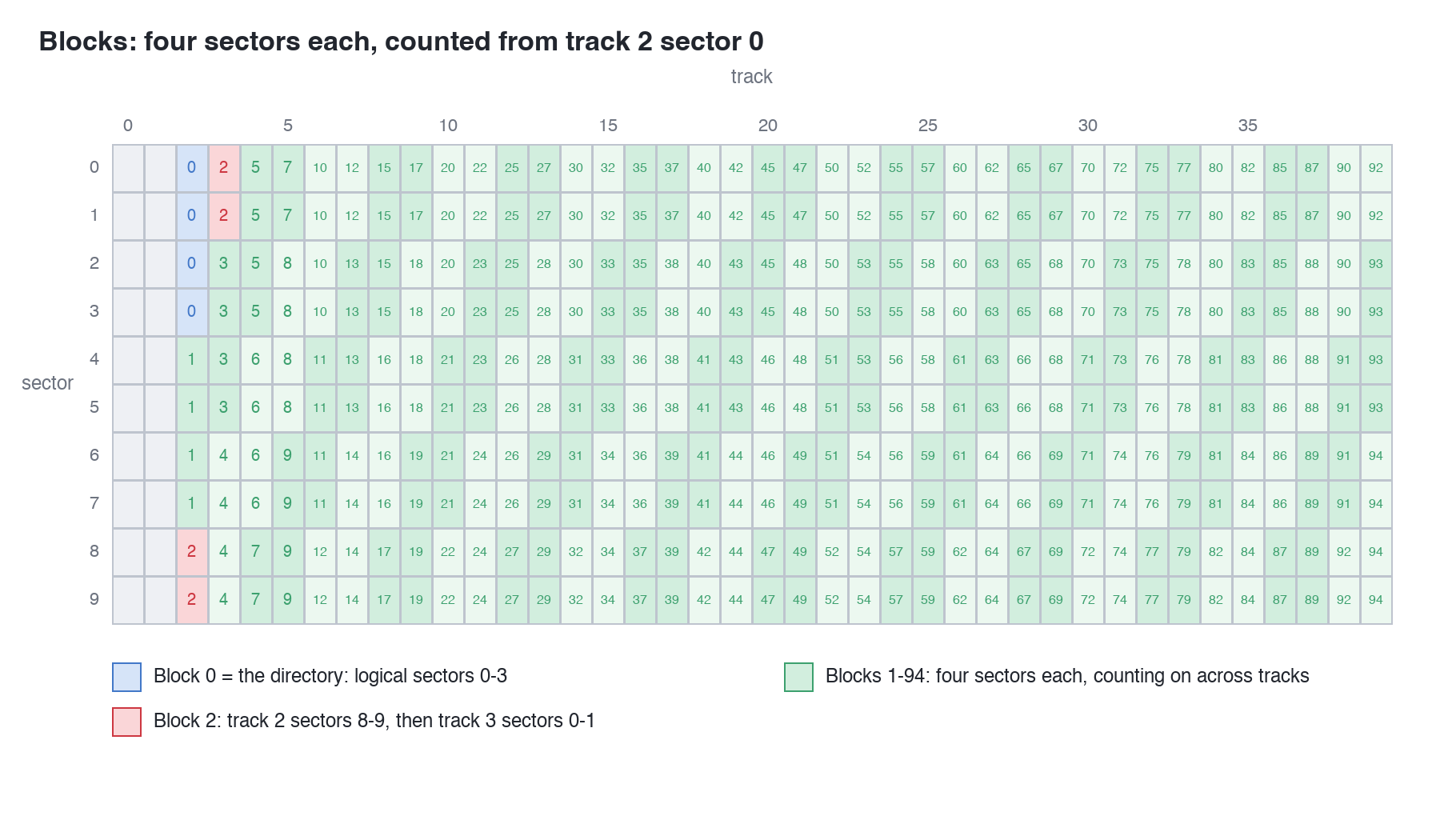
The last block is 94: logical sectors 376 to 379, track 39 sectors 6 to 9, the very end of the disc. Blocks 0 to 94 are 95 blocks, 190K; take away block 0 for the directory and 188K is left - DIR's free space on an empty disc, arrived at a third way.
block_sectors needs to give back four places, and each place is two numbers, a track and a sector. Python keeps a small group of values together as a tuple, written in round brackets: (2, 8). A list of tuples - [(2, 8), (2, 9), (3, 0), (3, 1)] - is exactly a block's sectors. And a for loop can take a tuple apart as it goes:
for track, sector_id in block_sectors(2):
gives track = 2, sector_id = 8 the first time round, and so on.
After live_entries:
def block_sectors(block):
    places = []
    for i in range(4):
        logical = block * 4 + i
        places.append((logical // 10 + 2, logical % 10))
    return places


def read_block(disc, block):
    data = b""
    for track, sector_id in block_sectors(block):
        data = data + read_sector(disc, track, sector_id)
    return data
The double brackets in places.append((...)) are the call's brackets and the tuple's. After list_files, a command to see a block - where it is, and its first 128 bytes:
def show_block(disc, block):
    places = block_sectors(block)
    for track, sector_id in places:
        print(f"Block {block}: track {track}, sector {sector_id}")
    dump(read_block(disc, block), 0, 128)
And before the else::
elif command == "block":
    show_block(disc, int(sys.argv[3]))
(The whole program: s15-edisc.py.)
Run it
python3 edisc.py block FILES.DSK 2
What you should see
Block 2: track 2, sector 8
Block 2: track 2, sector 9
Block 2: track 3, sector 0
Block 2: track 3, sector 1
000000  4C 69 6E 65 20 30 30 31 20 6F 66 20 53 54 4F 52  Line 001 of STOR
000010  59 2E 54 58 54 2C 20 77 68 69 63 68 20 6E 65 65  Y.TXT, which nee
000020  64 73 20 74 77 6F 20 65 78 74 65 6E 74 73 2E 0D  ds two extents..
000030  0A 4C 69 6E 65 20 30 30 32 20 6F 66 20 53 54 4F  .Line 002 of STO
000040  52 59 2E 54 58 54 2C 20 77 68 69 63 68 20 6E 65  RY.TXT, which ne
000050  65 64 73 20 74 77 6F 20 65 78 74 65 6E 74 73 2E  eds two extents.
000060  0D 0A 4C 69 6E 65 20 30 30 33 20 6F 66 20 53 54  ..Line 003 of ST
000070  4F 52 59 2E 54 58 54 2C 20 77 68 69 63 68 20 6E  ORY.TXT, which n
Block 2 is STORY.TXT's first block (S13: its blocks are 2 to 11), and here is the start of the story, read from four sectors on two tracks.
block FILES.DSK 0. What is block 0, and which slot is at its start?block FILES.DSK 1 - whose block is it? Check against entries.block FILES.DSK 94, then block FILES.DSK 95. Why does 95 fail?block_sectors, work the track out once, before the loop, as block * 4 // 10 + 2, and use (block * 4 + i) % 10 for the sector. Which blocks still come out right, and what does block FILES.DSK 2 show now?| Symptom | Cause |
|---|---|
IndexError: list index out of range for block 95 | Block 95 would start at track 40; the disc ends at track 39. Blocks run 0 to 94 |
The Einstein hands out file space in blocks of 2K, four sectors each, counted from track 2 sector 0 straight through the tracks: block n's sectors are logical sectors 4n to 4n + 3, each turned into a track (// 10 + 2) and sector (% 10) separately, because a block can cross from one track to the next. Block 0 is the directory; files use blocks 1 to 94. read_block reads any of them.
S16, Reading A Whole File - a file's blocks in order, cut down to its records, and what that 1A at the end of a text file is for.
This form is protected by reCAPTCHA, and the Google Privacy Policy and Terms of Service apply.
