module
4
VS Code let you click anywhere, select with the mouse and paste. ED80 has no mouse: everything is a key, and nearly every key is CONTROL and a letter. They look arbitrary at first. They are not - they are a map drawn on the left of the keyboard, and after an hour you stop thinking about them.
Hold CONTROL for all of these. (In MAME: Ctrl.)
| Keys | Moves |
|---|---|
| CONTROL-S / CONTROL-D | a character left / right |
| CONTROL-A / CONTROL-F | a word left / right - to the start of the word |
| CONTROL-E / CONTROL-X | a line up / down |
| CONTROL-R / CONTROL-C | a page up / down - 21 lines |
| CONTROL-Q then S / D | to the start / end of the line |
| CONTROL-Q then R / C | to the start / end of the whole file |
Look at where the first eight sit on the keyboard: E above, X below, S and D either side, A and F further out for the bigger step, R and C outside those for the biggest. CONTROL-Q in front turns a move into "all the way".
The top row always tells you where you are, as LINE and COL. At the right of the bottom row, ED80 shows the last command it took, so you can see what it thought you pressed.
| Keys | Deletes |
|---|---|
| DEL (or CONTROL-Y) | the character to the left of the cursor |
| SHIFT-DEL (or CONTROL-Z) | the whole line |
| CONTROL-Q then DEL | from the start of the line up to the cursor |
| CONTROL-Q then SHIFT-DEL | from the cursor to the end of the line |
(In MAME: DEL is Backspace.)
A block is a stretch of text you mark, and then copy, move or delete in one go.
| Keys | Does |
|---|---|
| CONTROL-K then B | marks where the block starts |
| CONTROL-K then K | marks where it ends |
| CONTROL-K then C | copies the block to the cursor |
| CONTROL-K then V | moves the block to the cursor |
| CONTROL-K then Y | deletes the block |
| CONTROL-O then P | puts the block you last deleted back, at the cursor |
Both marks include the character under the cursor. So to mark whole lines, put the start mark at the start of the first line, and the end mark at the start of the line after the last one you want - the block then ends with that line's first character. If that line is blank, its first "character" is just the end of the line, and you have marked your lines exactly.
Load S3's program:
ED80 HELLO.GEN
ED80 puts you at line 1, column 1. You are going to add a fifth letter by copying the four lines that print the O, and changing the copy.
LINE:22, the blank line before RET.LINE:19, the start of LD A,"O".LINE:22, the blank line.LINE:23, the start of RET.RET, and the cursor stays where it was: at the start of the copy.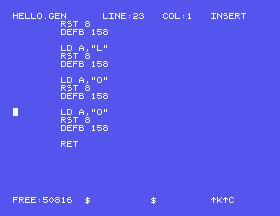
Now change the copy's O:
".".O to its left goes.!.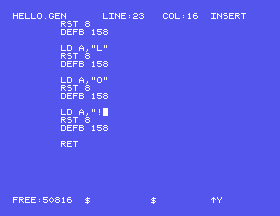
Save with CONTROL-K CONTROL-X and ENTER, and assemble and run as before.
What HELLO.GEN is now:
; HELLO - THE ASSEMBLY COURSE'S S3

        LD A,"H"
        RST 8
        DEFB 158       ; ZOUTC

        LD A,"E"
        RST 8
        DEFB 158

        LD A,"L"
        RST 8
        DEFB 158

        LD A,"L"
        RST 8
        DEFB 158

        LD A,"O"
        RST 8
        DEFB 158

        LD A,"!"
        RST 8
        DEFB 158

        RET
Edit, assemble and run
The eleven steps above, then CONTROL-K CONTROL-X, ENTER, and:
GEN80 HELLO
HELLO
What you should see
0:HELLO
HELLO!
0:
Saving over HELLO.GEN kept the version before as HELLO.BAK - type DIR and it is there. ED80 does that every time you save over a file: the last version is never more than one rename away.
If an edit has gone wrong and you want the file as it was, CONTROL-K then Q. ED80 asks:
Abandon text: Sure?
Y goes back to 0: without writing anything.
"!" lines again and delete them with CONTROL-K Y. Now go to the end of the file with CONTROL-Q C and press CONTROL-O P. Where does the block go? Before you assemble it, think: what will the program print? Leave with CONTROL-K Q if you would rather keep your HELLO!.DEFB 158 ; ZOUTC and try CONTROL-Q DEL and then CONTROL-Q SHIFT-DEL. Which part of the line does each take? Leave with CONTROL-K Q and Y."E" lines as a block and use CONTROL-K V instead of C to move them in front of RET. What does the program print now?CONTROL-E S D X and friends move; DEL, SHIFT-DEL and the CONTROL-Q versions delete; CONTROL-K B and K mark a block - both ends included - and C, V and Y copy, move and delete it. CONTROL-K X saves (the old file kept as .BAK); CONTROL-K Q abandons.
S5: what GEN80 does when your program is wrong.
