module
5
In VS Code a mistake was underlined before you had even pressed Run. GEN80 finds your mistakes only when you assemble, and tells you about them in the only place it has: the screen, between its sign-on and the next 0:. This section is about reading what it says - and about one habit that will save you a lot of confusion.
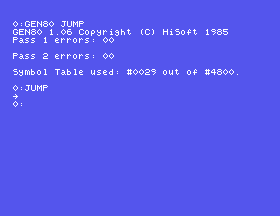
S4 of the assembly course jumped over a byte of data to reach the code that used it. Here it is for GEN80 - with no changes at all apart from the missing ORG. Type it into JUMP.GEN, save, assemble and run it:
0:JUMP
→
0:
The arrow is character 93, as it was in the assembly course.
Load JUMP.GEN again and change the last line's RET to RTS - an easy slip for anyone who has used another processor. Save and assemble:
GEN80 1.06 Copyright (C) HiSoft 1985
0109             10            RTS
Bad mnemonic in A:JUMP.GEN
Pass 1 errors: 01

Symbol Table used: #0029 out of #4800.
GEN80 shows you the line it could not understand - its address (0109), its line number in your file (10) and the line itself - then what was wrong and in which file. A: is the drive GEN80 is reading from, and a mnemonic is an instruction's name: RTS is not a Z80 one. It stops after the first pass.
The line number is the one ED80 shows in its LINE: when the cursor is on that line, which is how you find it again.
Put RET back, and this time misspell the label in the first jump: JP STRAT. Assemble:
GEN80 1.06 Copyright (C) HiSoft 1985
Pass 1 errors: 00

*WARNING* STRAT absent
Symbol Table used: #0035 out of #4800.
No error - but a warning, that STRAT is absent: you used a label you never defined. GEN80 calls it a warning, but it treats it as seriously as an error: there is no second pass, and no program.
Labels are case-sensitive in GEN80: START and Start are different labels, and a jump to one does not find the other.
After either of those mistakes, type JUMP. You might expect the arrow from last time, or No File. What you get is GEN80 again:
0:JUMP
GEN80 1.06 Copyright (C) HiSoft 1985

Command Line Format is:
...
The failed assembly did not leave your old JUMP.COM alone: it left it empty, with nothing in it. Running an empty program runs whatever happens to be in memory already - and what is there, just after an assembly, is GEN80.
This time it was harmless. Next time it might not be, so make it a rule: if GEN80 did not say Pass 2 errors: 00, do not run the program. Fix it and assemble again first.
| Message | Usually means |
|---|---|
Bad mnemonic | the instruction's name is misspelt |
Bad expression | a value GEN80 cannot read - 'A' for "A" is the classic (S6) |
Redefined symbol | the same label defined twice |
*WARNING* NAME absent | a label used but never defined, or spelt differently |
Add ;L+ after the name and GEN80 lists your program as it assembles it:
GEN80 JUMP;L+
0100              2
0100 C30401       3            JP    STA
RT       ; OVER THE DATA
0103              4
0103 5D           5 ARROW      DEFB  93
         ; A RIGHT ARROW
Each line starts with its address, then the bytes it assembled to, then the line number, the label, and the line. JP START is at 100h and is C3 04 01: a jump to 104h, where START turned out to be. The 40-column screen wraps every long line, which makes it hard going.
So add W as well - options are separated by commas:
GEN80 JUMP;L+,W
This time nothing is listed on the screen. GEN80 writes the listing to a file, JUMP.PRN, and you read it in ED80:
ED80 JUMP.PRN
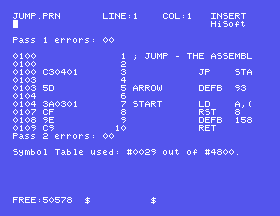
Each line of the listing stays on one row. Lines longer than the screen run off to the right; CONTROL-Q D takes you to the end of a line and ED80 slides the view across to show it. When you have read it, leave with CONTROL-K Q and Y - you do not want to save a listing back.
; JUMP - THE ASSEMBLY COURSE'S S4

        JP START       ; OVER THE DATA

ARROW:  DEFB 93        ; A RIGHT ARROW

START:  LD A,(ARROW)   ; FETCH IT
        RST 8
        DEFB 158       ; ZOUTC
        RET
Edit, assemble and run
ED80 JUMP.GEN
Type it in, CONTROL-K CONTROL-X, ENTER, then:
GEN80 JUMP
JUMP
What you should see
A right arrow on the line after JUMP.
ARROW in the LD line as ARROE. Which message do you expect - an error, or a warning? Assemble and see. Then fix it before you run anything.ARROW: a second time, on a new line just before RET. What does GEN80 call that, and which line number does it show?;L+ and find START in the listing. Now put a NOP on a line before ARROW: and assemble again with ;L+. Which addresses change, and which bytes of the JP?An error shows the address, the line number and the line, then what was wrong; a label that is never defined is a warning, but still stops the assembly. Either way GEN80 leaves your old .COM empty, so do not run a program that did not reach Pass 2 errors: 00. ;L+ lists on the screen, ;L+,W into a .PRN file you can read in ED80.
S6: what GEN80 wants written differently from the assembly course.
