module
3
In the assembly course's S3 you typed five letters' worth of LD, RST 8 and DEFB 158 into VS Code, pressed Run, and HELLO appeared. This section is the same program. The difference is everything around it: you type it on the Einstein, save it to the Einstein's disc, assemble it there, and run it from the 0: prompt.
At the 0: prompt, type:
ED80 HELLO.GEN
ED80 loads and clears the screen. The top row shows the file's name, where the cursor is, and that you are inserting:
HELLO.GEN LINE:1 COL:1 INSERT
The bottom row shows how much room is left. HELLO.GEN does not exist yet, so the page is empty. .GEN is the type GEN80 looks for - more on that in a moment.
Type the listing below exactly as it is printed. ENTER ends each line. If you make a mistake, DEL takes out the character to the left of the cursor. (In MAME: DEL is Backspace.) S4 is all about moving around and changing things; for now, just type.
The spaces at the start of each line are ordinary spaces - eight of them, so the instructions line up in a column the way they did in VS Code.
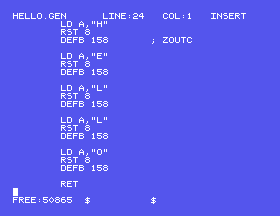
Look closely and the listing is not quite the assembly course's:
"H", not 'H'. GEN80 takes a character in double quotes. In single quotes it is an error.ORG 256. GEN80 starts every program at 100h - which is 256 - unless told otherwise, so the line has nothing to do.S6 is about everything GEN80 wants written differently. These two are all this program needs.
ED80's commands are CONTROL keys: hold CONTROL and press a letter. (In MAME: CONTROL is Ctrl.) Most take two letters in a row; to save, it is CONTROL-K then CONTROL-X. ED80 asks:
Filename: HELLO.GEN
with the name already filled in. Press ENTER. ED80 writes the file, and the Einstein is back at 0:.
Type:
GEN80 HELLO
without the .GEN - GEN80 adds it. After a few seconds:
GEN80 1.06 Copyright (C) HiSoft 1985
Pass 1 errors: 00

Pass 2 errors: 00

Symbol Table used: #0011 out of #4800.

0:
GEN80 works through your program in two passes and reports the mistakes each one found. Two zeros means it has written HELLO.COM to the disc. The last line is how much of its symbol table - its list of labels - it used, in hex, which GEN80 writes with a # in front.
Type the name of the program:
HELLO
0:HELLO
HELLO
0:
That is it: your program, printed by itself, and back to the prompt. The RET at the end returns to DOS exactly as it returned in the assembly course.
; HELLO - THE ASSEMBLY COURSE'S S3

        LD A,"H"
        RST 8
        DEFB 158       ; ZOUTC

        LD A,"E"
        RST 8
        DEFB 158

        LD A,"L"
        RST 8
        DEFB 158

        LD A,"L"
        RST 8
        DEFB 158

        LD A,"O"
        RST 8
        DEFB 158

        RET
Edit, assemble and run
ED80 HELLO.GEN
Type it in, CONTROL-K CONTROL-X, ENTER. Then:
GEN80 HELLO
HELLO
What you should see
GEN80 reports Pass 1 errors: 00 and Pass 2 errors: 00, and HELLO prints on the line after you type its name.
Each of these means going round the whole cycle: ED80 HELLO.GEN (your program is loaded back as you left it), change the line, CONTROL-K CONTROL-X, ENTER, GEN80 HELLO, HELLO.
LD A,"H" to LD A,'H'. GEN80 will not take it. What does it show you, and how does it tell you which line? (Put the "H" back before you run anything - S5 explains why.)ORG 256 back in, on a line of its own before the first LD. Does the program still work? What does GEN80 say about it?The 1985 cycle is edit, save, assemble, run: ED80 NAME.GEN, CONTROL-K CONTROL-X, GEN80 NAME, NAME. GEN80 writes NAME.COM, starting at 100h with no ORG needed, and takes characters in double quotes.
S4 is ED80 properly: moving about a program, deleting, and copying lines.
