module
25
Every image so far has been a good one. Real ones are not always. A file can be cut short when it is copied, a disc can lose a sector to a scratch or a fault when it was read, a file can turn out not to be a disc image at all, and some images are made by programs that do things their own way. When that happens, edisc.py should notice, stop, and say what is wrong - not carry on and write something worse, or bury the reason in a Python traceback.
All the checks happen once, when the image is read, in a new function, check_image. Each one is something earlier sections relied on:
| Check | Why |
|---|---|
| At least 256 bytes | There must be a disk-info header to read (S8) |
| The magic | It is a disc image at all (S8) |
| 40 tracks and 1 side | It is an Einstein disc |
| 256 + the track sizes = the file's size | Nothing is missing or extra (S8) |
Every track starts Track-Info | The walk from track to track is right (S9) |
They run in that order, because each relies on the one before: there is no point adding up track sizes for a file that is not a disc image.
Then a missing sector. A track's sector list can simply not have the ID you ask for - the disc lost it. Until now that produced a Python error, ValueError: 7 is not in list, which is true but unhelpful. find_sector now checks first and says which track and which sector.
Opening a file that does not exist makes Python stop with a FileNotFoundError and a traceback. Python lets a program catch an error like that and do something sensible instead:
try:
    with open(filename, "rb") as f:
        disc = f.read()
except FileNotFoundError:
    sys.exit(f"There is no file called {filename}")
Python runs the try part. If that error happens anywhere in it, it jumps to the except part instead of stopping. Any other error still stops the program as before.
This section replaces two functions. Replace read_image with these two:
def read_image(filename):
    try:
        with open(filename, "rb") as f:
            disc = f.read()
    except FileNotFoundError:
        sys.exit(f"There is no file called {filename}")
    check_image(disc)
    return disc


def check_image(disc):
    if len(disc) < 256:
        sys.exit("This is not a disc image: it is too short")
    image_format(disc)
    if disc[0x30] != 40 or disc[0x31] != 1:
        sys.exit(f"This image has {disc[0x30]} tracks and {disc[0x31]} sides;"
                 " an Einstein disc has 40 tracks and 1 side")
    if 256 + sum(track_sizes(disc)) != len(disc):
        sys.exit("This image is damaged: its size does not match its header")
    offsets = track_offsets(disc)
    for track in range(40):
        if disc[offsets[track]:offsets[track] + 12] != b"Track-Info\r\n":
            sys.exit(f"This image is damaged: track {track} has no Track-Info header")
image_format already stops the program for a file without the magic (S8), so calling it is the check. And replace find_sector with:
def find_sector(disc, track, sector_id):
    offset = track_offsets(disc)[track]
    ids = sector_ids(disc, track)
    if sector_id not in ids:
        sys.exit(f"This image is damaged: track {track} has no sector {sector_id}")
    position = ids.index(sector_id)
    start = offset + 0x100 + position * 512
    return start
Every command reads its image through read_image, and every sector through find_sector, so every command now gets the checks.
(The whole program: s25-edisc.py.)
Run it
DAMAGED.DSK, in the course download, is FILES.DSK with one sector gone: track 5 has nine sectors, and sector 7 is not among them.
python3 edisc.py list DAMAGED.DSK
python3 edisc.py type DAMAGED.DSK STORY.TXT
What you should see
3 file(s): 26k Size, 162k Free, 190k Total
This image is damaged: track 5 has no sector 7
The directory is fine, so list works. STORY.TXT's block 9 includes track 5 sector 7 (S15's arithmetic: logical sectors 36 to 39), so reading it stops there, with a reason. Here is the Einstein's own DISP on the same disc - it gets to line 303 and gives up:
Line 303 of STORY.TXT, which needs two e
xtents.
L
No Sector 1:
Try Again(Y/N)?
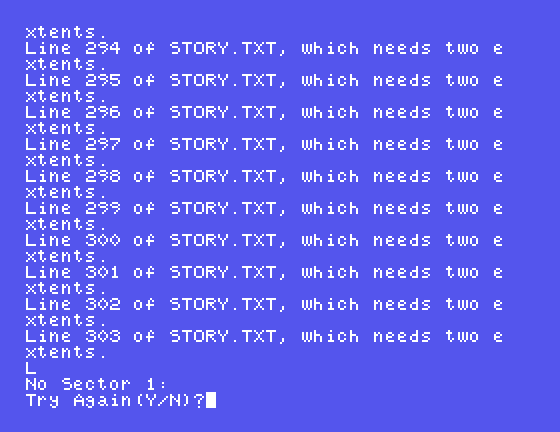
The same fault, found in the same place; your tool says which sector.
Now the other checks:
python3 edisc.py info NOSUCH.DSK
python3 edisc.py info four.bin
There is no file called NOSUCH.DSK
This is not a disc image: it is too short
CUT.DSK: the first 100,000 bytes of FILES.DSK (S5's slicing: disc[:100000]). What does list CUT.DSK say? And what did S5 show MAME does with an image like that?TWOSIDE.DSK: FILES.DSK with byte 0x31 set to 2. What does list say? (Such images exist: some programs wrap a one-sided Einstein disc as if it had two sides. S27 has more.)add DAMAGED.DSK hello.py. Which block would it use, and does the missing sector get in the way? Use free to find out.These are the messages. Each says what is wrong and, between them and this course, what to look at.
| Message | Meaning |
|---|---|
There is no file called NOSUCH.DSK | The name is wrong, or you are in the wrong folder |
This is not a disc image: it is too short | The file is smaller than a disk-info header |
This is not a disc image: it does not start EXTENDED CPC DSK or MV - CPC | No magic |
This image has 40 tracks and 2 sides; an Einstein disc has 40 tracks and 1 side | Not an Einstein disc as this tool knows it |
This image is damaged: its size does not match its header | The file has been cut short or added to |
This image is damaged: track 5 has no sector 7 | The disc lost a sector; files that use it cannot be read whole |
edisc.py now checks an image before using it: there, long enough, the right magic, 40 tracks and 1 side, sizes that add up, a Track-Info at every track. try and except turn a missing file into a sentence, and a missing sector is reported by track and number - the Einstein's No Sector, with directions.
S26, A Proper Command Line - help text, and commands that check their own words, with argparse.
This form is protected by reCAPTCHA, and the Google Privacy Policy and Terms of Service apply.
