module
24
The last of the tool's six commands, and the shortest: taking a file off a disc. You have seen what a deleted file looks like - OLD.TXT on FILES.DSK (S14). Now you make one.
The Einstein deletes a file by changing one byte in each of its entries: the status, byte 0, from 00 to E5. That is all. The name, the extent, the record count and the block numbers stay in the entry, and the file's data stays in its blocks, untouched.
That one byte is enough. Every reader - list, free, the Einstein's DIR - skips entries starting E5, so the file is gone from the listing, and its blocks, named by no live entry, are free (S20). The next file added takes them, lowest first, and only then are the old bytes overwritten.
remove_file does exactly that, to every entry with the name, and like rename it refuses a locked file.
After add_file:
def remove_file(disc, name):
    check_unlocked(disc, name)
    directory = bytearray(read_directory(disc))
    removed = 0
    for slot in range(64):
        entry = directory[slot * 32:slot * 32 + 32]
        if entry[0] != 0xE5 and entry_name(entry).upper() == name.upper():
            directory[slot * 32] = 0xE5
            removed = removed + 1
    write_directory(disc, directory)
    print(f"Removed {name.upper()}: {removed} directory entr{'y' if removed == 1 else 'ies'}")
check_unlocked also makes sure the file exists (it calls find_file). The last line uses a small trick: 'y' if removed == 1 else 'ies' picks one of two pieces of text, so the message says "1 directory entry" but "2 directory entries". And before the else::
elif command == "remove":
    disc = bytearray(disc)
    remove_file(disc, sys.argv[3])
    save_image(filename, disc)
(The whole program: s24-edisc.py.)
Run it
Copy MINE3.DSK from S23 to MINE4.DSK, then:
python3 edisc.py remove MINE4.DSK story.txt
python3 edisc.py list MINE4.DSK
python3 edisc.py free MINE4.DSK
What you should see
Removed STORY.TXT: 2 directory entries
then list's last line and free's map:
2 file(s): 4k Size, 184k Free, 190k Total
  0  D##...............................................
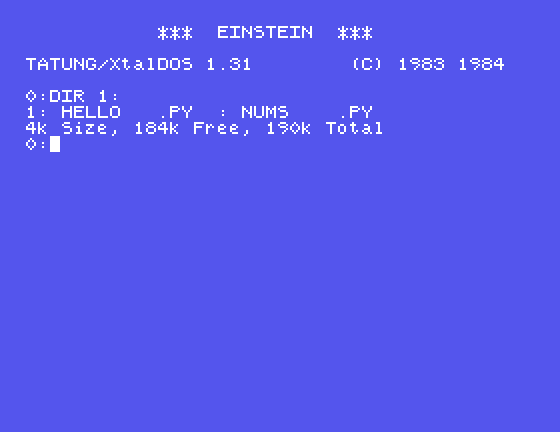
STORY.TXT's ten blocks are free again. The Einstein agrees:
0:DIR 1:
1: HELLO   .PY  : NUMS    .PY
4k Size, 184k Free, 190k Total
Now look at the directory itself, with dump MINE4.DSK 2 0. Slots 2 and 3, at offsets 0x40 and 0x60:
000040  E5 53 54 4F 52 59 20 20 20 54 58 54 00 00 00 80  .STORY   TXT....
000050  03 00 04 00 05 00 06 00 07 00 08 00 09 00 0A 00  ................
000060  E5 53 54 4F 52 59 20 20 20 54 58 54 01 00 00 1D  .STORY   TXT....
000070  0B 00 0C 00 00 00 00 00 00 00 00 00 00 00 00 00  ................
Everything is still there - name, extents, record counts, blocks 3 to 12 - except the first byte. And blocks 3 to 12 still hold the story. Until something is written over them, the file could be brought back.
Add a file and watch it happen:
python3 edisc.py add MINE4.DSK numbers.py
Added NUMBERS.PY: 284 bytes, 1 block(s), 1 extent(s)
NUMBERS.PY goes into block 3 and slot 2 - STORY.TXT's first block and first slot. Part of the story is gone for good now.
remove FILES2.DSK README.TXT. What happens, and why?remove MINE4.DSK STORY.TXT a second time. What does the tool say?remove STORY.TXT, then write a short program (S5 is all you need) that sets byte 0 of slots 2 and 3 back to 00. Do list and type find the whole story? Would that still work after the add above - and how much of it?| Symptom | Cause |
|---|---|
README.TXT is locked: edisc will not change it | Locked files are left alone |
There is no file called STORY.TXT on this disc | Already removed - or never there |
remove sets byte 0 of each of a file's entries to E5, and nothing else. The file disappears from every listing and its blocks become free, but its name, its block numbers and its data stay on the disc until a later write reuses them. edisc.py now has all six commands: list, dump, extract, create, add and remove.
S25, When The Disc Isn't What You Expect - making the tool check what it is given, and say something useful when it is wrong.
This form is protected by reCAPTCHA, and the Google Privacy Policy and Terms of Service apply.
