module
19
Everything edisc.py has done so far, it has done by reading. From here on it writes - and the first thing to write is a whole disc: an empty one, ready for files. You know every byte of a disc image now. This section puts them all in place, starting from nothing, and then asks the Einstein whether it agrees.
A blank image is the structures of S8 to S12, in order, holding nothing:
EXTENDED CPC DSK File and Disk-Info, the tool's name edisc at 0x22, 40 tracks at 0x30, 1 side at 0x31, and forty 15s in the size table from 0x34. Zeros everywhere else.Track-Info, the track's number at 0x10, side 0, size code 2 at 0x14, 10 sectors at 0x15, gap 3 at 0x16 (2A, as on real Einstein discs), filler E5 at 0x17, and the sector list from 0x18 (S10): ten entries of track, side 0, ID, size code 2, two zero status bytes, and length 512. - Ten sectors of E5: 5,120 bytes.The sectors go in ID order, 0 to 9. A real disc might have them in another order, but any order is correct as long as the list says which is which - and 0 to 9 is the simplest to check.
Why E5 and not zeros? Because the directory is part of the disc, and a directory slot whose first byte is not E5 is a file. Fill the disc with zeros and the Einstein sees 64 files with blank names. E5 everywhere is an empty directory and empty space at once.
Tracks 0 and 1 are E5 too, so this disc will not start an Einstein by itself - like FIRST.DSK in S3. It is a disc for files, for drive 1.
Most of the values fit in one byte, and you can put them straight in: header[0x15] = 10. The sector length, 512, needs two, low byte first. S8's int.from_bytes read two bytes as a number; to_bytes goes the other way:
(512).to_bytes(2, "little")
is the two bytes 00 02. (The brackets round 512 are needed so Python does not mistake the dot for a decimal point.)
Writing commands change a disc image, and a mistake half-way through writing a file can leave it ruined. So save_image writes to a temporary file first - the same name with .tmp on the end - and only when that has worked completely does it swap the new file into place with os.replace, which happens all at once. Either you get the old image or the new one, never half of each.
os is another module that comes with Python; it is about files and folders. Add it at the top of edisc.py, beside import sys:
import os
import sys
create also refuses to overwrite a file that is already there: os.path.exists(filename) is True if it is.
After host_name:
def save_image(filename, disc):
    temporary = filename + ".tmp"
    with open(temporary, "wb") as f:
        f.write(disc)
    os.replace(temporary, filename)


def blank_image():
    disc = bytearray(256)
    disc[0:34] = b"EXTENDED CPC DSK File\r\nDisk-Info\r\n"
    disc[0x22:0x27] = b"edisc"
    disc[0x30] = 40
    disc[0x31] = 1
    for track in range(40):
        disc[0x34 + track] = 0x15
    for track in range(40):
        header = bytearray(256)
        header[0:12] = b"Track-Info\r\n"
        header[0x10] = track
        header[0x11] = 0
        header[0x14] = 2
        header[0x15] = 10
        header[0x16] = 0x2A
        header[0x17] = 0xE5
        for sector_id in range(10):
            entry = 0x18 + sector_id * 8
            header[entry] = track
            header[entry + 1] = 0
            header[entry + 2] = sector_id
            header[entry + 3] = 2
            header[entry + 6:entry + 8] = (512).to_bytes(2, "little")
        disc = disc + header + bytes([0xE5]) * 5120
    return disc
bytearray(256) is 256 zero bytes, ready to fill in; anything the code does not set stays zero - the header's spare bytes, and the two status bytes of each sector entry. After extract:
def create(filename):
    if os.path.exists(filename):
        sys.exit(f"{filename} already exists: edisc will not overwrite it")
    save_image(filename, blank_image())
    print(f"Created {filename}: a blank Einstein disc, 188K free")
create is different from every other command: it has no image to read first. So it goes straight after the two lines that read the command and the file name, before disc = read_image(filename):
command = sys.argv[1]
filename = sys.argv[2]
if command == "create":
    create(filename)
    sys.exit()
disc = read_image(filename)
sys.exit() with nothing in the brackets ends the program quietly.
(The whole program: s19-edisc.py.)
Run it
python3 edisc.py create NEW.DSK
python3 edisc.py info NEW.DSK
python3 edisc.py list NEW.DSK
What you should see
Created NEW.DSK: a blank Einstein disc, 188K free
then info's report, ending
Expected size: 215296 bytes
Actual size:   215296 bytes
The sizes add up.
and from list:
0 file(s): 0k Size, 188k Free, 190k Total
Your tool says the disc is right - but your tool would, since the same person wrote the reading and the writing. Ask someone who does not know you:
mame -rompath ~/roms einstein -flop1 XTALDOS.DSK -flop2 NEW.DSK -window
0:DIR 1:
No File
0k Size, 188k Free, 190k Total
0:
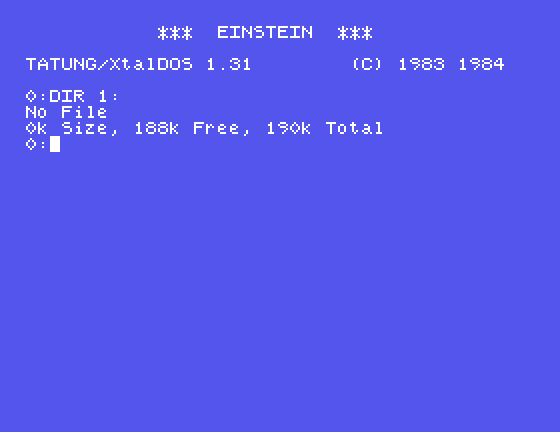
An empty disc, with all its space free. Every one of its 215,296 bytes was written by your program, and a disc operating system from 1984 accepts it without a murmur.
Make each change, create a new image (a new name each time - create will not overwrite), and look at it in MAME.
E5 in bytes([0xE5]) * 5120 to 0x00. What does DIR 1: show? (S12 tells you what to expect.)disc[0x34 + track] = 0x15 to 0x16. What does info say - and what does MAME do with the image?9 - sector_id (9, 8, 7 ... 0). Does DIR 1: still work? Use sectors to see what changed.| Symptom | Cause |
|---|---|
NEW.DSK already exists: edisc will not overwrite it | Exactly that - pick another name, or delete the old file yourself |
A blank Einstein image is a 256-byte disk-info header and forty tracks of a 256-byte track-info header and ten 512-byte sectors of E5, every field set as Part two described: 215,296 bytes. edisc.py create builds it from nothing, saves it safely with a temporary file and os.replace, and the Einstein reads it as an empty disc with 188K free.
S20, What's Free? - before a file can be added, the tool has to know which blocks and which directory slots nobody is using.
This form is protected by reCAPTCHA, and the Google Privacy Policy and Terms of Service apply.
