← Back to News
Wait, what? The Einstein had a mouse?
The Einstein never came with a mouse, but it could have one: EMSOFT's Mouse Art put one on the user port. We have it working in MAME, driven by the mouse on your desk.
September 26, 2026
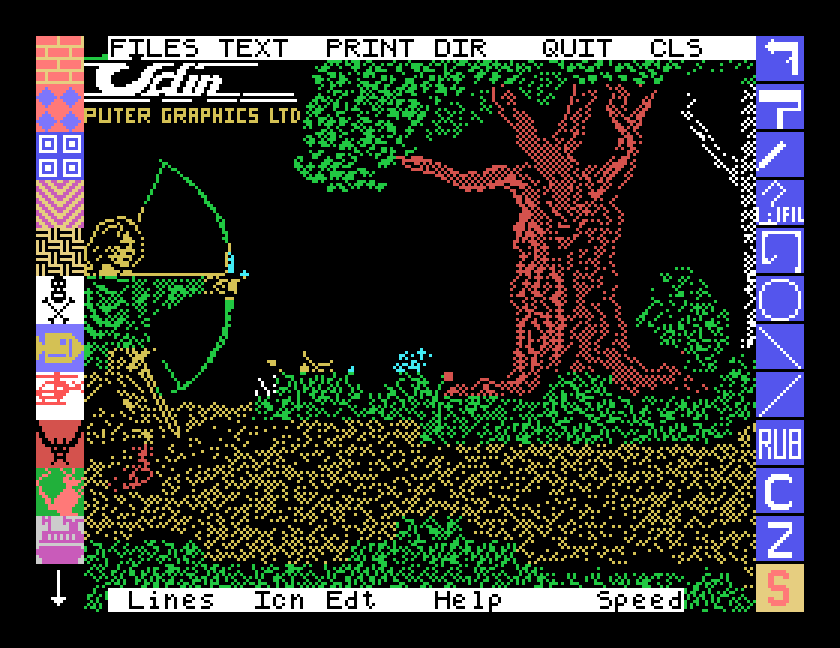
The Tatung Einstein never came with a mouse. Nobody expected it to: in 1984 a mouse was something you saw in magazine photographs of the Apple Macintosh. So it came as a surprise, going through the library for our next software guide, to find a disc that assumes you have one.
Mouse Art is a painting program from EMSOFT of Ipswich, and as far as its paperwork tells us, the mouse came in the box with it. The manual opens with "Congratulations on your purchase of MOUSE ART, please read this page before using this excellent input device", under the heading The Einstein Mouse, and its getting started steps read like unpacking a parcel: plug the adapter lead into the Einstein's user port, connect the mouse to the lead, and take the small sponge out of the bottom of the mouse. Then hold the left button down while you switch the Einstein on, so the mouse starts in the right mode.
What you got for it was a proper paint program in the style of the day: a canvas, the Einstein's fifteen colours, a spray can, a paint roller, lines, shapes, flood fill, five lettering styles, a zoom for pixel work, and a dot matrix printout. The disc came with a few pictures to show it off, like the archer above, and even a BASIC driver so you could use the mouse in your own programs.
MAME emulates the Einstein mouse too: start it with -user mouse and the mouse is plugged into the user port. Out of the box, though, MAME wires the emulated mouse to a third mouse on your computer, which is why it seems to do nothing. We have confirmed that a small MAME settings file fixes that: your own mouse moves the pointer, the left button draws and the right button brings up the colours. It wants a real two-button mouse rather than a laptop trackpad.
The full walkthrough, with the settings file ready to copy, is in our new guide: Drawing with Mouse Art. It takes you from a blank canvas to a finished picture, and shows what the printout looks like even if you have no printer at all.
We have never seen an Einstein mouse in the flesh. If you owned one, used Mouse Art, or still have the adapter lead in a drawer somewhere, we would love to hear about it through our Contact page.