module
28
Everything in this course so far was written to teach. This was not. On the disc is a complete arcade game, put there to show what the language and its extensions could do together. It is eleven screens long, and you can now read almost every word of it.
Reading other people's programs is the fastest way to get better. It is also a skill of its own, and this section is practice.
The game's first screen carries a comment: ( NB. GRAPHICS, SOUNDS & SPRITES must be loaded ). So:
NEWFILE GRAPHICS
1 LOAD
NEWFILE SOUNDS
1 LOAD
NEWFILE SPRITES
1 LOAD
NEWFILE GAME
1 LOAD
GAME
Starting from
A fresh boot, with FORTH just started. The last load is eleven screens and takes about a minute and a half.
What you should see
A title and a list of keys:
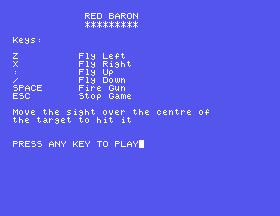
Press a key, and you are looking through a gunsight at five aeroplanes:
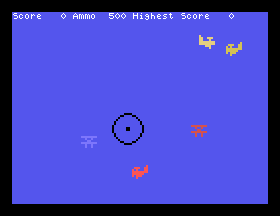
Z and X bank left and right, : and / climb and dive, SPACE fires, and ESC gives up. You do not move the sight. You move the sky, which is what it looks like from a cockpit. Get a plane dead centre and fire. Each burst costs three rounds of your 500.
In MAME, : is the ' key, to the right of ;, and ESC is Esc.
ESC ends the round and asks Another Go? Answer N and you are back at SuperForth.
1 11 INDEX
gives the table of contents, because every screen has a comment on line 0: shapes, sounds, sight and tracer, keyscan, random numbers, target checking, and so on up to the main loop. LIST any of them.
Start at the end. In a Forth program the last screen holds the top word, and the top word is the summary. Here is the bottom of screen 11:
: GAME INSTRUCT BEGIN 1GAME -RESTART UNTIL SPRITES-OFF
  4 BCOL CLS SP! QUIT ;
Show the instructions; play a game, and again, until the player says no; then tidy up. You knew that from playing it. Now go one level down, to 1GAME, just above it. This is how it begins:
: 1GAME CLS ENGINE SPRITES-OFF SIGHT SETUP STATUS
BEGIN 1MOVE
GUNS? FIRING @ IF -3 AMMO +! HITS? ENDIF
STATUS ESCAPE? AMMO @ 1 < + UNTIL
Set up; then round and round - move everything, look at the fire button, and if the guns are firing use up three rounds and check for hits - until ESC or the ammunition runs out. Notice + being used on two flags to mean "or".
Every word in there is defined on an earlier screen, and each of those is built from words on screens earlier still. Keep going down until you reach words you know. It never takes long.
The shapes are characters. Screen 1 is eight SHAPE lines, giving characters 160 to 167 the three aeroplanes, an explosion and the four quarters of the gunsight. Then 1 MAG doubles everything. The sight is four sprites in a two by two block.
A target is four numbers. Screen 4 makes 40 ARRAY TGTS, and the comment says how it is used: x, y, colour and shape for each target, four cells apiece. So target n starts at cell 4 * n, which is exactly what NXY and NDISP on screen 5 work out.
The shape decides the speed. In NMOVE, on screen 6, a CASE looks at the target's shape: the plane facing right gets 2 added to its x, the one facing left gets -2, and the head-on one gets nothing. Everything also gets a little random scatter, from 3 CHOOSE 1 -.
It carries its own copies. ARRAY, RANDOM and CHOOSE are typed out again inside the game, with a comment saying where they came from, so that UTILITY need not be loaded.
It rubs out with a line. GUN-ON draws the tracer with line type 2, and GUN-OFF draws the very same line with type 1. S23 showed that type 1 draws nothing you can see. The comment beside it says what it is for: to erase.
ENDIF, not THEN. The author uses it throughout.
Plain FORTH has no editor, so to change the game start again with BIGFORTH GAME. Try to save an edit and SuperForth stops you:
FLUSH? File is Locked - Read Only!
The * beside a file in the directory means it is locked against exactly this. UNLOCK takes the lock off the current file, and the FLUSH then works. Keep a copy of the disc as it came before you start.
Remember S7 as well. Words are built on the words that existed when they were defined, so redefining SETUP at the keyboard changes nothing: 1GAME goes on using the old one. To change the game, change the screen, and load the game again from its first word - FORGET GAME-TASK clears the old one out.
SETUP, on screen 8. Start BIGFORTH GAME, UNLOCK, edit, FLUSH, then load the three extensions and the game as above.NMOVE that decide how fast the planes fly.28.1 There are five targets. Find the four loops that would have to change to add more. Then work out from the size of TGTS, and the fact that targets are numbered from 1, how many the array really has room for.
28.2 GETMOVE moves the sky four dots at a time. Make the controls twice as sensitive.
28.3 Add a word TITLE that draws something of your own before the instructions appear, and make GAME call it.
Worked solutions are in Appendix II.
| Symptom | Cause |
|---|---|
A word with a ? partway through loading the game | One of the three extensions is missing. The ? names the first word it could not find: a drawing word, a sound word or a sprite word. |
FLUSH? File is Locked - Read Only! | The game's file is locked. UNLOCK, then FLUSH again. |
| Your change made no difference | You changed the screen but are still running the old game. FORGET GAME-TASK and load again. |
Isn't Unique for every word | The game was already loaded. Harmless, but you now have two. |
GAME needs the graphics, sounds and sprites loaded first. INDEX gives the map; read from the last screen upwards, where the top word summarises the whole, and follow each word down until you reach ones you know. To change a locked file, UNLOCK it; to see your change, forget the old program and load it again.
S29, Finding Out What Went Wrong - the messages SuperForth gives you, and what to do about each.
This form is protected by reCAPTCHA, and the Google Privacy Policy and Terms of Service apply.
