module
9
Everything you have defined so far has lived in the machine's memory and died with it. That was fine for SQUARE. It is not fine for anything you spent an evening on.
SuperForth keeps programs on the disc, as text, in files. You type your definitions into a file with an editor, and then tell SuperForth to read them. This section gets a program onto the disc and back again.
The FORTH you have been using is the language and nothing else. It has no editor in it. SuperForth's editor is itself written in Forth, it takes up room, and a finished program does not need it.
The course disc carries a second version, BIGFORTH, which is FORTH with the editor and a few disc tools already loaded. It was made with SuperForth itself, following the instructions in its own manual, and nothing in it differs from what you have been using. It is simply further along.
On a real Einstein with your own SuperForth disc, BIGFORTH is not there until you make it. Do that now, on your backup disc: Appendix III has the seven lines, and DIR at the 0: prompt will tell you whether the disc has the 16K free that it needs.
From here on, use BIGFORTH.
You name your file when you start. At the 0: prompt:
BIGFORTH MYWORK
SuperForth adds .FIG to the name, looks for MYWORK.FIG on the disc, and because it is not there, tells you it is starting a fresh one:
New File

Z80A Einstein SuperFORTH 1.12
     (c) 1984 Peter Amey
Next time, when the file exists, it says nothing and just opens it. (That is the other half of the No File Open you have been seeing since S2.)
A SuperForth file is not one long scroll of text. It is a stack of screens, numbered from 1. Each screen is sixteen lines, numbered 0 to 15. You write on one screen at a time.
It is a small page, and that is the point. A screen holds a handful of short definitions: about as much as you can hold in your head.
1 SELECT
opens screen 1 in the editor. The display changes completely:
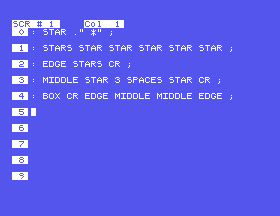
The top row tells you which screen you are on and which column the cursor is in. Down the left, in reverse, are the line numbers. Each line of your screen takes two rows of the display, because a screen's lines are wider than the Einstein's 40 columns, so a long line simply carries on underneath itself. The 40 character rule from S7 does not apply in here.
Now just type. ENTER takes you to the start of the next line. If you make a mistake, DEL rubs out backwards. S10 covers moving around and changing things; for now, type carefully.
When you have finished, press ESC. You are back at SuperForth, below the editor's display.
In MAME, ESC is your Esc key and DEL is Backspace.
Leaving the editor does not put anything on the disc. Your screen is in memory. To write it:
FLUSH
And now the part that makes it all worthwhile:
1 LOAD
LOAD reads screen 1 exactly as if you were typing it, line by line, only much faster. Every definition on it is compiled. When it has finished, your words exist.
At the 0: prompt:
BIGFORTH MYWORK
Then:
1 SELECT
In the editor, type these five lines, pressing ENTER after each, and then press ESC:
: STAR ." *" ;
: STARS STAR STAR STAR STAR STAR ;
: EDGE STARS CR ;
: MIDDLE STAR 3 SPACES STAR CR ;
: BOX CR EDGE MIDDLE MIDDLE EDGE ;
Back at SuperForth:
FLUSH
1 LOAD
BOX
Starting from
A fresh boot of the course disc, at the 0: prompt, with no file called MYWORK on it yet.
What you should see
FLUSH
ok
1 LOAD

Loading Blocks: 1 2 3 4 5 6 7 8 ok
BOX

*****
*   *
*   *
*****
ok
Loading Blocks is SuperForth counting its way through the screen as it reads it.
Now find out whether it really is on the disc. Type DOS, restart the Einstein, in MAME, close the window and run the command again, and at the 0: prompt:
BIGFORTH MYWORK
This time there is no New File. Try your word before loading anything:
BOX
BOX?
It has never heard of it; SuperForth has only just started. Then:
1 LOAD
BOX
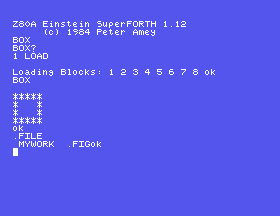
That box came off the disc.
| Word | Shows |
|---|---|
1 LIST | screen 1, without opening the editor |
.FILE | the name of the file you have open |
DIR | everything on the disc, and the current file's name |
DIR is one of the disc tools in BIGFORTH. Your file is in the list as MYWORK .FIG. The files with a * beside them are SuperForth's own and are locked, so that you cannot overwrite them by accident.
FLUSH writes your screens to the disc. So does DOS: it saves anything outstanding on its way out. Switching off does not, and nor does closing the MAME window. Make a habit of FLUSH after every spell in the editor and DOS before you stop the machine, and you will never lose more than a few minutes.
1 LOAD a second time. What does SuperForth say about each word, and is anything actually wrong? (S7 has the answer.)1 LIST. Then 2 LIST. What is on a screen you have never written to?BIGFORTH with no file name at all and try 1 LIST. What does it tell you, and what should you have typed?DIR before and after you first FLUSH a brand new file. When does the file appear on the disc?9.1 Start BIGFORTH with a new file called SHAPES. Put TRIANGLE from S8 on screen 1, save it, load it and run it.
9.2 Leave with DOS, restart with BIGFORTH SHAPES, and get TRIANGLE running again. How many things did you have to type?
9.3 Open MYWORK again and look at screen 1 with 1 LIST. Without opening the editor, how can you tell which file you are in?
Worked solutions are in Appendix II.
| Symptom | Cause |
|---|---|
| You pressed ESC and MAME itself closed | MAME's own control keys have been switched on, by forward delete on a Mac (Fn and Backspace on a laptop) or Scroll Lock on Windows. Press the same key again to switch them off. Appendix IV explains. Anything not yet written to the disc went with it. |
SELECT? | You started FORTH, which has no editor. Type DOS and start BIGFORTH. |
New File when you expected your old one | The name is not the one you used before. DOS, then DIR at the 0: prompt to see what it is really called. |
Your words come back with a ? after restarting | Opening the file does not load it. 1 LOAD. |
Bad Data, Drive 0: | You are not using the course disc. SuperForth can only save to an .mfi disc image; S2 explains. |
Every word gets Isn't Unique during a LOAD | You have loaded the screen twice. Harmless; S10 shows how to avoid it. |
BIGFORTH name starts a SuperForth with an editor and opens your file. 1 SELECT edits screen 1, ESC leaves the editor, FLUSH writes to the disc, and 1 LOAD compiles the screen as though you had typed it. Always leave through DOS. Your work now survives.
S10, Changing Your Mind: moving around in the editor, fixing a word that is wrong, using more than one screen, and letting SuperForth show you where a mistake is.
This form is protected by reCAPTCHA, and the Google Privacy Policy and Terms of Service apply.
