module
8
SQUARE and CUBE were one idea each. Real programs are many ideas, and the Forth way of writing one is not to write a long word. It is to write a lot of very short ones, each built from the ones before, until the last word you define is the program.
This section builds something small that way, and then shows you how to see the words you have made and how to get rid of them.
CR starts a new line. SPACES takes a number from the stack and prints that many spaces: 3 SPACES.
One more, less often needed: EMIT takes a number and prints the character with that code. 42 EMIT prints *.
Here is a box made of stars:
*****
*   *
*   *
*****
Do not start by thinking about the box. Start with the smallest thing in it that deserves a name, and work upwards.
STAR.STARS is five STARs.STARS followed by a new line. That is EDGE.MIDDLE.EDGE, two MIDDLEs and an EDGE.Every one of those is a single short line, and you can try each as soon as you have typed it. By the time you define BOX there is nothing left in it that could be wrong.
: STAR ." *" ;
: STARS STAR STAR STAR STAR STAR ;
: EDGE STARS CR ;
: MIDDLE STAR 3 SPACES STAR CR ;
: BOX CR EDGE MIDDLE MIDDLE EDGE ;
BOX
Starting from
A fresh boot, with SuperForth just started.
What you should see
An ok after each of the five definitions, and then:
BOX

*****
*   *
*   *
*****
ok
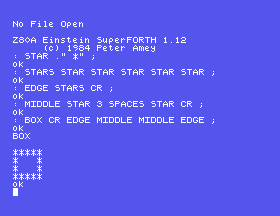
BOX begins with a CR so that the box starts on a fresh line rather than straight after the word BOX on the screen.
Look at the last definition again. CR EDGE MIDDLE MIDDLE EDGE reads almost like the description of the box in English. That is what you are aiming for every time: the top word should say what happens, and leave how to the words below it.
VLIST
pours out the name of every word SuperForth knows, newest first, so yours are at the top. There are a great many and they go past fast. Press any key to stop it, and be quick if you want to see your own.
It is worth doing once, just to see the size of what you have been given. Most of those words are for later, and some of them you will never need.
FORGET removes a word:
FORGET MIDDLE
But it removes more than you asked for. FORGET takes out the word you name and every word defined after it. BOX was defined after MIDDLE, so BOX has gone too. EDGE, defined before it, is untouched.
That sounds heavy-handed, and it is exactly what you want. BOX was built on the old MIDDLE, and you saw in S7 that it would go on using the old one whatever you did. Taking it out along with MIDDLE means that when you type both in again, they match.
It also gives you a neat trick. Before you start on something, define a word that does nothing at all:
: MARK ;
Then type in your program. When you want to clear the whole lot out and start again, FORGET MARK takes out MARK and everything since, in one go, and leaves SuperForth as it was.
STARS. Remember that changing a word means FORGETting it and typing it, and everything after it, again, and that seven STARs will not fit on one line of under 40 characters. What else has to change before the box looks right?FORGET MIDDLE, then BOX, then EDGE. Which of the two still works, and why that one?VLIST and stop it with a key. Find three words in the list that you already know.." *" in STAR with 42 EMIT. Does the box change?8.1 Define TRIANGLE to print
*
**
***
Watch the length of your lines.
8.2 Define GREET to print HELLO on one line and GOODBYE on the next.
8.3 Define MARK, then two words of your own, ONE and TWO. Use one FORGET to remove both, and check that they have gone.
Worked solutions are in Appendix II.
| Symptom | Cause |
|---|---|
A word that worked a minute ago now gets a ? | You FORGET a word that was defined before it. Everything after the forgotten word goes too. |
The list from VLIST will not stop | Press any key. |
ok, a blank line, and your new word is not there | The definition was exactly 40 characters long and was lost. Split it over two lines; S7 explains. |
| The shape starts halfway along a line | It needs a CR at the beginning, to get off the line you typed its name on. |
Write small words and build upwards, so that the top word reads like a description of the job. CR starts a new line and SPACES prints gaps. VLIST shows the dictionary, and any key stops it. FORGET removes a word and everything defined after it, which is why a do-nothing MARK at the start of your work makes a clean slate one word away.
S9, Keeping Your Work: everything so far vanishes when you leave. The next section puts your words on the disc, where they stay.
This form is protected by reCAPTCHA, and the Google Privacy Policy and Terms of Service apply.
