module
10
In S9 you typed a screen straight through and it worked. Most screens do not work the first time. This section is about the second time: getting back to the mistake, fixing it, and loading the result without tripping over what is already there.
The editor's movement keys are the Einstein's two cursor keys, the grey pair at the right-hand end of the QWERTY row.
| To move | Press |
|---|---|
| down a line | the vertical cursor key |
| up a line | SHIFT and the vertical cursor key |
| right one column | the horizontal cursor key |
| left one column | SHIFT and the horizontal cursor key |
In MAME, the horizontal cursor key is your Tab key and the vertical one is your Down arrow.
The three keys marked with a single arrow do not move anything. They are character keys: ← and → type [ and ], and ↑ a small arrow, into your screen, just as they do outside the editor. In MAME they are your Left, Right and Up arrows. If you get one by accident, DEL removes it.
The Col number on the top row follows the cursor, which is handy on a long line that has wrapped.
The editor starts in overwrite mode: what you type replaces what was there. That is the quickest way to fix a wrong letter. Put the cursor on it and type the right one.
| Key | Does |
|---|---|
| DEL | removes the character to the left and closes the gap |
| SHIFT and DEL | switches to insert mode. INSERT appears at the top, and typing now pushes the rest of the line along |
| ESC | in insert mode, goes back to overwrite. In overwrite mode, leaves the editor |
| CTRL and X | opens a blank line where the cursor is. Everything below moves down |
| CTRL and E | removes the cursor's line. Everything below moves up |
So ESC once or twice gets you out, depending on which mode you were in. Watch for the INSERT caption.
In MAME, DEL is Backspace, and ESC and CTRL are your Esc and Ctrl keys. On a Mac that is Ctrl itself, not Command.
A screen has sixteen lines and no more. Open a blank line in a full screen and the bottom line has nowhere to go.
When LOAD meets a word it does not know, it stops and names it, exactly as it does at the keyboard. Type
WHERE
straight away, and SuperForth opens the editor on the right screen with the cursor at the scene of the crime. It lands just past the word it could not find: one column beyond the space that follows it. Step back onto the word with SHIFT and the horizontal cursor key before you start typing.
When a load fails partway, the words above the mistake were defined and the ones below were not. If you simply 1 LOAD again after fixing it, the ones that made it the first time are defined twice and each gets an Isn't Unique warning. It works, but it wastes memory and it buries real warnings in noise.
The tidy way is to FORGET the first word on the screen, which takes out that word and everything after it, and then load:
FORGET STAR
1 LOAD
At the 0: prompt:
BIGFORTH FIXME
Then 1 SELECT, and type these three lines. The mistake in the third is deliberate: ROQ should be ROW.
: STAR ." *" ;
: ROW STAR STAR STAR CR ;
: SQUARE3 CR ROW ROW ROQ ;
Press ESC, and then:
FLUSH
1 LOAD
WHERE
In the editor: SHIFT and the horizontal cursor key twice, type W, press ESC. Then:
FLUSH
FORGET STAR
1 LOAD
SQUARE3
Starting from
A fresh boot of the course disc, at the 0: prompt, with no file called FIXME on it.
What you should see
The first load stops at the mistake:
1 LOAD

Loading Blocks: 1 ROQ?
WHERE opens the editor with Col 26 on the top row and the cursor on the semicolon of line 2:
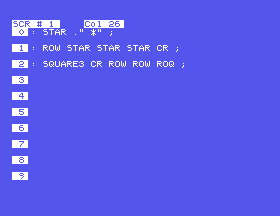
After SHIFT and the horizontal cursor key twice the counter reads Col 24 and the cursor is on the Q. Type W and the line is right. Then:
FLUSH
ok
FORGET STAR
ok
1 LOAD

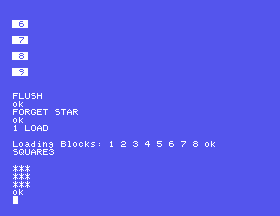
Loading Blocks: 1 2 3 4 5 6 7 8 ok
SQUARE3

***
***
***
ok
Sixteen lines fill up fast. When they do, carry on with 2 SELECT. Two things make a multi-screen program pleasant:
--> at the end of a screen tells LOAD to carry straight on with the next one. Put it as the last thing on screen 1 and 1 LOAD loads both. Without it, LOAD stops at the end of the screen you named.
A comment on line 0 of every screen, saying what is on it. Then
1 5 INDEX
prints the first line of screens 1 to 5, and you have a table of contents for nothing.
EDIT, with no number, reopens whichever screen you were last in.
1 LOAD again without a FORGET. Count the warnings. Does SQUARE3 still work?( THREE BY THREE ). Leave, FLUSH, and try 1 1 INDEX.--> on a line of its own after the last definition on screen 1, define one more word on screen 2, and FORGET STAR then 1 LOAD. How many blocks does LOAD count through now?10.1 Change FIXME so that SQUARE3 draws a block four stars wide and four deep. Which words did you have to touch? Rename the top word to suit.
10.2 Deliberately misspell a word on line 0 of a screen, load it, and use WHERE. Where does the cursor land when the bad word is the last thing on its line?
10.3 Give every screen you have written a comment on line 0, and print an index of your file.
Worked solutions are in Appendix II.
| Symptom | Cause |
|---|---|
| You pressed ESC and MAME itself closed | MAME's own control keys have been switched on, by forward delete on a Mac (Fn and Backspace on a laptop) or Scroll Lock on Windows. Press the same key again to switch them off. Appendix IV explains. Anything not yet written to the disc went with it. |
[, ] or a little arrow appears in your text | You pressed one of the ← → ↑ keys (your Left, Right or Up arrow in MAME). They type characters. The cursor keys are the grey pair beside them, Tab and the Down arrow in MAME, with SHIFT for left and up. DEL removes the stray character. |
After WHERE, you pressed DEL and typed the right letter, and now the word is longer and still wrong | The cursor was past the space, not on the word. DEL took out the space. Use SHIFT and the horizontal cursor key to get onto the letter, and overtype it. |
| ESC does not leave the editor | You were in insert mode. The first ESC only turns that off. Press it again. |
Isn't Unique for every word when you load | The screen was already loaded. FORGET its first word, then load. |
| A word you fixed still behaves the old way | You edited the screen but did not load it again, or loaded without FORGET, so older words are still using the old one. |
In the editor the two cursor keys move the cursor, plain and with SHIFT, and the three keys marked with single arrows type characters. Overwrite is the default; SHIFT-DEL inserts; ESC backs out. WHERE takes you to a load error. FORGET the screen's first word before loading it again. --> chains screens together and INDEX lists their first lines.
S11, Names For Numbers: constants and variables: giving a number a name, and having somewhere to keep one that changes.
This form is protected by reCAPTCHA, and the Google Privacy Policy and Terms of Service apply.
