module
3
A computer from 1984 will not guess what you meant. SuperForth waits for you to type a line, and then does exactly what that line says, which is wonderful when the line is right and baffling for a minute or two when it is not.
It is also a language of very few words, in both senses. It has two replies, and one of them is two letters long. This section gets you to the point where you can read both.
Start the Einstein with the course disc in the first drive, as in S2. At the 0: prompt, type FORTH and press ENTER. A few seconds later the screen clears and you have the sign-on, with No File Open above it and a solid block cursor underneath, at the left-hand edge.
There is no prompt. No >, no ?, no Ready. The cursor is the whole of the invitation, and everything in this course happens at it.
No File Open is not an error. SuperForth keeps programs in files on the disc, you did not name one when you started it, and it is telling you so. You will not need a file until S9.
Type a word and it appears at the cursor. Nothing else happens yet: the machine is not reading over your shoulder as you go. It waits until you press ENTER, and only then looks at what you wrote.
That gap is useful. If you mistype, press DEL and the last character disappears.
This course names keys the way the Einstein does: ENTER, DEL, ESC, CAPS LOCK.
On a real Einstein that is all you need. Press the key with that name on it, and find each character where the keys say it is.
In MAME your own keyboard is standing in for the Einstein's, key for key. The letters and digits land where you expect. ENTER is your Return key, DEL is your Backspace key, and SHIFT, CTRL, ESC and CAPS LOCK are the keys of the same name.
Wherever a key is somewhere you would not guess, the course says so at the moment you need it, in a line beginning In MAME. At a real Einstein, skip those lines. Appendix IV has the whole keyboard in one place.
Your letters come out as capitals without your touching SHIFT. That is just as well, because SuperForth's words are in capitals and it does not recognise them any other way. DECIMAL is a word it knows. decimal is not.
CAPS LOCK switches to lower case, and pressing it again switches back. If SuperForth suddenly stops understanding words you know are right, look at the letters on the screen: if they are small, you have knocked CAPS LOCK.
Forth uses more punctuation than most languages, and the Einstein kept some of it in places a modern keyboard does not:
| For this | In MAME, press |
|---|---|
" | SHIFT and 2 |
: | the ' key, to the right of ; |
* | SHIFT and that same ' key |
; | ; |
+ | SHIFT and ; |
- | SHIFT and = |
( and ) | SHIFT and 8, SHIFT and 9 |
[ and ] | the Left and Right arrows: on the Einstein, the keys marked ← and → |
. , / | where you expect |
The one that catches everybody is the minus sign. In MAME the key with - printed on it gives an underscore, and SuperForth will not know what to do with it.
Leave the arrow keys alone here, on either keyboard. The Einstein's three keys marked with a single arrow are character keys: ← and → type square brackets and ↑ types a little arrow, and in MAME they are your Left, Right and Up arrows. If one lands in your line, DEL takes it out. The Einstein's real cursor keys are the grey pair at the end of the QWERTY row, Tab and the Down arrow in MAME; they move the cursor off your line, which you will not want yet. Appendix IV has the whole story.
You need only the first row today. The rest, and every other key the course uses, are in Appendix IV.
Type this, and press ENTER:
DECIMAL
DECIMAL is a word SuperForth knows, and one that shows nothing when it runs, which makes it a good first word. What you get back is:
DECIMAL
ok
ok means: I understood all of that, I have done it, and I am ready for more. You will see it thousands of times. It is the only praise SuperForth gives.
Now type a word it has never heard of:
HELLO
HELLO
HELLO?
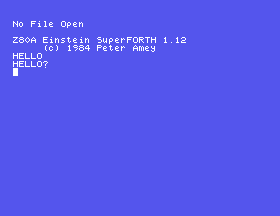
That is the other reply. SuperForth hands your word straight back with a question mark on the end, and there is no ok. It is not being rude. It looked HELLO up in its dictionary, did not find it, and is telling you exactly which word stopped it, which, on a long line, is the thing you most want to know.
Those are the two replies. ok, or your own word with a ?.
The word for printing a message is .": a full stop and a double quote, together, with no space between them. It is pronounced "dot-quote". It prints everything after it up to the next double quote.
." is a word like any other, and that has a consequence that catches everyone once: it must have a space after it. The space is how SuperForth knows where the word ." stops and your message starts.
." HELLO FROM THE EINSTEIN"
Starting from
A fresh boot, with SuperForth just started. This section's line needs nothing that came before it.
What you should see
The line you typed, and underneath it the same words without the ." and the quotes, with ok hard up against the end:
." HELLO FROM THE EINSTEIN"
HELLO FROM THE EINSTEINok
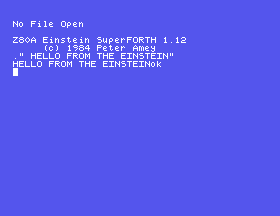
." prints exactly what is between it and the closing quote, and nothing else: no space afterwards and no new line. So SuperForth's ok lands immediately after your last letter. It looks like a mistake the first time. It is two separate things: your message, then the reply to your line, printed one after the other.
.", so the line starts ."HELLO. You have seen the reply you get before in this section. What is SuperForth telling you it was looking for, and why could it not find it?." SECOND LINE" ." AND MORE". Before you press ENTER, decide where the second message will start. Then look. What would you change to put a gap between them?decimal. One of those works and one does not. Why is SuperForth fussy about the letters in one and not the other? Press CAPS LOCK again before you go on.3.1 Make SuperForth print your name.
3.2 Print HELLO THERE, with the space, using two separate ." words on one line, one for each half.
3.3 Type a line of one word that gets a ? back, and then a line of one word that gets ok. You have met one of each already; find another of the first kind.
Worked solutions are in Appendix II.
When you have finished, type:
DOS
SuperForth hands the machine back to the disc operating system, and you are at 0: again. From there FORTH starts it again from the beginning.
| Symptom | Cause |
|---|---|
."HELLO"? | No space after .". SuperForth read ."HELLO" as a single word and went looking for it. |
A word you are sure of comes back with a ?, and your letters are small | CAPS LOCK is off. SuperForth's words are in capitals. Press CAPS LOCK. |
A [, a ] or a small arrow appears in your line | You pressed one of the ← → ↑ keys (in MAME, Left, Right or Up). They type characters. DEL removes it. |
| The cursor has moved off your line and it gets an odd answer | You pressed a cursor key (Tab or the Down arrow in MAME). Press ENTER, and type the line again. |
The output has ok stuck on the end of it | Nothing is wrong. ." adds nothing after your text, and ok is the reply to the line. |
You typed FORTH and got > back, under a screen that says Ready | The machine started without the disc. S2's "When it goes wrong" has the rest. |
FORTH at the 0: prompt starts SuperForth, and a bare cursor means it is listening. It reads a line when you press ENTER and gives one of two replies: ok, or the word it could not find with a ? after it. Its words are in capitals. ." followed by a space prints a message, and DOS takes you back out.
S4, The Stack: what SuperForth does with a number when you type one, where it keeps it, and how to get it back.
This form is protected by reCAPTCHA, and the Google Privacy Policy and Terms of Service apply.
