module
4
In S3 everything you typed was a word. Type a number instead and SuperForth says ok and appears to do nothing at all. It has done something. It has kept the number, and it will go on keeping it until a word comes along that wants it.
Where it keeps it is called the stack, and nearly everything in Forth comes down to knowing what is on the stack at any moment. This section is about learning to see it.
Think of a pile of plates. You can put a plate on top, and you can take the top plate off. You cannot get at one in the middle without first taking off the ones above it.
That is the stack. Every number you type goes on top. Every word that needs a number takes it from the top. The last number on is always the first one off.
SuperForth has a word that shows you the whole pile and leaves it exactly as it was: .S. Type three numbers and look:
11 22 33 .S
11 22 33 .S

11 22 33 ok
The numbers are listed from the bottom of the pile to the top, so the right-hand end is the top. 33 went on last; 33 is on top.
You can type .S as often as you like. Nothing changes. When there is nothing on the stack it says Empty.
., just a full stop, pronounced "dot", takes the top number off the stack and prints it. It really does take it: the pile is one shorter afterwards.
.
.
33 ok
Do it twice more and you get 22 and then 11. They come off in the opposite order to the one they went on in, because the top is the only end you can reach.
Typing .S after every line gets tedious, so SuperForth will do it for you. STON, stack on, shows the stack after every line you type, and STOFF turns that off again. It is the best teacher in the whole language. Leave it on for as long as the stack feels slippery.
STON
11
22
33
.
.
.
STOFF
Starting from
A fresh boot, with SuperForth just started.
What you should see
After each line, a blank line and then the stack, with ok after it. The pile grows to three and shrinks back to nothing:
STON

Empty ok
11

11 ok
22

11 22 ok
33

11 22 33 ok
.
33
11 22 ok
.
22
11 ok
.
11
Empty ok
STOFF
ok
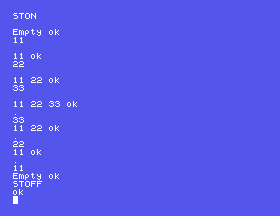
Read the three . lines carefully, because two things are printed for each. The first row is what . printed: the number it took off. The row below is the stack display, showing what is left. So . printed 33, and what was left was 11 22.
Ask for a number when the stack is empty and you get this:
.
46 .? Empty Stack
Three things are worth knowing about it. . went ahead and printed something: a number that was never yours, and which may be a different number next time, so ignore it. Then SuperForth names the word that came unstuck, .?, in the way it names a word it does not know. And then it says why: Empty Stack. There is no ok, because things were not.
SP! empties the stack in one go. It is the word to reach for when you have lost track of what is on there and want a clean start.
An unknown word has the same effect, whether you want it or not. When SuperForth hits a word it cannot find, it does not just stop: it throws away everything on the stack as well. A typing mistake at the end of a line costs you the numbers at the start of it.
11 22 33, then .S. Is the stack any different from typing them on three lines?. . . .: four dots, one more than you have numbers. Before you press ENTER, write down exactly what you expect to see, in order.11 22 HELLO and then .S. Where did 11 and 22 go, and which word is to blame?DEPTH . and then .S. What did DEPTH tell you, and did it cost you anything to ask?4.1 Put 1, 2 and 3 on the stack, in that order, and make SuperForth print 3 2 1 on a single line.
4.2 Without using .S or STON, find out how many numbers are on the stack. Then check your answer with .S.
4.3 Whatever is on the stack now, leave it holding exactly two numbers, 7 and 9, with 9 on top. Prove it.
Worked solutions are in Appendix II.
| Symptom | Cause |
|---|---|
A number you did not type, then .? Empty Stack | You asked for more numbers than the stack held. The stray number means nothing. |
The stack is Empty and you are sure you put numbers on it | Something on a line in between was not a word SuperForth knew, and it cleared the stack. Look up the screen for a ?. |
| Every line is followed by a blank line and a row of numbers | STON is still on. STOFF turns it off. |
With STON on, . seems to print two numbers | It prints one. The row underneath is the stack display. |
Numbers you type go on top of the stack, and words take what they need from the top, so the last one on is the first one off. .S shows the stack without disturbing it, STON shows it after every line, . takes the top number off and prints it, DEPTH counts, and SP! empties. Asking for a number that is not there gets you Empty Stack, and an unknown word empties the stack whether you like it or not.
S5, Sums Backwards: doing arithmetic with what is on the stack, and why the numbers come before the sign.
This form is protected by reCAPTCHA, and the Google Privacy Policy and Terms of Service apply.
