module
2
Before DISKMON can read a disc it has to be on one. In the assembly course MAME loaded your program straight into memory. From now on your program lives on a disc image, the way a real program does, and XtalDOS loads it when you type its name.
Every section from here on ends the same way:
.COM file.edisc.py.0: prompt.Keep your work in one folder, with edisc.py and a copy of the system disc (XTALDOS.DSK) in it. Use a copy, not your only one.
The first DISKMON does one thing: prints its own name. Type it in as diskmon.asm.
; DISKMON - reads and writes the Einstein's discs.
; The Assembly Disc Access Primer's program, as it stands at the end of
; the section named in this file's name.

        ORG 0100H

START:  LD HL,TITLE
        CALL PRINT
        RET

; --------------------------------------------------------------- output
; PRINT: print the zero-terminated text at HL.
PRINT:  LD A,(HL)
        OR A
        RET Z
        CALL PUTC
        INC HL
        JR PRINT

; PUTC: print the character in A, keeping BC, DE and HL.
PUTC:   PUSH BC
        PUSH DE
        PUSH HL
        RST 8
        DEFB 158
        POP HL
        POP DE
        POP BC
        RET

; ----------------------------------------------------------------- data
TITLE:  DEFB 'DISKMON',13,10,0
ORG 0100H because XtalDOS loads a program at 0100h and starts it there. PUTC keeps BC, DE and HL safe around call 158 itself, so that everything DISKMON builds on it can rely on them - you know HL survives the call, but not every register does. 13,10 is carriage return then line feed, a full newline. And RET at the end hands control back to the DOS.
Run it
z80asm -o diskmon.com diskmon.asm
python3 edisc.py create diskmon.dsk
python3 edisc.py add diskmon.dsk diskmon.com DISKMON.COM
mame -rompath ~/roms einstein -window -nomaximize -ui_active -skip_gameinfo -flop1 XTALDOS.DSK -flop2 diskmon.dsk
-flop1 is drive 0 and -flop2 drive 1. When the 0: prompt appears, type:
1:DISKMON
What you should see
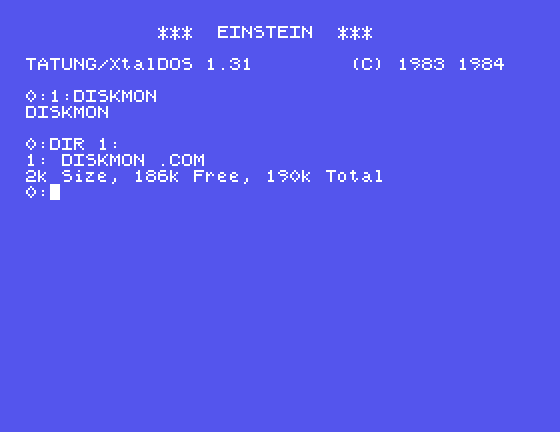
0:1:DISKMON
DISKMON

0:
Then ask the DOS what is on your disc:
0:DIR 1:
1: DISKMON .COM
2k Size, 186k Free, 190k Total
0:
Each time you change the source, assemble again and replace the program on the disc. edisc.py add will not put a second file of the same name on a disc - it says DISKMON.COM is already on this disc - so take the old one off first:
python3 edisc.py remove diskmon.dsk DISKMON.COM
python3 edisc.py add diskmon.dsk diskmon.com DISKMON.COM
Quit MAME before you change the image, and start it again afterwards.
13,10 before the 0. Where will the 0: prompt appear after DISKMON has run?ORG 0100H to ORG 0200H. PRINT, PUTC and TITLE are reached by absolute addresses. What will happen when you run it - and why does nothing in the source warn you?| Symptom | Cause |
|---|---|
DISKMON.COM is already on this disc | The old copy is still there: remove, then add |
You can assemble a program, put it on your own disc image, and run it under XtalDOS from drive 1. DISKMON prints its name and hands back to the DOS.
S3 recaps what is on a disc - the map DISKMON will need when it starts reading one for itself.
This form is protected by reCAPTCHA, and the Google Privacy Policy and Terms of Service apply.
