module
22
This is the command the whole course has been working towards: take a file from your computer and put it on an Einstein disc, so the Einstein can use it. Every piece is already written. add puts them together in the right order.
split_name (S21), and refuse one already on the disc.1A - the Einstein's mark for the end of a text file (S16), and harmless at the end of any other file.block_sectors. The last block is filled out with E5, like the rest of the empty disc.make_entry (S21), and write the directory back.The order matters. Data first, entry last: until the entry is written, the disc's directory still describes the disc exactly as it was.
Rounding up is S4's arithmetic: (size + 127) // 128 is the number of whole records needed for size bytes, and (length + 2047) // 2048 the number of blocks.
If you do not give a disc name, add uses the file's own name. os.path.basename takes the folder off a path: os.path.basename( "/Users/you/edisc/hello.py") is "hello.py", and split_name turns that into HELLO and PY.
After make_entry's neighbours, below name_in_use:
def write_block(disc, block, data):
    places = block_sectors(block)
    for i in range(4):
        track, sector_id = places[i]
        write_sector(disc, track, sector_id, data[i * 512:i * 512 + 512])


def add_file(disc, path, disc_name):
    base, ext = split_name(disc_name)
    if name_in_use(disc, base + "." + ext):
        sys.exit(f"{base}.{ext} is already on this disc")
    with open(path, "rb") as f:
        data = f.read()
    if len(data) == 0:
        sys.exit(f"{path} is empty: there is nothing to add")
    if len(data) > 16384:
        sys.exit(f"{path} is over 16K: this version of edisc cannot add it yet")
    size = len(data)
    records = (size + 127) // 128
    data = data + bytes([0x1A]) * (records * 128 - size)
    count = (len(data) + 2047) // 2048
    blocks = free_blocks(disc)[:count]
    slots = free_slots(disc)
    if len(blocks) < count:
        sys.exit(f"The disc is full: {path} needs {count * 2}K")
    if len(slots) < 1:
        sys.exit("The disc's directory is full")
    for i in range(count):
        chunk = data[i * 2048:i * 2048 + 2048]
        write_block(disc, blocks[i], chunk + bytes([0xE5]) * (2048 - len(chunk)))
    directory = bytearray(read_directory(disc))
    slot = slots[0]
    directory[slot * 32:slot * 32 + 32] = make_entry(base, ext, 0, records, blocks)
    write_directory(disc, directory)
    print(f"Added {base}.{ext}: {size} bytes in block(s) {blocks}, slot {slot}")
free_blocks(disc)[:count] is the first count free blocks: the lowest. And before the else::
elif command == "add":
    disc = bytearray(disc)
    path = sys.argv[3]
    if len(sys.argv) > 4:
        add_file(disc, path, sys.argv[4])
    else:
        add_file(disc, path, os.path.basename(path))
    save_image(filename, disc)
(The whole program: s22-edisc.py.)
Run it
Put your first program, hello.py from S2, on a new disc, and numbers.py from S4 beside it under a shorter name:
python3 edisc.py create MINE.DSK
python3 edisc.py add MINE.DSK hello.py
python3 edisc.py add MINE.DSK numbers.py NUMS.PY
python3 edisc.py list MINE.DSK
What you should see (your byte counts may differ a little, if your files do)
Created MINE.DSK: a blank Einstein disc, 188K free
Added HELLO.PY: 89 bytes in block(s) [1], slot 0
Added NUMS.PY: 284 bytes in block(s) [2], slot 1
HELLO.PY         128 bytes    2K  1 extent(s)
NUMS.PY          384 bytes    2K  1 extent(s)
2 file(s): 4k Size, 184k Free, 190k Total
Then the Einstein, with MINE.DSK in drive 1:
0:DIR 1:
1: HELLO   .PY  : NUMS    .PY
4k Size, 184k Free, 190k Total
Your files, on an Einstein disc, listed by the Einstein - right names, right size, right free space.
Now DISP 1:HELLO.PY. If you saved hello.py on a Mac or Linux, you will see this:
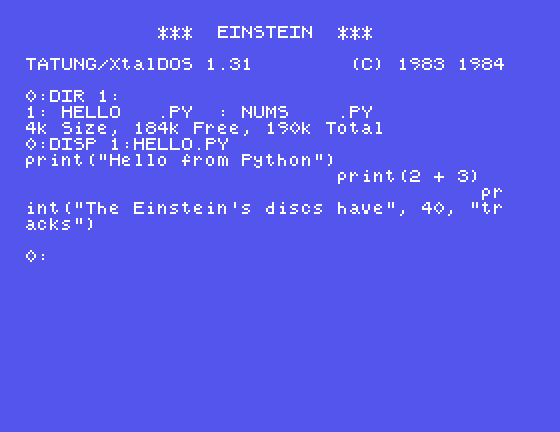
print("Hello from Python")
                          print(2 + 3)
                                      pr
int("The Einstein's discs have", 40, "tr
acks")
Nothing is wrong with the disc. Text files on the Einstein end each line with two bytes, 0D 0A: 0D (carriage return) sends the cursor back to the left edge, and 0A (line feed) moves it down a line. Macs and Linux end lines with 0A alone, so on the Einstein each line starts where the last one finished. (Editors on Windows usually write 0D 0A, and you may not see this at all.)
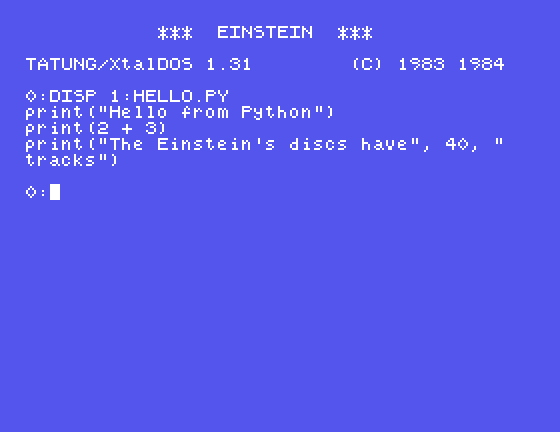
If a text file is meant for the Einstein, give it Einstein line endings first. data.replace(b"\n", b"\r\n") turns every 0A into 0D 0A; with that done, the same file shows properly:
FILES2.DSK from S21: add FILES2.DSK numbers.py. S20 predicted where the next file on that disc would go. Was it right? Check with free and entries.add MINE.DSK hello.py again. What happens, and which line stopped it?hello.py, does the replace above, and writes hello-einstein.py. Add that to a disc as HELLO2.PY and DISP it.STORY.TXT, extracted in S18, will do. What does add say?| Symptom | Cause |
|---|---|
DISP shows each line starting where the last one ended | The file's lines end with 0A alone; the Einstein expects 0D 0A |
HELLO.PY is already on this disc | Names must be unique (in any mix of capitals) |
big.txt is over 16K: this version of edisc cannot add it yet | S23 |
add checks the name, reads the file, pads it with 1A to whole records, takes the lowest free blocks and the first free slot, writes the data a block at a time, and writes the entry last. The Einstein lists the result exactly as it lists its own files. Text going to the Einstein should have 0D 0A line endings.
S23, Files Bigger Than 16K, Again - writing more than one extent.
This form is protected by reCAPTCHA, and the Google Privacy Policy and Terms of Service apply.
