module
12
edisc.py can now reach any of the 400 sectors on a disc. But a disc is not 400 interchangeable boxes: the Einstein uses some of them for one thing and the rest for another, always in the same places. Before you can find a file, you need that plan. This section draws it, and reads the part of it that says what files there are.
Every Einstein disc is divided the same way:
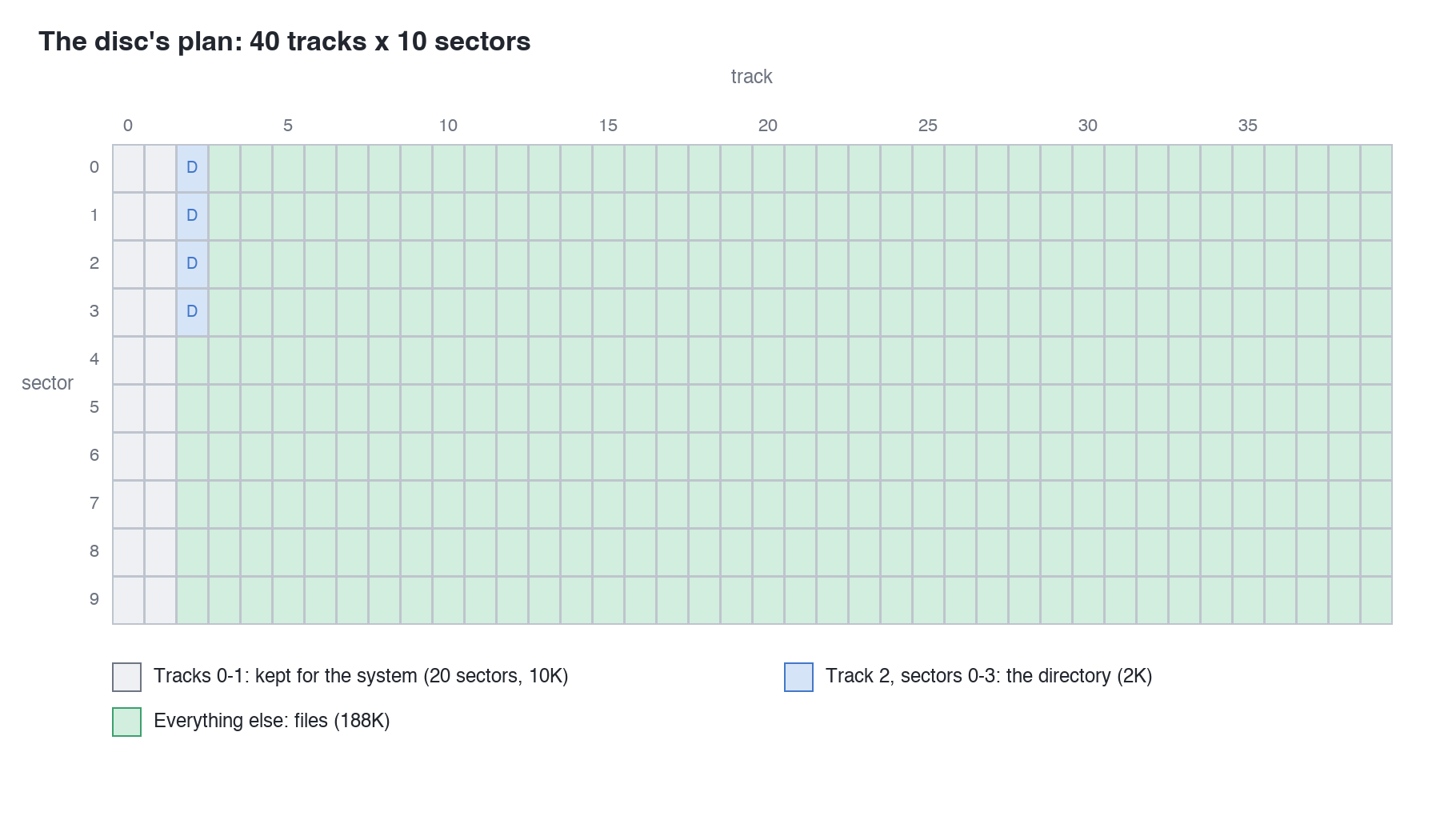
XTALDOS.DSK they hold what the Einstein starts up from: the disc operating system itself. (That is why, in S3, putting FIRST.DSK in drive 0 left the Einstein sitting at its logo: FIRST.DSK's first two tracks are blank.) No file is ever stored there.Count it up. Tracks 2 to 39 are 38 tracks, 38 x 10 x 512 = 194,560 bytes, which is exactly 190K: the 190k Total at the end of every DIR. Take off the 2K directory and 188K is left for files: the 188k Free of an empty disc.
The directory's 2,048 bytes are divided into 64 slots of 32 bytes. Each slot can describe one file (or one piece of a big one - S17), so a disc can hold at most 64 files however much space is left. A slot nobody is using has E5 as its first byte.
Slots run in order through the four sectors: slots 0 to 15 are sector 0, 16 to 31 sector 1, and so on. So if you read the four sectors one after another into one run of 2,048 bytes, slot n is simply the 32 bytes starting at n x 32.
From here on the course uses a second practice disc, FILES.DSK from the course download, which has more on it than FIRST.DSK. It was made with the very tool you are building, and XtalDOS sees it like this:
0:DIR 1:
1:*README  .TXT : STORY   .TXT
1: NUMBERS .BIN
26k Size, 162k Free, 190k Total
Two new helpers, after find_sector. read_sector gives you a sector's 512 bytes (S11's dump_sector worked out where they were; this hands them over). read_directory reads track 2's sectors 0, 1, 2 and 3 and joins them into the directory's 2,048 bytes:
def read_sector(disc, track, sector_id):
    start = find_sector(disc, track, sector_id)
    return disc[start:start + 512]


def read_directory(disc):
    directory = b""
    for sector_id in range(4):
        directory = directory + read_sector(disc, 2, sector_id)
    return directory
b"" is an empty bytes, and + joins two bytes end to end - the same way S6's dump built up text.
Then a command to look at it. Add this after dump_sector:
def show_directory(disc):
    directory = read_directory(disc)
    used = 0
    for slot in range(64):
        entry = directory[slot * 32:slot * 32 + 32]
        if entry[0] != 0xE5:
            print("Slot", slot)
            dump(entry, 0, 32)
            used = used + 1
    print(used, "of 64 directory slots in use")
!= means "is not equal to". The loop takes each slot in turn and dumps only the ones whose first byte is not E5.
Finally, one more command at the end of the program, just before the else: line:
elif command == "directory":
    show_directory(disc)
The whole program as it should now be is s12-edisc.py in the course download, if you want to check yours against it.
Run it
python3 edisc.py directory FILES.DSK
What you should see
Slot 0
000000  00 52 45 41 44 4D 45 20 20 D4 58 54 00 00 00 01  .README  .XT....
000010  01 00 00 00 00 00 00 00 00 00 00 00 00 00 00 00  ................
Slot 1
000000  00 53 54 4F 52 59 20 20 20 54 58 54 00 00 00 80  .STORY   TXT....
000010  02 00 03 00 04 00 05 00 06 00 07 00 08 00 09 00  ................
Slot 2
000000  00 53 54 4F 52 59 20 20 20 54 58 54 01 00 00 1D  .STORY   TXT....
000010  0A 00 0B 00 00 00 00 00 00 00 00 00 00 00 00 00  ................
Slot 3
000000  00 4E 55 4D 42 45 52 53 20 42 49 4E 00 00 00 18  .NUMBERS BIN....
000010  0C 00 0D 00 00 00 00 00 00 00 00 00 00 00 00 00  ................
4 of 64 directory slots in use
Four slots for three files: STORY.TXT has two. And there are names you can read in every one - README, STORY, NUMBERS - with three letters after each, though README's look odd: .XT where you would expect TXT. The other 28 bytes of each slot are numbers. S13 takes a slot apart, byte by byte.
python3 edisc.py directory FIRST.DSK. How many slots are in use?python3 edisc.py dump FILES.DSK 2 0 dumps the directory's first sector whole. Find the slot just after NUMBERS. Its first byte is E5, so directory skipped it - but it is not blank. What does it say?if entry[0] != 0xE5: to if True:. What happens, and why is checking one byte enough?Every Einstein disc follows one plan. Tracks 0 and 1 are kept for the system and never hold files. The first four sectors of track 2 are the directory: 64 slots of 32 bytes, unused ones starting with E5. The rest - 190K including the directory, 188K without it - holds files. read_sector and read_directory fetch those bytes, and directory shows the slots in use.
S13, A Directory Entry, Byte By Byte - what each of a slot's 32 bytes means, and why README's extension looks wrong.
This form is protected by reCAPTCHA, and the Google Privacy Policy and Terms of Service apply.
