module
8
edisc.py can show you the first 256 bytes of an image, and you can read the words in them. It cannot yet tell you what the numbers mean, or even whether the file it was given is a disc image at all - hand it a photo and it will cheerfully dump the photo. This section explains every byte of that first page, and turns what you learn into the tool's first real command, info.
An emulator reading a disc image needs to know how the disc is laid out before it can find anything on it: how many tracks there are, how many sides, and where in the file each track begins. The disk-info header - the first 256 bytes of every image - answers those questions, and nothing else. It is not part of the Einstein's disc; a real floppy has no such page. It is the label on the box.
Its layout, as offsets from the start of the file:
| Offset | Bytes | What it holds |
|---|---|---|
0x00 | 16 | Magic: EXTENDED CPC DSK - the text that says "this is a disc image" |
0x22 | 14 | The name of whatever program made the image (FIRST.DSK says edisc). Nothing reads it |
0x30 | 1 | Number of tracks: 28 = 40 |
0x31 | 1 | Number of sides: 01 |
0x34 | 1 per track | Track sizes: one byte for each track, the size of that track's part of the file, in units of 256 bytes |
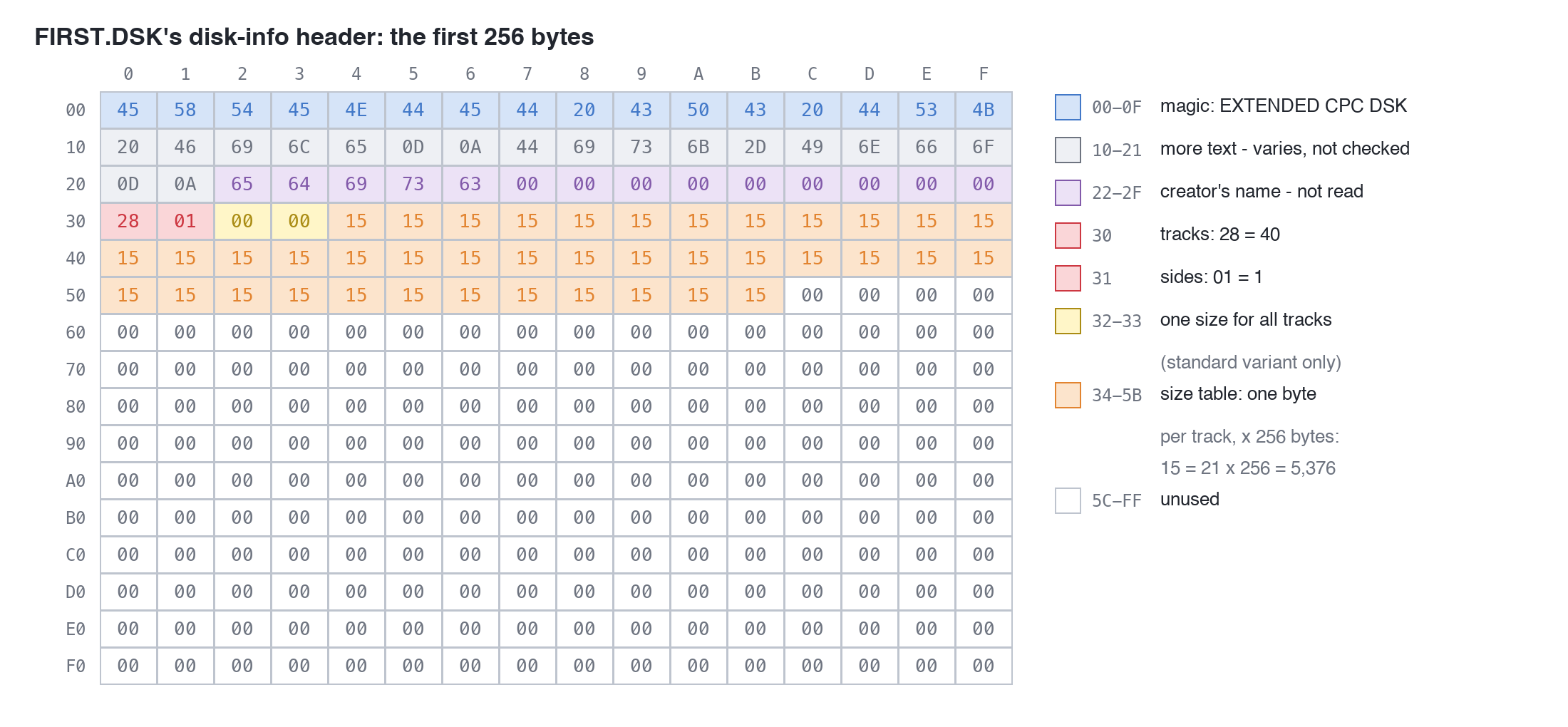
Everything else is zero, or whatever the program that made the image left there - some images carry a few letters of text in the spare space. Only the fields above matter.
A file format usually starts with a few fixed bytes - its magic - so a program can tell at a glance whether it has been given the right kind of file. Here it is the sixteen characters EXTENDED CPC DSK.
Check only those sixteen. The text after them - in FIRST.DSK, File\r\nDisk-Info\r\n - differs from one image to another, depending on what made it. A tool that insists on the whole line turns away perfectly good images.
In Python, == compares two things and gives True or False, and it works on bytes:
disc[0:16] == b"EXTENDED CPC DSK"
is True for an image and False for almost anything else.
0x30 holds 40 and 0x31 holds 1: forty tracks, one side, as you would expect of an Einstein disc. And from 0x34 there are forty bytes of 15, one for each track. 0x15 is 21, and 21 x 256 is 5,376: the number of bytes each track takes up in the file.
Why 5,376, when a track holds ten sectors of 512 bytes, 5,120? Because each track's stretch of the file has a 256-byte header of its own, before its sectors: 256 + 5,120 = 5,376. S9 opens one up.
So the file's size can be worked out from the header alone: 256 for this front page, plus every track's size. For FIRST.DSK, 256 + 40 x 5,376 = 215,296 - exactly the size edisc.py reported in S7. That sum is the best check there is that a file is what it says it is.
Use the table, every time. On every Einstein image you are likely to meet, all forty entries are the same. It is tempting to skip reading them and just assume 5,376. Don't: the table is how the emulator finds each track, and an image whose table says something different is read by the table, not by the assumption.
There is a second form of the header - the standard variant - which the emulator reads just as happily, so a complete tool should read it too. It differs in only two ways:
MV - CPCEMU Disk-File\r\nDisk-Info\r\n; check the first eight bytes, MV - CPC.0x32 serves for every track - and it is too big for one byte, so it takes two.Everything after the header - the tracks themselves - is the same in both.
One byte holds 0 to 255. A size like 5,376 needs two bytes, and they are stored low byte first - "little-endian". 5,376 is 0x1500, so it is stored as 00 15: the 00 (low part) at 0x32, then the 15 (high part) at 0x33. The value is the low byte plus 256 times the high byte: 0 + 256 x 21 = 5,376.
Python does that sum for you:
int.from_bytes(disc[0x32:0x34], "little")
takes the two bytes and gives back the number, low byte first. You will use this whenever the disc stores a number bigger than 255.
When the tool is handed something that is not a disc image, it should say so and stop - not carry on and print nonsense. sys.exit("message") prints the message and ends the program there.
The whole of edisc.py so far. The new parts are read_image, image_format, track_sizes, info, and the lines at the end that choose a command.
import sys


def show_byte(b):
    if 32 <= b < 127:
        return chr(b)
    return "."


def dump(data, start, length):
    for offset in range(start, start + length, 16):
        row = data[offset:offset + 16]
        hex_part = ""
        text_part = ""
        for b in row:
            hex_part = hex_part + f"{b:02X} "
            text_part = text_part + show_byte(b)
        print(f"{offset:06X}  {hex_part:<48} {text_part}")


def read_image(filename):
    with open(filename, "rb") as f:
        return f.read()


def image_format(disc):
    if disc[0:16] == b"EXTENDED CPC DSK":
        return "extended"
    if disc[0:8] == b"MV - CPC":
        return "standard"
    sys.exit("This is not a disc image: it does not start EXTENDED CPC DSK or MV - CPC")


def track_sizes(disc):
    form = image_format(disc)
    count = disc[0x30] * disc[0x31]
    sizes = []
    if form == "extended":
        for i in range(count):
            sizes.append(disc[0x34 + i] * 256)
    else:
        size = int.from_bytes(disc[0x32:0x34], "little")
        for i in range(count):
            sizes.append(size)
    return sizes


def info(filename, disc):
    sizes = track_sizes(disc)
    expected = 256 + sum(sizes)
    print("Image:   ", filename)
    print("Format:  ", image_format(disc))
    print("Tracks:  ", disc[0x30])
    print("Sides:   ", disc[0x31])
    print("Tracks are", min(sizes), "to", max(sizes), "bytes")
    print("Expected size:", expected, "bytes")
    print("Actual size:  ", len(disc), "bytes")
    if expected == len(disc):
        print("The sizes add up.")
    else:
        print("The sizes DO NOT add up.")


command = sys.argv[1]
filename = sys.argv[2]
disc = read_image(filename)

if command == "info":
    info(filename, disc)
elif command == "header":
    dump(disc, 0, 256)
else:
    sys.exit("Unknown command: " + command)
Some new pieces of Python:
elif ("else if") and else extend an if: Python tries each condition in turn and runs the first one that is true, or the else if none is. That is how the last lines pick a command.sizes.append(x) adds x to the end of the list sizes. The list starts empty, [], and grows by one for each track.sum, min and max give the total, smallest and largest of a list. If min and max are the same, every track is the same size.sys.argv[1]) and the image (sys.argv[2]). S7's dump is still there, as the header command.Run it
python3 edisc.py info FIRST.DSK
python3 edisc.py info STANDARD.DSK
STANDARD.DSK is in the course download: the same disc as FIRST.DSK, with a standard-variant header.
What you should see
Image:    FIRST.DSK
Format:   extended
Tracks:   40
Sides:    1
Tracks are 5376 to 5376 bytes
Expected size: 215296 bytes
Actual size:   215296 bytes
The sizes add up.
Image:    STANDARD.DSK
Format:   standard
Tracks:   40
Sides:    1
Tracks are 5376 to 5376 bytes
Expected size: 215296 bytes
Actual size:   215296 bytes
The sizes add up.
Now look at the standard header itself:
python3 edisc.py header STANDARD.DSK
The first four rows:
000000  4D 56 20 2D 20 43 50 43 45 4D 55 20 44 69 73 6B  MV - CPCEMU Disk
000010  2D 46 69 6C 65 0D 0A 44 69 73 6B 2D 49 6E 66 6F  -File..Disk-Info
000020  0D 0A 65 64 69 73 63 00 00 00 00 00 00 00 00 00  ..edisc.........
000030  28 01 00 15 00 00 00 00 00 00 00 00 00 00 00 00  (...............
At 0x32 and 0x33, 00 15: 5,376, low byte first. And no table.
Both images hold exactly the same disc - start MAME with STANDARD.DSK in drive 1 if you like, and DIR 1: lists the same HELLO.TXT.
python3 edisc.py info four.bin (the 4-byte file from S5). What does the tool say, and which line of the program said it?BADSIZE.DSK with one change: disc[0x39] = 0x16 (use a bytearray, as in S5). Which track's entry is that? Predict the info output before you run it - then put BADSIZE.DSK in MAME's drive 1 and see what the emulator makes of it.image_format, change disc[0:16] to disc[0:15]. What happens to info FIRST.DSK, and why?| Symptom | Cause |
|---|---|
This is not a disc image: it does not start EXTENDED CPC DSK or MV - CPC | Exactly what it says - try info four.bin. A real image that says this has been damaged at the very start |
The sizes DO NOT add up. with Expected size: 215552 bytes | One size-table entry changed (BADSIZE.DSK). The file and its own header disagree; the emulator will not load it |
Unknown command: list | The command word is not one the tool knows yet |
IndexError: list index out of range on filename = sys.argv[2] | The image's name was left off: python3 edisc.py info |
The first 256 bytes of a disc image are its disk-info header: magic text that says what it is (EXTENDED CPC DSK, or MV - CPC for the standard variant), the number of tracks and sides, and how big each track's part of the file is - a table of one-byte sizes in the extended variant, one two-byte little-endian size in the standard. An Einstein image is 40 tracks of 5,376 bytes behind a 256-byte header, 215,296 bytes, and edisc.py info checks that it adds up.
S9, Tracks - using those sizes to find every track, and the 256-byte header each one starts with.
This form is protected by reCAPTCHA, and the Google Privacy Policy and Terms of Service apply.
