Word Processor 40, or WP40, is a word processor for the Tatung Einstein published by Surrey Software in 1985. It works a line at a time, with every line numbered, and does almost everything with a single letter typed at its Command?: prompt: A to add lines, K to kill them, M to copy them, F to find, L to print. It has a help screen listing every command, and its disc carries its own tutorial.
This guide takes you from a new file to a printed page. Everything in it was done in MAME with the copy of the Word Processor 40 disc in our library. Where something comes only from the tutorial on the disc and we did not try it, the guide says so.
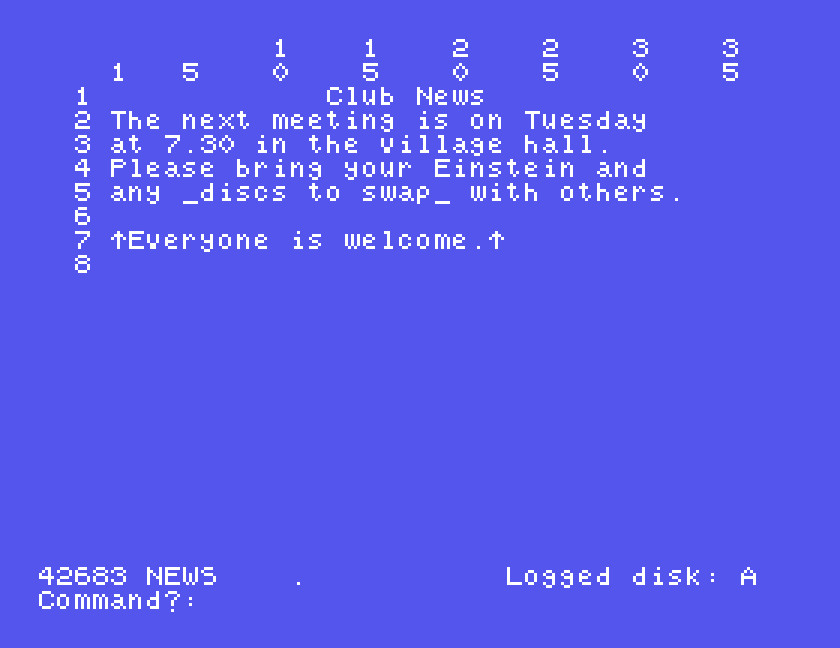
The WP40 disc. It starts WP40 by itself when the Einstein boots. On a real Einstein, put it in drive 0 and switch on or press reset.
Under MAME, set up the Einstein as in Setting Up MAME, and use an .mfi disc image, which MAME can save to; DSK, MFI and SCP explains how to convert the .dsk. To print, give MAME a printer that writes to a file, as shown under Printing:
mame einstein -window -flop1 wp40.mfi -centronics printer -prin notice.prn
WP40 starts with its title, a list of the files on the disc, and a question:
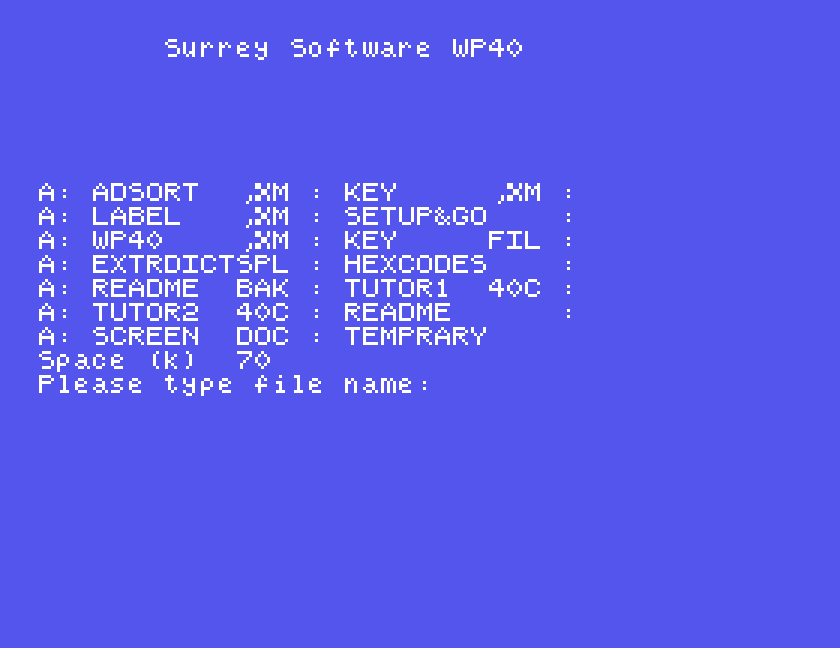
Type a filename and press ENTER. A name that is not on the disc starts a new, empty file with that name; a name that is on the disc loads it. The disc's own tutorial is a good first file to open: type TUTOR1.40C and read it in WP40 itself. TUTOR2.40C carries on from it, and SETUP&GO is a shorter version of the same ground.
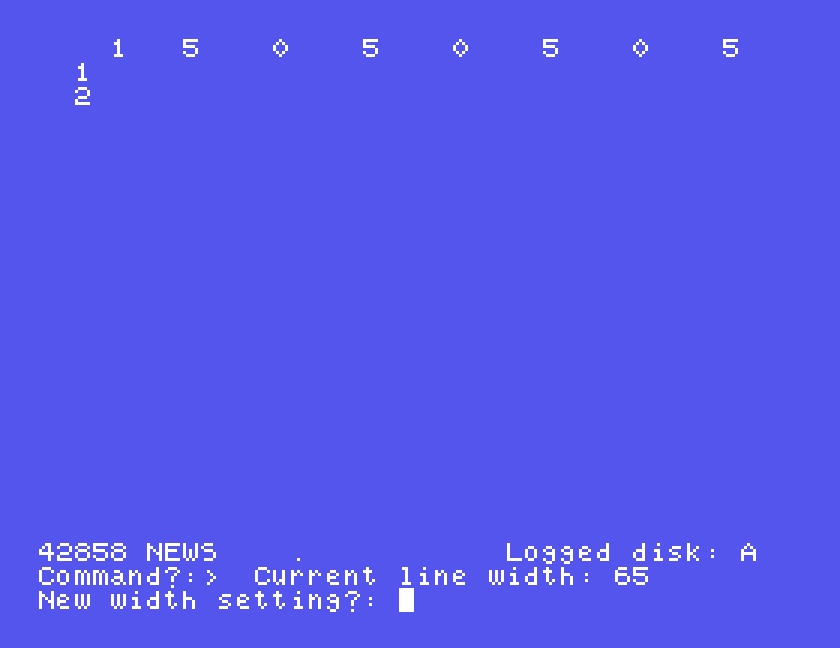
> command asking for a new line width.The bottom two lines are always there. The number is how much memory is left for your text, then the file's name and the drive it is on, and below that the Command?: prompt, where you type commands. Along the top is a ruler numbered in columns, and down the left, the line numbers. Commands work on lines by number.
A new file has lines 65 columns wide. The tutorial suggests 64, and so did we. Type > (SHIFT and the full stop key). WP40 shows Current line width: 65 and asks New width setting?: type 64 and ENTER.
The screen shows only 35 columns at once. X swaps to the other half of the line, and X again swaps back. The ruler tells you which half you are looking at.
The Einstein starts with ALPHA LOCK on, so everything comes out in capitals. Press ALPHA LOCK once before you start: then letters are small, and SHIFT gives a capital.
Type I for Insert. The prompt line says insert/remove characters, and what you type goes into the text. ESC ends it and takes you back to the Command?: prompt. ENTER starts a new line, and pressed twice leaves a blank one. The tutorial suggests leaving a blank line between paragraphs.
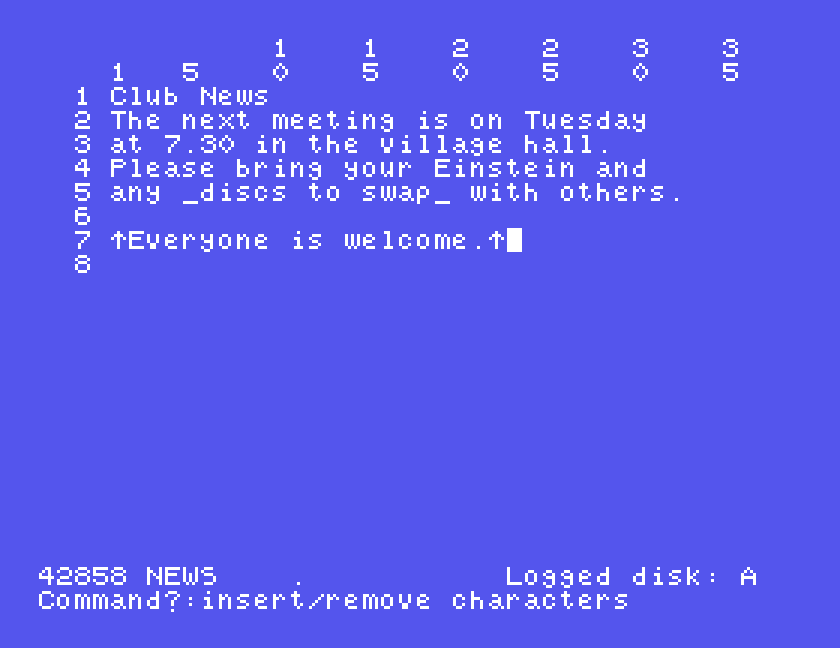
Press ENTER at the end of each line yourself. WP40 will start a new line for you when you reach the end, but in our testing it cut the word in two where the line ran out, rather than moving it down whole. And when we typed quickly, the letter typed at the moment the line ran out was lost. Keep an eye on the ruler, and press ENTER before a word crosses the end.
Underline and bold are marked in the text, and happen when you print:
any _discs to swap_ with others.↑Everyone is welcome.↑. It is the ↑ key on the top row, and in MAME your Up arrow key.On the screen you see the marks; on paper each one prints as a space, so use them in place of the space before and after the words.
Every command is a letter typed at the Command?: prompt. Most ask a question on the bottom line, and many ask which lines to work on: one number, 5, or a range, 5-6.
H shows the list of them all. Any key goes back to your text.
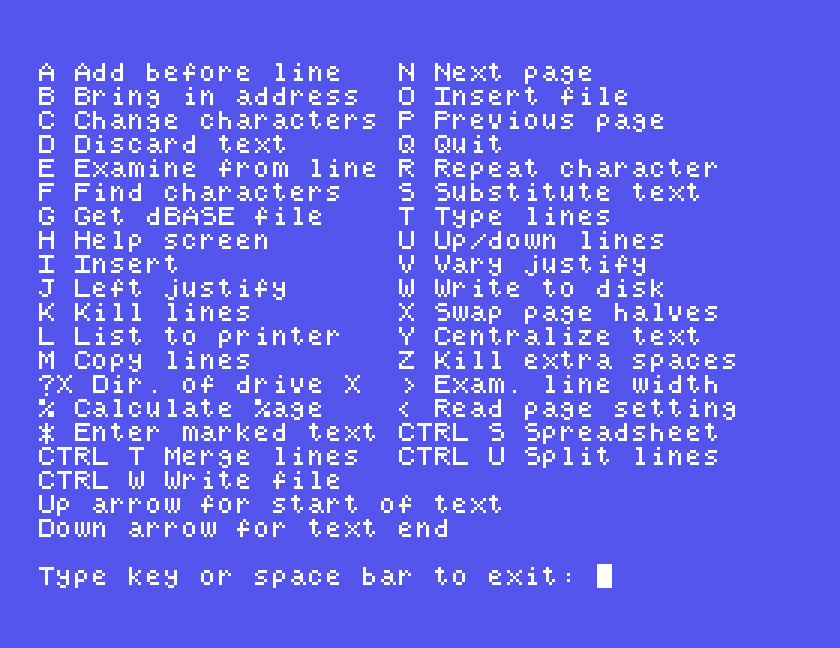
The ones this guide uses:
| Command | Asks | Does |
|---|---|---|
| N, P | next and previous page, fifteen lines at a time | |
| X | swap to the other half of the lines | |
| A | Add before line: | opens space to type new lines before that line; two ENTERs finish |
| M | make a copy of lines:, then before line: | copies lines to another place |
| K | kill lines:, then OK? | deletes lines; answer Y |
| Y | Centre text on lines:, then Total line width: | centres lines within that width |
| F | Find string: | finds text and shows the line; ESC to go back |
| S | substitute all occurrences of string:, by string:, then Replace all strings? | replaces text throughout; answer Y |
The heading at the top of this guide was centred with Y: line 1, in a width of 34.
F and S care about capitals. A search for well does not find Well.
Press CTRL-W. The first time, WP40 asks Store width/paper settings? (Y/N): answer Y, and the file is saved together with its width and printing settings. The tutorial says a second save of the same file asks whether to overwrite it, back it up, or forget it, and suggests B, so that the disc keeps the latest version and the one before; we did not try that.
?A lists the files on drive A, with the space left. SPACE goes back.
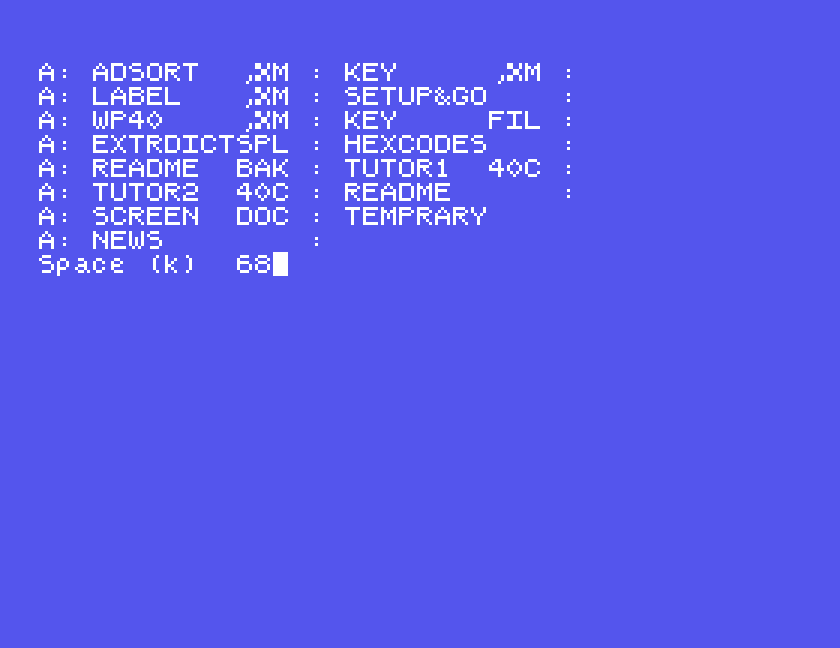
A WP40 file is plain text, with the Einstein's usual line endings, so other programs can read it. The one oddity is at the start: the stored settings are kept as three characters, |B@, in front of the first line. WP40 shows them on its own screen as well, at the start of line 1, in a file with saved settings.
L lists the whole file to the printer. It asks a series of questions:
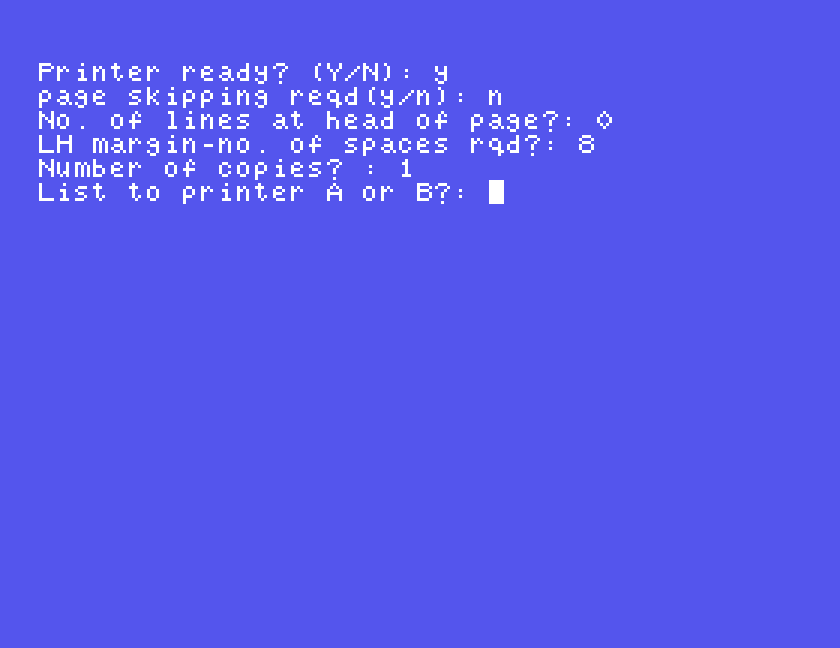
0 for none, then ENTER.8 puts a 64-column line in the middle of the paper.1.The tutorial lists a different set of questions, including headings and page numbers. Answer what your screen asks.
In MAME, with the virtual printer attached, the notice printed with its heading centred and an eight-space margin, and WP40 fed the rest of the page through at the end. Underlining and bold were printed the way a typewriter would: WP40 printed the line, went back to its start without moving the paper, and printed underscores under the marked words; the bold line it printed three times over itself. That needs no special codes from the printer.
If you have no printer, under MAME the .prn file is your printout: open it in any text editor. A text editor cannot put one line on top of another, so the underlined and bold lines may show more than once. On a real Einstein, the saved file is plain text, so the disc itself can be your printout: save the file, image the disc, and take the file off the image on a modern computer.
Q asks what you want:
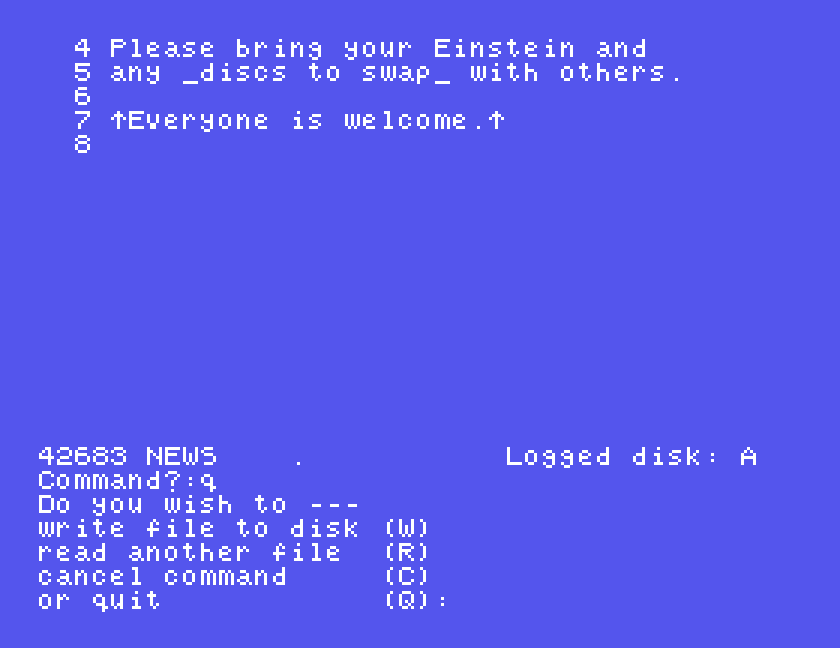
W saves, R loads another file, C goes back to your text, and Q leaves WP40 for the DOS 0: prompt. Save with CTRL-W first; we did not test whether WP40 warns you about unsaved text.
| Key | Does |
|---|---|
| > | set the line width |
| I, then ESC | type text, then back to commands |
| _ ... _ | underline |
| ↑ ... ↑ | bold |
| N, P | next, previous page |
| X | other half of the lines |
| A, M, K | add, copy, kill lines |
| Y | centre lines |
| F, S | find, substitute |
| H | help: every command |
| CTRL-W | save (Y to store settings) |
| ?A | files on drive A |
| L | print the whole file |
| Q, then Q | leave WP40 |
The help screen lists much more that we did not try, including getting a dBASE file (G), spreadsheets (CTRL-S) and percentages (%).
If you used WP40 on a real Einstein, or have its printed manual, we would like to hear from you. The contact form is at tatungbytes.co.uk/contact.