Some downloads on TatungBytes give you the same disc in up to three formats: DSK, MFI and SCP. They are all copies of the same floppy, made for different jobs. This guide explains why there are three, and which one to use.
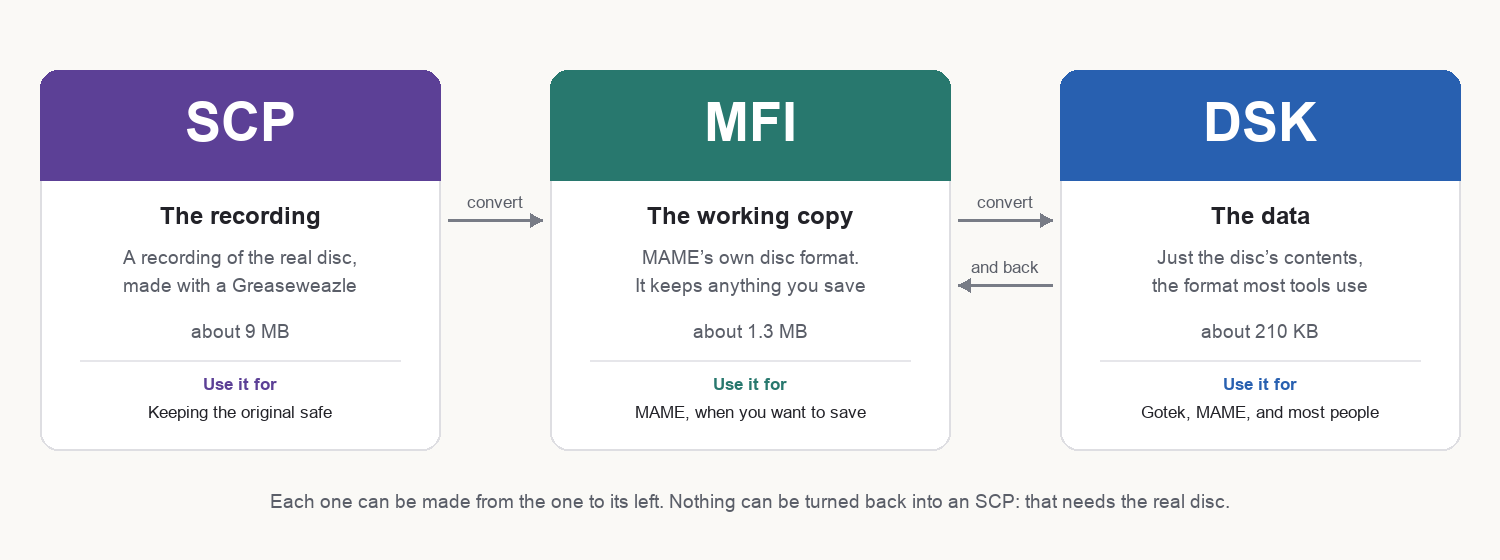
When a real disc is read, the result can be kept at different stages, and each stage is useful for something different.
An SCP is a recording of the disc itself, made with a reader such as a Greaseweazle. It captures the magnetic signal on the disc, read several times over, rather than just the files. It is large, and most software cannot open it, but it is as close to the original disc as a file can get. That makes it the copy to keep for preservation.
A DSK holds just the disc’s contents: the files and data the Einstein itself would read, in a small file that almost everything understands. It is what most people want.
An MFI is MAME’s own disc format. It exists for one practical reason: MAME saves your changes to an MFI, but never to a DSK.
If you only want one file, take the DSK.
On a Gotek, copy the DSK onto the Gotek’s USB stick and choose it like any other disc.
In MAME, give MAME the file as drive 0 when you start it, and the Einstein boots from it:
mame einstein -flop1 GAME.DSKAn MFI works exactly the same way. Our guide to setting up MAME for the Einstein covers the rest.
An SCP cannot be opened by MAME directly. Convert it first, as below.
Our free Einstein Disc Tools convert between the formats in the directions the picture shows. Each command writes a new file with the same name and the new extension:
python3 dsk2mfi_v1.1.py GAME.DSK     # DSK to MFI, for saving work in MAME
python3 mfi2dsk_v1.2.py GAME.mfi     # MFI back to DSK, for a Gotek
python3 scp2mfi_v1.2.py DISC.scp     # SCP to MFI
The version number in each script’s name changes as the tools are updated, so use the names in your copy. To turn an SCP into a DSK, run scp2mfi and then mfi2dsk. The one thing you cannot do is go the other way: an SCP can only be made from the real disc.
If an image misbehaves, dskcheck, also in the Disc Tools, will check any of the three and tell you what, if anything, is wrong with it.
If all we have for a disc is a DSK, the download is just that DSK. If we have more than one file for it, several formats or both sides of a disc, they come together in a single zip, with a short README saying what is what.
A 3 inch disc can be turned over, and the Einstein treats each side as a separate disc. So a disc with something on both sides becomes one set of images per side. Public Domain Disk 193 is an example: two sides, each in all three formats.

This form is protected by reCAPTCHA, and the Google Privacy Policy and Terms of Service apply.
