Zen is an editor, assembler, disassembler and debugger for the Tatung Einstein, all in one 7K program. Kuma sold it in 1984, and its manual comes from Avalon Software. With it you can write Z80 assembly language on the Einstein itself, turn it into machine code, run it, stop it at a breakpoint to look at the registers, and save the result as a program you can run from DOS. It is how you would have written fast code for the Einstein in 1984, and it still works.
This guide takes you through Zen under MAME, from typing in a first program to taking someone else's apart. Everything in it was done with the copies in our library: the Zen disc and the ZEN Editor Assembler Manual. It assumes you know a little Z80 assembly language; if you do not, our Z80 Assembly course starts from the beginning.
The Zen disc boots by itself to the DOS 0: prompt, and holds one file, ZEN.COM. On a real Einstein that is all you need. Under MAME, set up the Einstein as in Setting Up MAME, and convert the disc to MAME's .mfi format first, because you will be saving files and MAME will not write to a .dsk image. DSK, MFI and SCP explains how.
mame einstein -window -flop1 zen.mfi
At the 0: prompt type ZEN and press ENTER. Zen loads and gives you its prompt:
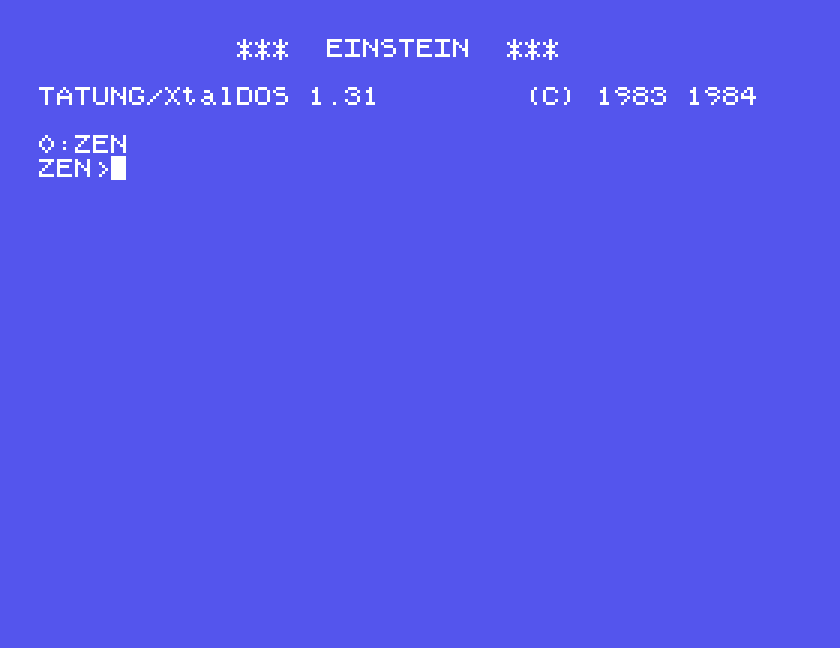
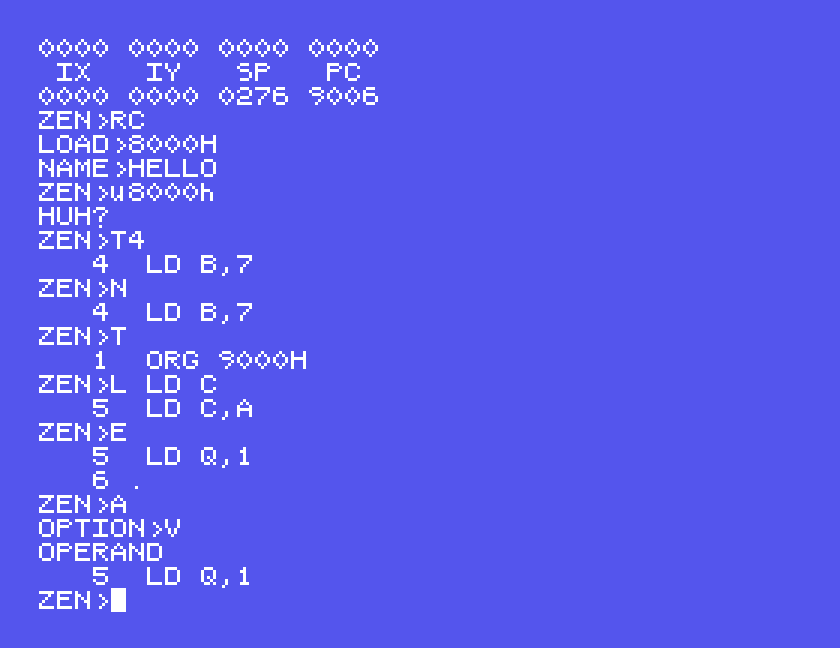
Every command is a single letter, sometimes followed by a number, then ENTER. A few want more, and ask for it with a prompt of their own. If Zen does not understand you it says HUH?, and ENTER on its own clears the screen. The Einstein starts with ALPHA LOCK on, so everything you type comes out in capitals, which is what Zen wants; the two exceptions are covered below.
Numbers can be decimal, or hexadecimal with an H on the end: 8000H. The H must be a capital.
E is Enter. Zen shows a line number, you type a line of assembly language and press ENTER, and it shows the next number. A full stop on a line of its own takes you back to the ZEN> prompt.
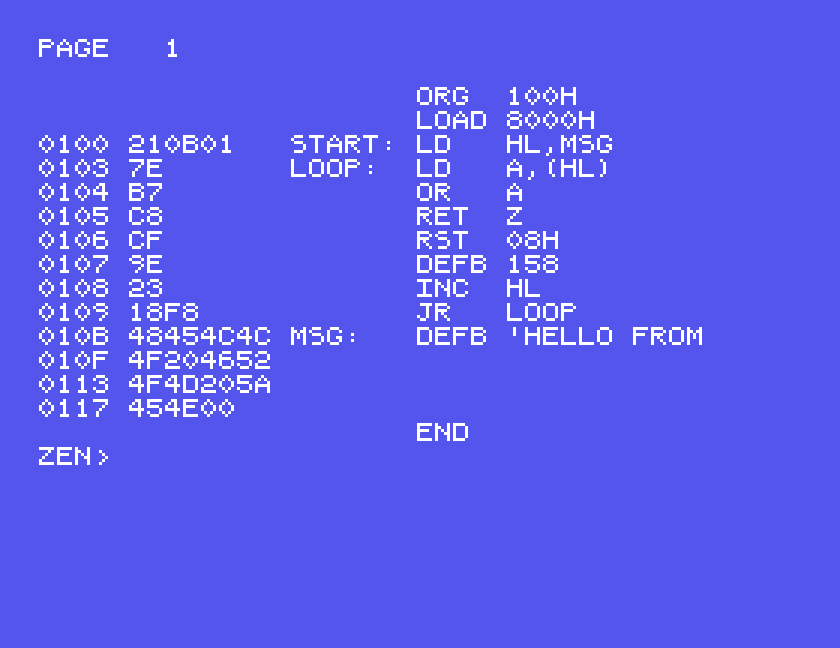
This program prints a message using the Einstein's print-a-character call, RST 08H followed by DEFB 158:
 ORG 100H
 LOAD 8000H
START: LD HL,MSG
LOOP: LD A,(HL)
 OR A
 RET Z
 RST 08H
 DEFB 158
 INC HL
 JR LOOP
MSG: DEFB 'HELLO FROM ZEN',0
 END
Lines without a label begin with a space here, and a label ends with a colon. END is required: it tells the assembler where to stop.
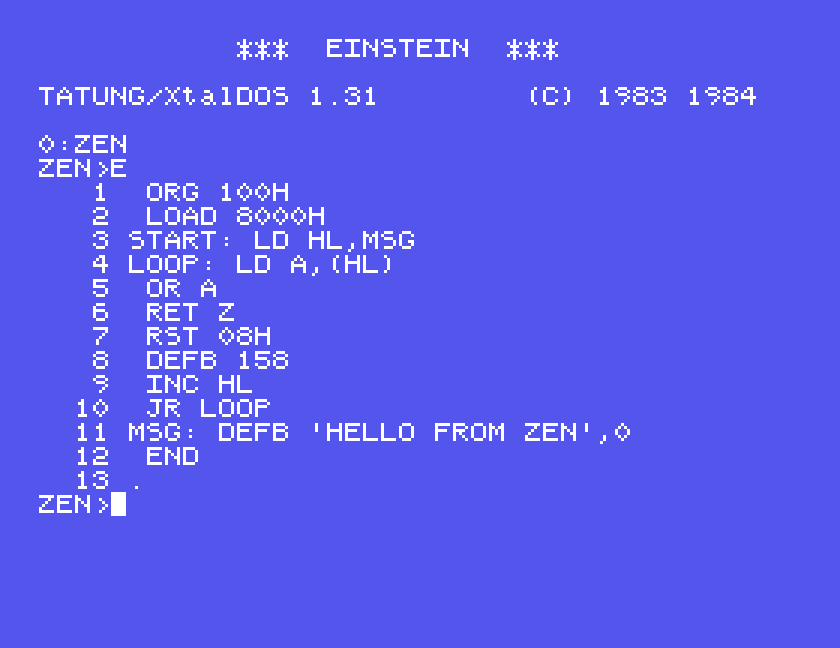
The two lines at the top matter, and they are the key to using Zen. ORG 100H says where the program will run: every Einstein .COM program runs from address 100H. But Zen itself is sitting at 100H while you work, so LOAD 8000H tells the assembler to put the machine code somewhere else in memory for now, at 8000H. The code is built to run at 100H and stored at 8000H.
Zen's editor works a line at a time, like BASIC, but without line numbers stored in the text; the numbers you see are worked out as you go.
| Command | Does |
|---|---|
T | go to the top; T4 goes to line 4 |
P20 | print 20 lines from the current one |
D, U | down, up a line; the manual says D5 moves five |
L LD C | find the next line containing LD C |
N | edit the current line: it appears with the cursor at the end |
E | insert new lines at the current line |
Z | the manual says this deletes lines from the current one; Z5 five |
K | kill the whole text, like NEW in BASIC |
A assembles. Zen asks OPTION>: type V for a listing on the screen, or just press ENTER for no listing, which is faster when you only want to check for mistakes. The manual says E sends the listing to a printer.
If a line is wrong, the listing stops at it and names the problem. Here LD Q,1, which has no register Q, gives OPERAND:
S then sorts and lists the labels with their addresses (only labels written in capitals appear), and Q shows memory, sixty-four bytes at a time. Q8000H shows that the machine code really is at 8000H:
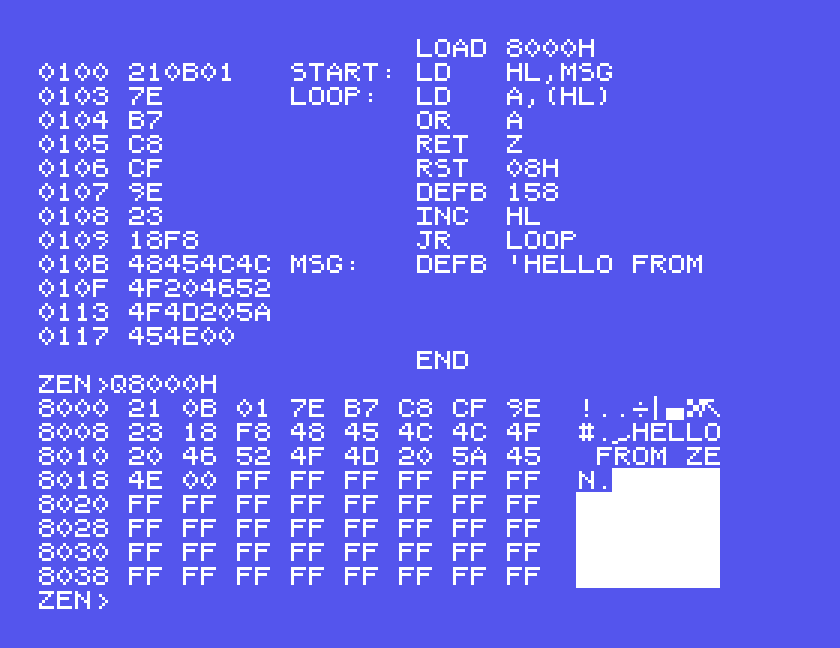
W writes files. WC writes a .COM program: it asks START> and STOP>, the first and last addresses of the code, and then NAME>. Our program runs from 8000H to 8019H in memory:
WC
START>8000H
STOP>8019H
NAME>HELLO
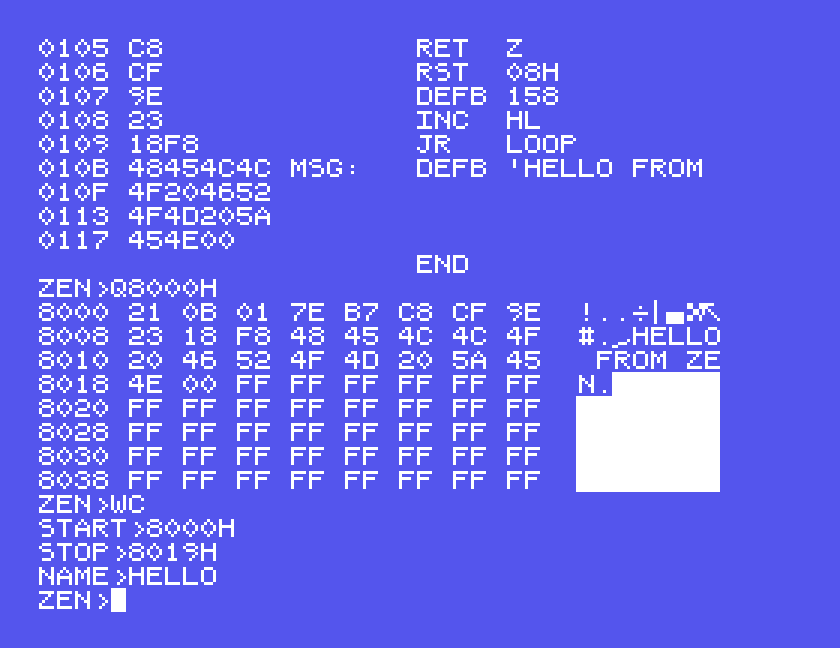
Now B, Bye, goes back to DOS. DIR shows HELLO.COM on the disc beside Zen, and typing HELLO runs it:
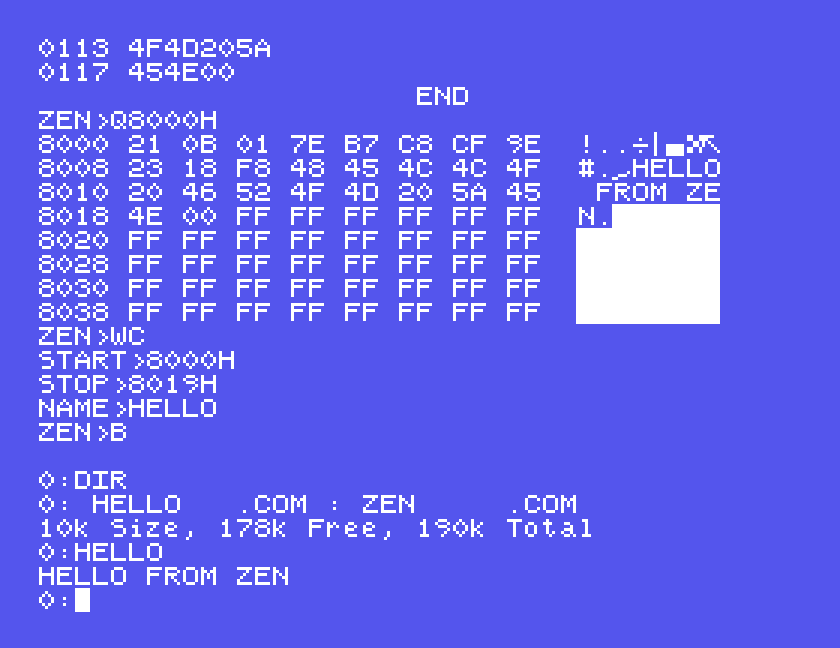
That is the whole cycle, and it is worth remembering in one line: ORG 100H and LOAD 8000H at the top, assemble, WC from 8000H, and run it from DOS.
Saving your source is separate. WS writes the text of the program, asking for a name, and RS reads it back. The manual says RS adds what it reads to the end of anything already in memory, so use K first if you want to start clean, as we did. The manual says Zen's source files are ordinary text files, which is what makes them easy to move to and from a modern computer.
For a program that does not return to DOS, or one you want to watch, Zen can run it and stop it. Assemble something with its ORG and LOAD at the same address, so that it can run where it is:
 ORG 9000H
 LOAD 9000H
START: LD A,42H
 LD B,7
 LD C,A
DONE: NOP
 END
G runs code: G9000H. Zen asks BKPT> for a breakpoint, an address to stop at. We gave 9006H, just after the NOP. The program ran, stopped there, and X showed the registers as it left them: A holds 42, B holds 07 and C holds 42, exactly what the three instructions put there, and the program counter is at 9006.
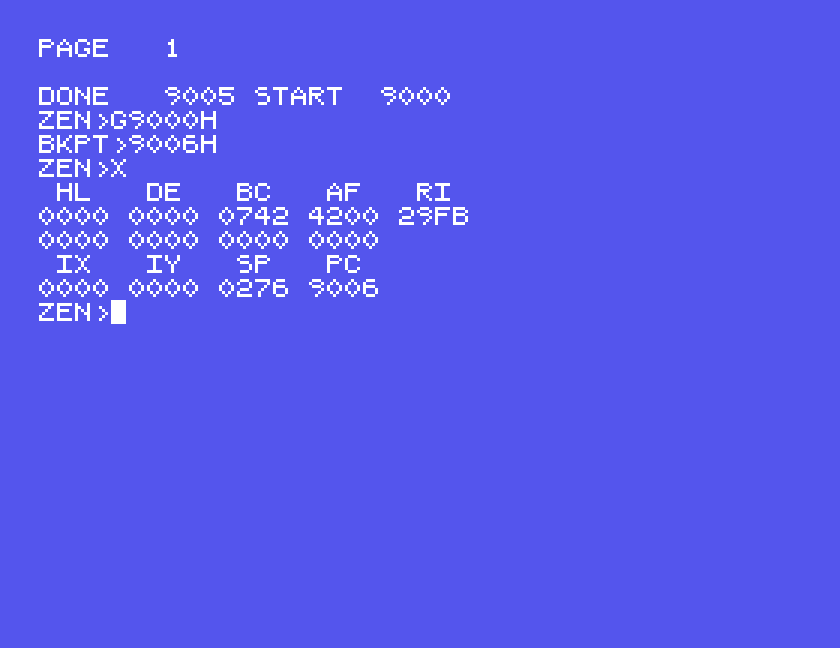
The manual says ENTER at BKPT> sets no breakpoint, and that a program stopped at a breakpoint carries on with G on its own.
Zen can read any .COM file into memory and turn it back into assembly language. RC reads one, asking where to put it with LOAD> and then its NAME>. We read HELLO back in at 8000H.
The two disassembly commands are small letters, u and d, so press ALPHA LOCK before typing the letter and again before the address, because the H of the address must be a capital.
u, unscramble, shows eight instructions from an address: u8000H.
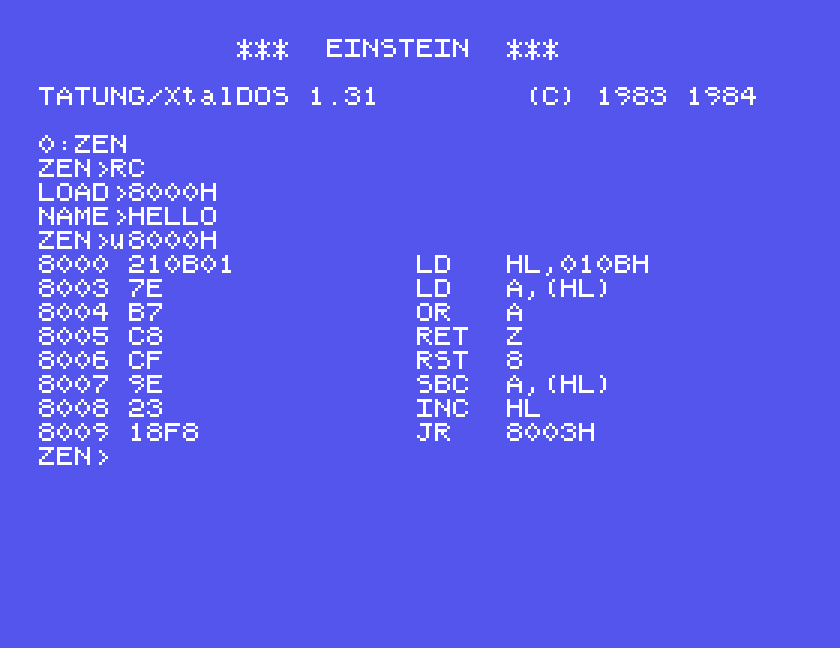
Look at the sixth line. Our program said DEFB 158 after RST 08H, a byte of data for the system call, but the disassembler cannot know that and shows it as the instruction SBC A,(HL). Every disassembler has this problem, which is why the full one lets you mark data.
d is the full disassembler. It asks START> and STOP> for the code, then RUNS AT>, the address the program really runs at, so that its jumps and labels come out right, then any number of DATA AREAS, a START> and STOP> for each block that is data rather than code. A START> and STOP> of 0 ends the list. Then OPTION> as for the assembler:
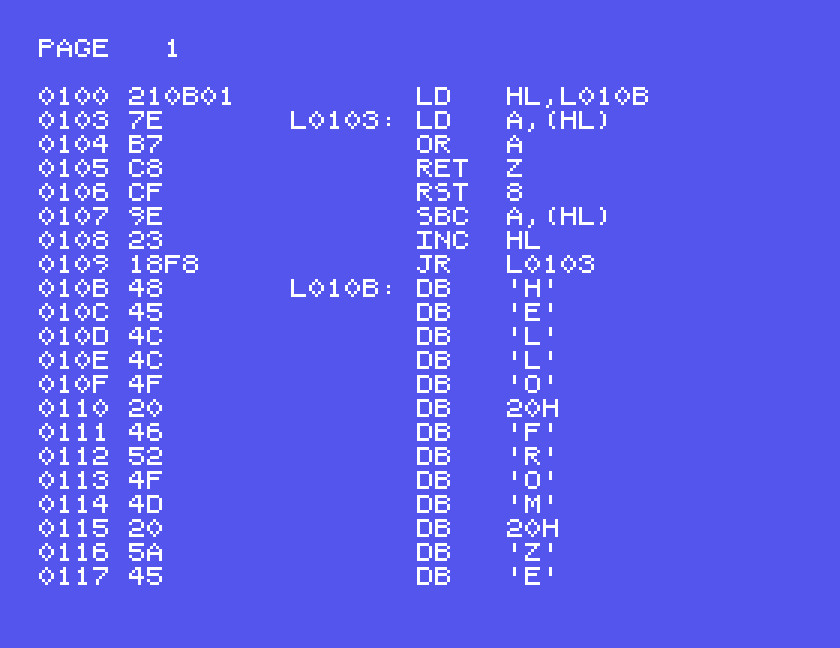
If you answer OPTION> with ENTER, the manual says the disassembly goes into Zen's text as source, ready to edit and assemble again.
| Letter | Command | Does |
|---|---|---|
| A | Assemble | assemble the text; OPTION> V screen, ENTER none |
| B | Bye | back to DOS |
| C | Copy | copy a block of memory, START STOP DESTINATION |
| D, U | Down, Up | move through the text |
| E | Enter | type in lines; . to finish |
| F | Fill | fill memory with a value |
| G | Goto | run code, with an optional breakpoint |
| H | Howbig | the text's start and end, and the top of memory |
| I, O | In, Out | read or write an I/O port |
| K | Kill | clear the text |
| L | Locate | find text |
| M | Modify | change memory a byte at a time; . to finish |
| N | New | edit the current line |
| P | show lines of text | |
| Q | Query | show 64 bytes of memory |
| R | Read | RS source, RC a program |
| S | Sort | list the labels |
| T | Target | go to a line |
| W | Write | WS source, WC a program |
| X | Xamine | show the registers |
| Z | Zap | delete lines |
| d | disassemble | full disassembly |
| u | unscramble | eight instructions |
We used A, B, E, G, H, K, L, N, P, Q, R, S, T, W, X, d and u in writing this guide. The rest are as the manual describes them.
If you used Zen on a real Einstein and remember how, we would like to hear from you. The contact form is at tatungbytes.co.uk/contact.