module
26
SuperForth's own numbers are whole, and stop at 32767. That is enough for counting, co-ordinates and scores, and it is fast. It is no good for the area of a circle.
The FLOAT extension adds numbers with a decimal point and an enormous range. They cost memory, and a minute and a half of loading, so load them when a program needs them and not otherwise.
NEWFILE FLOAT
1 LOAD
Twelve screens go past. Be patient.
A floating number is typed in three parts: the digits, with a decimal point; the word E; and a power of ten.
3.14 E 0
is 3.14 times ten to the power nought, which is 3.14. 1.5 E 3 is 1500. The power is a convenience for very big and very small numbers; most of the time it is 0. Type the decimal point, even in 2. E 0: a whole number is accepted too, but the point is a good habit.
F. prints a floating number, always in the same form - one digit, the point, eight more digits, and the power of ten:
3.14 E 0 F.
3.14000000 E 0 ok
Every word has an F on the front: F+ F- F* F/. They work exactly like their whole-number cousins, numbers first and sign after.
A floating number takes up three places on the stack, not one, so the ordinary stack words would tear it apart. It has its own: FDUP, FDROP, FSWAP.
S->F turns an ordinary whole number into a floating one: 7 S->F.
This is the one thing in the section you must not skip. E only works at the keyboard. Put 2. E 0 inside a definition and SuperForth accepts the definition without complaint - and then the word fails with a bare ? when you run it.
The reason is that E reads the power of ten from whatever is typed next, at the moment it runs. Inside a word, that moment is when the word runs, and what is typed next is nothing at all.
The way round it is to give the number a name first, at the keyboard, with FCONSTANT, and use the name inside the word:
3.14159 E 0 FCONSTANT MYPI
NEWFILE FLOAT
1 LOAD
10. E 0 4. E 0 F/ F.
3.14159 E 0 FCONSTANT MYPI
: AREA FDUP F* MYPI F* F. ;
2.5 E 0 AREA
Starting from
A fresh boot, with SuperForth just started.
What you should see
10. E 0 4. E 0 F/ F.
2.50000000 E 0 ok
3.14159 E 0 FCONSTANT MYPI
ok
: AREA FDUP F* MYPI F* F. ;
ok
2.5 E 0 AREA
1.96349375 E 1 ok
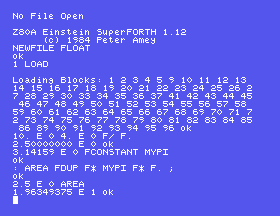
1.96349375 E 1 is 19.6349375. AREA squares the radius with FDUP F* and multiplies by pi.
More of FLOAT lies further down the file:
14 LOAD
brings in FSQR, the square root, and SINE, COSINE and TANGENT, which take their angles in degrees. 60. E 0 COSINE F. prints a half and 45. E 0 TANGENT F. prints one, each give or take the last few digits. 30. E 0 SINE F. prints a half - or rather, 5.00000001 E -1.
About nine digits. 6.02 E 23 F. prints 6.01999999 E 23, and the sine of 30 degrees comes out a whisker over a half. That is the nature of these numbers on any computer, and it has two consequences.
Never test floating numbers for being exactly equal. Test whether they are close.
And be ready for an oddity. One divided by three, times three, ought to be 1. F. prints it as 0.00000000 E -2. The arithmetic has produced something a hair under 1, and the printing word does not cope with it. When a result looks absurd, print the steps that led to it before you doubt your sums.
10 E 0 F. with no decimal point. Does SuperForth mind?: DOUBLE-BAD 2. E 0 F* F. ; and try 2.5 E 0 DOUBLE-BAD. Then fix it.1. E 0 3. E 0 F/ F. and then the same with 3. E 0 F* before the F.26.1 Define ROUND-IT to print the circumference of a circle from its radius: two times pi times r.
26.2 Load the second part and define HYP to print the longest side of a right-angled triangle from the other two. Try it on 3 and 4.
26.3 Print the sines of 0, 30, 60 and 90 degrees, one to a line, using a loop. You will need S->F.
Worked solutions are in Appendix II.
| Symptom | Cause |
|---|---|
A bare ? when a word runs | There is an E inside the definition. Make an FCONSTANT at the keyboard and use that. |
FSQR? or SINE? | Those are in the second part. 14 LOAD. |
Rubbish after a DUP or SWAP | A floating number is three cells. Use FDUP, FSWAP, FDROP. |
0.00000000 E -2 where you expected about 1 | The printing word mishandles a value a hair under 1. Check the steps. |
FLOAT adds numbers typed as 3.14 E 0 and printed by F., with F+ F- F* F/, their own stack words, and nine digits of precision; 14 LOAD adds roots and trigonometry in degrees. E works only at the keyboard, so inside a word use an FCONSTANT.
S27, The Function Keys - making the row of keys along the top type for you.
This form is protected by reCAPTCHA, and the Google Privacy Policy and Terms of Service apply.
