module
24
To move something you have drawn, you have to rub it out and draw it again, and mend whatever was underneath. The Einstein's video chip offers a way round all that. A sprite is a small shape that the chip lays over the picture by itself. You say where; it appears there. Say somewhere else and it moves, and nothing underneath is touched.
NEWFILE SPRITES
1 LOAD
A sprite needs a shape, and you already know how to make one. A sprite's pattern is simply a character, by its code. Whatever SHAPE has done to character 176 is what a sprite with pattern 176 looks like.
0 100 90 11 176 SPRITE
That is five numbers:
| which sprite | they are numbered from 0 |
| x | 0 at the left |
| y | 0 at the TOP |
| colour | 0 to 15 |
| pattern | a character code |
Look hard at y. For sprites y counts down from the top of the screen. For the drawing words in S23 it counts up from the bottom. They are two different parts of the machine with two different habits, and nothing will warn you when you mix them up. A sprite and a plotted dot with the same numbers are in different places.
To move a sprite, call SPRITE again with the same sprite number and new co-ordinates.
Typing five numbers every time is tedious, and three of them never change. SPRITEVAR makes a word with those three built in:
0 11 176 SPRITEVAR ALIEN
Sprite 0, light yellow, pattern 176. From now on 100 90 ALIEN puts it at 100,90, and that is all moving it takes.
NEWFILE SPRITES
1 LOAD
CLS
165 90 36 255 219 126 60 24 176 SHAPE
0 11 176 SPRITEVAR ALIEN
: WAIT 200 0 DO LOOP ;
: FLY 240 0 DO I 90 ALIEN WAIT LOOP ;
FLY
Starting from
A fresh boot, with SuperForth just started.
What you should see
A small yellow invader crossing the screen from left to right, about halfway down, in a few seconds. It passes over the text without disturbing it, and stops at the right-hand side.
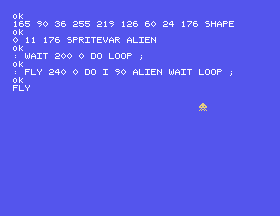
WAIT is a loop with nothing in it. It is there to waste a little time, because without it the flight is over before you can see it.
1 MAG doubles the size of every sprite. 0 MAG puts them back.
0 SPRITE-OFF removes sprite 0, and SPRITES-OFF removes them all. Sprites belong to the video chip, not to the text on the screen, so CLS does not remove them.
FLY to 20 and then to 170. Which is nearer the top?WAIT to loop 1000 times, then 50. FORGET WAIT takes FLY with it, remember.1 MAG and FLY again.24.1 Define DROP-IT to move the alien from the top of the screen to the bottom.
24.2 Define PATROL to fly the alien across and back again. You will want a loop that counts down.
24.3 Define STEER to move the alien left when you press Z and right when you press X, until you press Q. Keep its x in a variable. KEY and CASE will do the rest.
Worked solutions are in Appendix II.
| Symptom | Cause |
|---|---|
| The sprite is at the wrong height | Sprite y counts from the top. Graphics y counts from the bottom. |
| A sprite shaped like a letter | The pattern number is a character code. 65 is an A. |
CLS does not remove it | Use SPRITE-OFF or SPRITES-OFF. |
| Nothing appears | The colour is 0, which is transparent, or the same as the backdrop. |
A sprite floats over the screen and moves without redrawing. Its pattern is a character, designed with SHAPE. SPRITE takes sprite number, x, y, colour and pattern, with y counted from the top; SPRITEVAR wraps the fixed three into a named word that takes just x and y.
S25, Making A Noise - three voices, and a tune.
This form is protected by reCAPTCHA, and the Google Privacy Policy and Terms of Service apply.
