module
29

The worker can walk. Now he gets his job: pushing crates. It is one rule, and the whole puzzle grows out of it - a crate moves only when it is pushed, only one square, and only if there is room for it.
When the worker steps towards a crate, two squares matter: the crate's, one step ahead - NR, NC - and the one beyond it, two steps ahead, NR + DR, NC + DC. The push happens only if both are right:
if (L.Grid[NR, NC] in
     [Crate, Stored]) and
   (L.Grid[NR + DR, NC + DC] in
     [Floor, Goal]) then
There is a crate ahead - on a goal or not - and the square beyond is floor or a goal. A wall beyond, or another crate, and nothing moves: the worker can push one crate, never two.
Sets make this read almost as it would in English, and they make it hard to get wrong. Without them, the same test would be a tangle of four comparisons joined by or and and.
Moving a crate is two jobs: take it off one square, put it on another. Each must remember the goals:
Lift takes a crate off a square. A Crate leaves Floor; a Stored crate leaves the Goal it was standing on.Drop puts a crate on a square. On Floor it becomes a Crate; on a Goal it becomes Stored.Each redraws its square as it goes.
Go pushes first, then does exactly what it did before: if the square ahead is now floor or a goal - because the crate has just left it - he steps into it. If the push could not happen, the crate is still there, and he stays put. Nothing else in Go had to change.
Start WARE3 from WARE2: W WARE3, E, CTRL-K CTRL-R, WARE2.
After Delta, before Go, add:
procedure Lift(Row, Col: Integer);
begin
  if L.Grid[Row, Col] = Crate then
    L.Grid[Row, Col] := Floor
  else
    L.Grid[Row, Col] := Goal;
  Show(Row, Col);
end;

procedure Drop(Row, Col: Integer);
begin
  if L.Grid[Row, Col] = Floor then
    L.Grid[Row, Col] := Crate
  else
    L.Grid[Row, Col] := Stored;
  Show(Row, Col);
end;
In Go, straight after NC := C + DC;, add the push:
  if (L.Grid[NR, NC] in
       [Crate, Stored]) and
     (L.Grid[NR + DR, NC + DC] in
       [Floor, Goal]) then
  begin
    Lift(NR, NC);
    Drop(NR + DR, NC + DC);
  end;
so that Go now reads:
procedure Go(Key: Char);
var
  DR, DC, NR, NC: Integer;
begin
  Delta(Key, DR, DC);
  NR := R + DR;
  NC := C + DC;
  if (L.Grid[NR, NC] in
       [Crate, Stored]) and
     (L.Grid[NR + DR, NC + DC] in
       [Floor, Goal]) then
  begin
    Lift(NR, NC);
    Drop(NR + DR, NC + DC);
  end;
  if L.Grid[NR, NC] in [Floor, Goal]
  then
  begin
    R := NR;
    C := NC;
    Show(R - DR, C - DC);
    Show(R, C);
  end;
end;
Starting from
WARE2 from S28, read into a new work file WARE3. Make the changes, CTRL-K CTRL-D, S, R.
What you should see
The first level again. Walk round behind the crate - LEFT, LEFT, UP - and push it with RIGHT, RIGHT. It slides onto the goal and turns into **.
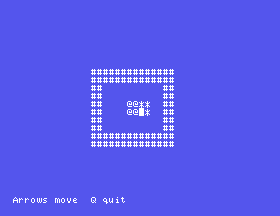
Push it on, off the goal, and the .. comes back. Try to push it into a wall: nothing happens. The game does not yet notice that you have finished; that is next.
Lift(NR, NC); in Go, and push the crate. What appears, and why does the worker not move?Show(Row, Col); at the end of Drop. Push the crate onto the goal, then step away. Where is the crate?if in Lift with L.Grid[Row, Col] := Floor;. Push the crate onto the goal and then off it again. What has happened to the goal?29.1 Count the pushes - only the steps that moved a crate - and show Pushes and the count on the top line.
29.2 A crate pushed into a corner, not on a goal, can never be moved again. Write a function Cornered(R0, C0) that is True when the square has a wall above or below it and a wall to its left or right, and make Go print Stuck! when it pushes a crate into such a square.
29.3 Write a function Home that counts the crates on goals, and show On goals and the count after every key.
Worked solutions are in Appendix II.
| Symptom | Cause |
|---|---|
| The crate will not move | The two tests are the wrong way round, or Lift and Drop have their squares swapped. The crate is one step ahead; the free square is two. |
| Crates multiply | Lift is missing: the new crate is dropped, the old one never taken away. |
| A crate disappears, but is still in the way | Drop does not Show the square it put the crate on. |
| Goals vanish after a crate has been on them | Lift always leaves Floor; it must leave Goal under a Stored crate. |
A push needs a crate one step ahead and a free square - floor or a goal - two steps ahead; two sets say so in one if. Lift and Drop move a crate off and onto squares, keeping the goals underneath. After the push, the worker steps as before.
S30, A Level Complete - noticing the last crate going home, and moving on to the next level.
This form is protected by reCAPTCHA, and the Google Privacy Policy and Terms of Service apply.
