module
30

Push the last crate home and... nothing happens. The game has no idea it is over. This section teaches it to notice, to say so, and to move on to the next level - and gives it four more levels to move on to.
A level is finished when no crate is left off a goal. Left is a function (S16) that counts the crates still on plain floor:
function Left: Integer;
var
  I, J, K: Integer;
begin
  K := 0;
  for I := 1 to Rows do
    for J := 1 to Cols do
      if L.Grid[I, J] = Crate then
        K := K + 1;
  Left := K;
end;
A crate on a goal is a Stored, not a Crate, so it does not count. When Left is 0, the level is done. The game loop asks after every key:
if Left = 0 then
  Won;
Counting 160 squares after every key sounds wasteful, but it is a small job for compiled Pascal - far quicker than drawing even one line of the screen.
Won says Level complete!, waits for a key, and starts the next level. After the last, it goes back to the first.
Start gathers up what the main program used to do - make the level, put the worker at his start, draw it all - so that it can be done from three places: at the beginning, after a level is won, and when you press R to start the level again. Every puzzle of this kind needs R: one crate pushed into a corner and the level cannot be finished.
The level's number and name now go on the top line, so you know where you are.
Count becomes 6, and Names and Plans get four more levels each. They are harder, one after another; every one of them can be finished, and the last takes 46 moves at the very least.
Start WARE4 from WARE3.
At the top, Count = 2; becomes Count = 6;, and Names becomes:
  Names: array[1..Count] of Str20 = (
    'First Steps',
    'Two Crates',
    'The Bend',
    'Crossroads',
    'The Stores',
    'Loading Bay');
In Plans, the last level's '')) becomes ''), and four more levels follow it:
    '',
    ''),
   ('#######',
    '#  #  #',
    '# $ $ #',
    '#. #  #',
    '#. @  #',
    '#######',
    '',
    ''),
   (' #######',
    ' #  .  #',
    '## #$# ##',
    '# $   $ #',
    '#.  @  .#',
    '### $ ###',
    '  # . #',
    '  #####'),
   ('############',
    '#  .   #   #',
    '# $ ## # $ #',
    '#   #  .   #',
    '## @#  #####',
    '#  $  $  . #',
    '#.   ###   #',
    '############'),
   ('##########',
    '#   #    #',
    '# $   $  #',
    '# ## # # #',
    '#  .  .  #',
    '#   @  $ #',
    '##.#     #',
    ' #########'));
In DrawAll, after Squares;, add the top line:
  GotoXY(1, 1);
  Write('Level ', N, ': ', L.Name);
and the bottom line gains the new key:
Write('Arrows R restart Q quit');
After DrawAll, add Start:
procedure Start;
begin
  MakeLevel(N);
  R := L.StartR;
  C := L.StartC;
  DrawAll;
end;
After Go, add Left (above) and Won:
procedure Won;
var
  K: Char;
begin
  GotoXY(1, 2);
  Write('Level complete!');
  GotoXY(29, 2);
  Write('Press a key');
  Read(Kbd, K);
  N := N + 1;
  if N > Count then
    N := 1;
  Start;
end;
Won reads its key into a variable of its own, K, not Ch. If it used Ch, a Q pressed to go on would also end the game.
And the main program becomes:
begin
  N := 1;
  Start;
  repeat
    Read(Kbd, Ch);
    case UpCase(Ch) of
      '^', '[', ']', #10: Go(Ch);
      'R': Start;
    end;
    if Left = 0 then
      Won;
  until UpCase(Ch) = 'Q';
  ClrScr;
end.
Starting from
WARE3 from S29, read into a new work file WARE4. Make the changes, CTRL-K CTRL-D, S, R.
What you should see
Level 1: First Steps at the top. Push the crate onto the goal - LEFT, LEFT, UP, RIGHT, RIGHT - and the game says so:
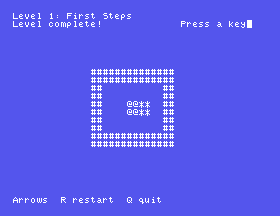
Press a key, and Level 2: Two Crates appears. Make a mess of it and press R: the level is as it was at the start.
Left, change = Crate to = Stored. Run it and press an arrow. Why does the game think you have won?'R': Start;. Walk a step, then press R. What happens?Won, take out Read(Kbd, K);. Finish level 1. Do you see Level complete!?30.1 Show Crates left and the number on the line under the board after every key.
30.2 Make N skip to the next level, for when you are stuck.
30.3 After the last level, instead of going back to the first, say All done!, wait for a key, and end the game. (To test it without finishing all six levels, start at level 6.)
Worked solutions are in Appendix II.
| Symptom | Cause |
|---|---|
Level complete! straight away | Left counts the wrong tile: it must count Crate, the crates not on goals. |
Error 3: ',' expected in Plans | One of the new levels is short of a row. |
| A level is drawn out of shape | A row mistyped: count the spaces against the listing. |
| Nothing happens when the last crate goes home | The if Left = 0 then Won; is missing from the loop, or is outside it. |
Q after Press a key ends the game | Won reads into Ch; give it its own K. |
| R does nothing | The 'R': Start; line is missing from the case. |
A function counts the crates still off their goals, and when it reaches 0 the level is won. Start sets up a level from scratch, so the beginning, the next level and R all use it. The game has six levels, and goes round them in order.
S31, Levels From A File - moving the levels out of the program and onto the disc, where they can be changed without changing the game.
This form is protected by reCAPTCHA, and the Google Privacy Policy and Terms of Service apply.
