module
28

A warehouse you can only look at is not much of a game. This section puts the worker under your control: the arrow keys walk him around, and the walls stop him. Crates stop him too, for now - pushing them is the next section.
Each stage of the game starts as a copy of the one before. S always saves under the work file's own name, so the copy is made the other way round: a new work file, with the old one read into it. The editor can read a whole file into the text:
W, and the new name, WARE2. Turbo says New File.E to open the empty editor.Read block from file:. Type WARE1 and ENTER.The whole of WARE1 appears. Change it into WARE2, and WARE1 stays on the disc as it was - if a change goes badly wrong, you can always start this stage again.
repeat
  Read(Kbd, Ch);
  case UpCase(Ch) of
    '^', '[', ']', #10: Go(Ch);
  end;
until UpCase(Ch) = 'Q';
This is the heart of the game, and it is S24's key-driven loop: wait for a key, act on it, go round again. The arrow keys arrive as ^, [, ] and the character numbered 10 (S24); any of them is handed to Go. Q stops. Any other key falls through the case and does nothing.
Nothing happens between keys. The game costs nothing while you think, and it needs no {$U+} to be stoppable: Q is always there.
Delta turns an arrow into a direction - how far to move in rows (DR) and in columns (DC):
| Key | DR | DC |
|---|---|---|
UP ^ | -1 | 0 |
| DOWN (10) | 1 | 0 |
LEFT [ | 0 | -1 |
RIGHT ] | 0 | 1 |
DR and DC are var parameters (S15): Delta sets the caller's own variables. Working in steps like this means the rest of the game never has to care which of the four keys was pressed - moving up is the same arithmetic as moving right.
Go works out the square the worker would step onto - NR, NC, for next row and next column - and looks at what is there:
if L.Grid[NR, NC] in [Floor, Goal]
then
Only floor and goals can be walked on. A wall, a crate or a crate on a goal stops him, and Go does nothing at all.
If he can go, he moves, and exactly two squares are redrawn: the one he left - Show draws it as whatever tile is there, now that he is not - and the one he arrived on. The rest of the screen is untouched, and the move is instant.
Start WARE2 from WARE1 as above, then make these changes.
Add Ch to the variables:
var
  L: Level;
  N, R, C: Integer;
  LeftCol, TopRow: Integer;
  Wide, High: Integer;
  Ch: Char;
At the end of DrawAll, after Squares;, put the keys on the bottom line:
  GotoXY(1, 24);
  Write('Arrows move  Q quit');
end;
After DrawAll, add the two new procedures:
procedure Delta(Key: Char;
                var DR, DC: Integer);
begin
  DR := 0;
  DC := 0;
  case Key of
    '^': DR := -1;
    #10: DR := 1;
    '[': DC := -1;
    ']': DC := 1;
  end;
end;

procedure Go(Key: Char);
var
  DR, DC, NR, NC: Integer;
begin
  Delta(Key, DR, DC);
  NR := R + DR;
  NC := C + DC;
  if L.Grid[NR, NC] in [Floor, Goal]
  then
  begin
    R := NR;
    C := NC;
    Show(R - DR, C - DC);
    Show(R, C);
  end;
end;
And the main program becomes:
begin
  N := 1;
  MakeLevel(N);
  R := L.StartR;
  C := L.StartC;
  DrawAll;
  repeat
    Read(Kbd, Ch);
    case UpCase(Ch) of
      '^', '[', ']', #10: Go(Ch);
    end;
  until UpCase(Ch) = 'Q';
  ClrScr;
end.
Starting from
WARE1 from S27, read into a new work file WARE2 as above. Make the changes, CTRL-K CTRL-D, S to save, then R.
What you should see
The first level, with Arrows move Q quit on the bottom line. The arrow keys walk the worker around the floor, and he goes over the goal square without spoiling it. He will not go into the walls, and he will not go into the crate. Q clears the screen and returns to Turbo.
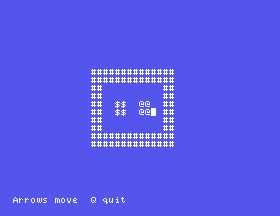
In MAME: the arrow keys on your keyboard are the Einstein's ↑ ← → keys and its vertical cursor key (S24), so the game plays as you would expect.
Show(R - DR, C - DC);. Walk around. What does the worker leave behind him, and why?Go, change in [Floor, Goal] to <> Wall. Walk through the crate, and out the other side. What happens to it?Delta, swap the -1 and the 1 on the '^' and #10 lines. Which way does UP go now?28.1 Make SPACE send the worker straight back to where he started.
28.2 Show the worker's row and column on the top line after every step, as Row 4 Col 5.
28.3 Let the letters E, S, D and X move the worker as well as the arrows - up, left, right and down, as in the editor (S5).
Worked solutions are in Appendix II.
| Symptom | Cause |
|---|---|
| The worker does not move at all | The case is missing an arrow, or Go is not called. Check the characters '^', '[', ']' and #10. |
| He moves the wrong way | A sign in Delta is the wrong way round. |
| A trail of workers | The square he left is not redrawn: Show(R - DR, C - DC) is missing. |
| Q does nothing | until UpCase(Ch) = 'Q' is missing or mistyped. |
A new stage starts as a new work file with the last stage read in by CTRL-K CTRL-R. The game loop waits for a key, acts on it, and goes round until Q. Delta turns an arrow into a step in rows and columns, and Go takes the step only onto floor or a goal, redrawing just the two squares that changed.
S29, Pushing A Crate - the one thing the worker is for.
This form is protected by reCAPTCHA, and the Google Privacy Policy and Terms of Service apply.
