module
15

S14's scroll moves the whole screen. A game almost always wants something that doesn't move: the score, the lives, the fuel gauge. On the TC-01 the video chip draws every line the same way, and all your program hears from it is the frame flag, once a frame (the assembly course's S26).
The 256's chip will interrupt your program at a line you name. At that moment you can change the registers that decide what the rest of the picture looks like: which page is shown, where it is scrolled to, the backdrop colour. The top of the screen is drawn one way and the bottom another.
Three things set it up:
| R#19 | the line to interrupt at |
| R#0 bit 4 (IE1) | the line interrupt on. Graphics 4 with it is R#0 = 16h |
| S#1 bit 0 (FH) | the line flag: set when that line is reached, cleared when you read S#1 |
It comes through the same IM 2 vector as the frame interrupt, FFh, so one handler gets both. It tells them apart by reading S#1. If FH is set it is the line; if not, it is the frame, and frame.asm's handler takes over as usual, reading S#0.
Two rules about where the split lands:
R#19 counts lines of the scrolled picture, not lines of the screen. With R#23 = 16, R#19 = 100 interrupts at screen line 84, where picture line 100 is showing. So when the playfield scrolls, add R#23 to R#19 every frame, or the split scrolls with it.
A change made in the line handler shows from the next line. So ask for the line above the one you want. To start the panel at screen line 160, write R#19 = 159 + R#23.
The handler is short, and you will want it again in S19, so it is a file of its own that you INCLUDE after frame.asm. Save it as s15-lineint.asm.
; s15-lineint.asm - adds the line interrupt to frame.asm, for any program
; that INCLUDEs both. (S15 explains every line.)
;
; Both of the video chip's interrupts come through the same IM 2 vector,
; FFh. This file puts its own entry stub on that vector. The stub reads
; S#1: if the line flag (FH, bit 0) is set, it is the line interrupt and
; it calls the program's online; if not, it is the frame interrupt, and
; frame.asm's frame does the usual work (and calls onframe).
;
; Your program must define, as well as onframe:
;   online    - its work at the line in R#19. Called from the interrupt;
;               it may use AF only (save anything else it needs), must
;               not read port 9 (R#15 is 1 while it runs), must not call
;               MOS, and should be quick: the picture is being drawn.
; and use, in order:
;   irqon, then lineon - both tables' entries in place (interrupts off)
;   set R#19, R#0 with bit 4 (IE1) on, R#1 with bit 5 on, then EI
;   on the way out: R#0 with bit 4 off, under DI, BEFORE irqoff

LENTRY: EQU 9140h       ; this stub's home: above 8000h, clear of frame.asm's

; --- lineon: copy the stub up and point vector FFh at it
lineon: LD HL, lstub
        LD DE, LENTRY
        LD BC, lstubend-lstub
        LDIR
        LD HL, LENTRY
        LD (TABLE+255), HL
        RET

; --- lstub: copied to LENTRY. As frame.asm's stub: if the interrupt came
;     during a MOS call, page the ROM out first, and back in after.
lstub:  PUSH AF
        IN A, (26h)
        BIT 1, A        ; 1 = the ROM is in
        JR Z, ls1
        OUT (24h), A    ; ROM out
        CALL vdpint
        OUT (24h), A    ; ROM back in
        POP AF
        EI
        RETI
ls1:    CALL vdpint
        POP AF
        EI
        RETI
lstubend:

; --- vdpint: which interrupt is it? S#1 bit 0 (FH) says the line.
;     The line's work goes first, before anything else: the picture does
;     not wait. R#15 is still 1 while online runs.
vdpint: LD A, 1
        OUT (9), A
        LD A, 128+15
        OUT (9), A      ; R#15 = 1
        IN A, (9)       ; S#1 - reading it clears FH
        RRCA            ; FH into carry
        JR NC, notln
        CALL online     ; the line
        XOR A
        OUT (9), A
        LD A, 128+15
        OUT (9), A      ; R#15 = 0 again
        RET
notln:  XOR A
        OUT (9), A
        LD A, 128+15
        OUT (9), A      ; R#15 = 0 again, before frame reads S#0
        JP frame        ; the frame: frame.asm reads S#0 and calls onframe
lineon replaces frame.asm's entry on vector FFh with its own. Like frame.asm's, the stub is copied above 8000h: an interrupt that arrives during a MOS call finds the ROM over the bottom 32K, where the rest of your program lives, so the stub pages it out first (port 26h bit 1 says it is in, port 24h swaps it) and back in afterwards.
Then vdpint reads S#1 with R#15 = 1. If the line flag is set it calls your online straight away, before it even puts R#15 back. The picture doesn't wait for your handler: the chip is drawing the next line while the Z80 is still working out which interrupt it has. A handler that does a few more things first makes its changes land late, and a register written second can miss the line the first one made. So online does only the visible change, writes registers directly with OUT, and returns.
Only then does vdpint set R#15 back to 0. On the frame path that has to happen before frame reads port 9, or frame reads S#1 instead of S#0, the frame flag is never cleared, and the interrupt comes straight back.
On the way out, turn IE1 off first. frame.asm's irqoff puts MOS's table back, and vector FFh in MOS's table lands in the middle of MOS. A line interrupt still enabled then throws your program back to MOS, as an enabled frame interrupt did in S3. Write R#0 without bit 4, under DI, before irqoff.
The simplest split changes one colour. In Graphics 4 every dot of colour 0 shows the backdrop, R#7. So draw sky and sea in colour 0, set R#7 to cyan in the frame interrupt and to blue in the line interrupt, and the screen is cyan above the line and blue below it. Move R#19 each frame and the waterline rises and falls.
The frame handler sets the colour for the top of the next picture. The backdrop also colours the border, so the border above the picture is cyan, and so is the border below it, apart from a line or two of blue just under the picture.
A green rock stands in the sea. The tide comes in and goes out: the waterline climbs from line 163 to line 100 and back, a line a frame.
; S15: a colour split. One picture, two backdrop colours: sky above a
; line, sea below it - and the line rises and falls, like a tide.
;
; Everything in the picture that is colour 0 shows the backdrop, R#7.
; The frame interrupt sets R#7 to cyan for the top of the picture; the
; line interrupt, at the line in R#19, sets it to blue. Moving R#19 each
; frame moves the waterline. Runs for 500 frames (10 seconds).

        ORG 256

        DI
        ; --- Graphics 4, showing the page at 10000h
        LD A, 06h
        LD B, 0
        CALL setreg
        LD A, 5Fh
        LD B, 2
        CALL setreg

        ; --- sprites out of the way (attribute table at 1FA00h: Y = 216)
        LD A, 7
        LD B, 14
        CALL setreg
        XOR A
        OUT (9), A
        LD A, 3Ah + 40h
        OUT (9), A
        LD A, 216
        OUT (8), A
        LD A, 0F7h
        LD B, 5
        CALL setreg
        LD A, 03h
        LD B, 11
        CALL setreg

        ; --- the picture: all colour 0, with an island of colour 12
        LD A, 4
        LD B, 14
        CALL setreg     ; 10000h
        XOR A
        OUT (9), A
        LD A, 40h
        OUT (9), A      ; offset 0, writing: the run carries on in G4
        LD D, 0         ; D = line
pic1:   LD E, 0         ; E = byte across
pic2:   XOR A           ; colour 0 ...
        LD C, A
        LD A, D
        CP 60           ; ... except lines 60-191, bytes 40-87
        JR C, pic3
        LD A, E
        CP 40
        JR C, pic3
        CP 88
        JR NC, pic3
        LD C, 0CCh      ; the island
pic3:   LD A, C
        OUT (8), A
        INC E
        BIT 7, E
        JR Z, pic2      ; 128 bytes a line
        INC D
        LD A, D
        CP 192
        JR NZ, pic1

        ; --- both interrupts
        CALL irqon
        CALL lineon
        LD A, 120
        LD B, 19
        CALL setreg     ; a line to start with
        LD A, 16h       ; R#0: Graphics 4 with IE1, the line interrupt
        LD B, 0
        CALL setreg
        LD A, 0E0h      ; R#1: display on, frame interrupt on
        LD B, 1
        CALL setreg
        EI

main:   CALL waitf
        LD HL, (TICKS)
        LD DE, 500
        OR A
        SBC HL, DE
        JR C, main

        ; --- put the machine back: the line interrupt off first
        DI
        LD A, 06h       ; R#0 without IE1
        LD B, 0
        CALL setreg
        LD A, 4         ; R#7: MOS's backdrop, colour 4
        LD B, 7
        CALL setreg
        LD A, 0C0h
        CALL irqoff
        CALL tomos
        RET

; --- onframe: sky for the top of the next frame; move the waterline
onframe:
        LD A, 7         ; R#7 = colour 7, cyan
        LD B, 7
        CALL setreg
        LD A, (TICKS)   ; t = frames mod 128, folded: 0-63, then back down
        AND 7Fh
        CP 64
        JR C, of1
        CPL
        AND 7Fh
of1:    ADD A, 100      ; the waterline: lines 100-163
        DEC A           ; ask for the line above: the change shows a line late
        LD B, 19
        JP setreg

; --- online: the waterline - the backdrop turns blue from here down
online: LD A, 4         ; colour 4, blue
        OUT (9), A
        LD A, 128+7
        OUT (9), A
        RET

        INCLUDE "frame.asm"
        INCLUDE "s15-lineint.asm"
Build and run
Save it as s15-colour-split.asm next to frame.asm and s15-lineint.asm. Build and run it as in S2.
What you should see
A cyan sky, a dark green rock in the middle, and blue sea below a straight waterline right across the screen. The waterline moves a line every frame, falling for a little over a second and then rising, again and again. Below the picture the border is cyan, after a line or two of blue. After ten seconds MOS's screen and the prompt.

The colour split changed one register. The score panel changes two:
The frame interrupt puts both back for the top of the next frame (R#2 = 5Fh, R#23 = the scroll), asks for the next line interrupt at 159 + the scroll, and feeds the playfield's next line as in S14. The playfield shows only 160 lines now, but its page still loops through all 256, so nothing else in S14's scroll changes.
What it costs: the panel's 32 lines take 4K of the page at 18000h; the rest of that page is free. The handlers cost two interrupts a frame instead of one.
The panel's text comes from MOS's own font, which is still in video memory at 1800h while your program runs: 8 bytes a character, one byte a row, a set bit for each dot of ink. glyph reads a character's 8 bytes and turns each into four Graphics 4 bytes.
; S15: a still score panel under a scrolling playfield.
; The top 160 lines are S14's river, scrolling up a line a frame. The
; bottom 32 lines are a panel that never moves. Runs for 500 frames.
;
; The playfield is the page at 10000h (R#2 = 5Fh), scrolled by R#23.
; The panel is 32 lines at the top of the page at 18000h (R#2 = 7Fh).
; At line 159 the line interrupt switches R#2 to the panel's page and
; R#23 to 96, so that screen line 160 shows panel line 0 (160 + 96 =
; 256, which wraps to 0). The frame interrupt puts both back for the
; top of the next frame, and asks for the next line interrupt.

        ORG 256

        DI
        ; --- Graphics 4 first, so VRAM runs carry on past 16K
        LD A, 06h
        LD B, 0
        CALL setreg
        LD A, 5Fh
        LD B, 2
        CALL setreg
        XOR A
        LD B, 23
        CALL setreg

        ; --- sprites out of the way (attribute table at 1FA00h: Y = 216)
        LD A, 7
        LD B, 14
        CALL setreg
        XOR A
        OUT (9), A
        LD A, 3Ah + 40h
        OUT (9), A
        LD A, 216
        OUT (8), A
        LD A, 0F7h
        LD B, 5
        CALL setreg
        LD A, 03h
        LD B, 11
        CALL setreg

        ; --- the panel, before the river: its text comes from MOS's
        ;     font, still in VRAM at 1800h
        CALL panel

        ; --- the river: rows 0-255 into lines 0-255
        LD HL, 0
first:  LD A, L
        CALL drawrow
        INC HL
        LD A, H
        OR A
        JR Z, first

        ; --- both interrupts
        CALL irqon
        CALL lineon
        LD A, 159       ; the first split: line 159, no scroll yet
        LD B, 19
        CALL setreg
        LD A, 16h       ; R#0: Graphics 4 with IE1
        LD B, 0
        CALL setreg
        LD A, 0E0h      ; R#1: display on, frame interrupt on
        LD B, 1
        CALL setreg
        EI

main:   CALL waitf
        LD HL, (TICKS)
        LD DE, 500
        OR A
        SBC HL, DE
        JR C, main

        ; --- put the machine back: the line interrupt off first
        DI
        LD A, 06h
        LD B, 0
        CALL setreg
        LD A, 0C0h
        CALL irqoff
        CALL tomos
        RET

; --- online: line 159 - from the next line down, show the panel
online: LD A, 7Fh       ; the panel's page
        OUT (9), A
        LD A, 128+2
        OUT (9), A
        LD A, 96        ; screen line 160 = panel line 0
        OUT (9), A
        LD A, 128+23
        OUT (9), A
        RET

; --- onframe: the top of the next frame - the playfield, scrolled on
onframe:
        LD A, 5Fh
        LD B, 2
        CALL setreg     ; the playfield's page
        LD HL, (TICKS)
        LD A, L
        LD B, 23
        CALL setreg     ; R#23 = the scroll
        LD A, L
        ADD A, 159      ; R#19 counts lines after the scroll: add it
        LD B, 19
        CALL setreg
        DEC HL          ; feed the line just scrolled off, as in S14
        LD A, L
        INC H
        JP drawrow

; --- panel: lines 0-31 of the page at 18000h. Line 0 white, the rest
;     black (colour 1), with the text on lines 12-19.
panel:  LD A, 6
        LD B, 14
        CALL setreg     ; 18000h
        XOR A
        OUT (9), A
        LD A, 40h
        OUT (9), A
        LD A, 0FFh      ; line 0: white
        LD B, 128
pn1:    OUT (8), A
        DJNZ pn1
        LD DE, 31*128   ; lines 1-31: black
pn2:    LD A, 11h
        OUT (8), A
        DEC DE
        LD A, D
        OR E
        JR NZ, pn2
        LD HL, text     ; then the text, a character at a time
        LD E, 4         ; E = the character column (8 dots each)
pn3:    LD A, (HL)
        OR A
        RET Z
        CALL glyph
        INC HL
        INC E
        JR pn3

; --- glyph: character A at column E, lines 12-19 of the panel. HL, E kept.
;     Each of the font's 8 bytes is 8 dots, 1 = ink; in Graphics 4 that
;     is 4 bytes, two dots each, the left dot in the high nibble.
glyph:  PUSH HL
        PUSH DE
        LD L, A         ; the font byte address: 1800h + code * 8
        LD H, 0
        ADD HL, HL
        ADD HL, HL
        ADD HL, HL
        LD BC, 1800h
        ADD HL, BC
        LD D, 12        ; D = panel line
gl1:    XOR A
        LD B, 14
        CALL setreg     ; MOS's font is in the first 16K
        LD A, L
        OUT (9), A
        LD A, H
        OUT (9), A      ; read address (no 40h)
        IN A, (8)
        LD C, A         ; C = the glyph's row
        LD A, 6
        LD B, 14
        CALL setreg     ; the panel's 16K
        LD A, D         ; offset = line * 128 + column * 4
        RRCA
        AND 80h
        LD B, A
        LD A, E
        ADD A, A
        ADD A, A
        OR B
        OUT (9), A
        LD A, D
        SRL A
        OR 40h
        OUT (9), A
        LD B, 4         ; 4 bytes of 2 dots
gl2:    LD A, 11h       ; both dots black ...
        SLA C
        JR NC, gl3
        OR 0E0h         ; ... left dot colour 15 (1 OR E = F)
gl3:    SLA C
        JR NC, gl4
        OR 0Eh          ; right dot colour 15
gl4:    OUT (8), A
        DJNZ gl2
        INC HL
        INC D
        LD A, D
        CP 20
        JR NZ, gl1
        POP DE
        POP HL
        RET

text:   DEFB "SCORE 001230    LIVES 3", 0

; --- drawrow: river row HL on VRAM line A of the page at 10000h (S14)
drawrow:
        PUSH HL
        PUSH AF
        RLCA
        AND 1
        ADD A, 4
        LD B, 14
        CALL setreg
        POP AF
        AND 7Fh
        RRCA
        LD C, A
        AND 80h
        OUT (9), A
        LD A, C
        AND 3Fh
        OR 40h
        OUT (9), A
        POP HL
        PUSH HL
        LD A, L
        AND 7Fh
        CP 64
        JR C, dr1
        CPL
        AND 7Fh
dr1:    ADD A, 8
        LD D, A
        LD A, L
        AND 1Fh
        LD E, 44h
        JR NZ, dr2
        LD E, 0FFh
dr2:    LD C, 128
        LD A, 0CCh
        LD B, D
dr3:    OUT (8), A
        DEC C
        DJNZ dr3
        LD A, E
        LD B, 48
dr4:    OUT (8), A
        DEC C
        DJNZ dr4
        LD A, 0CCh
        LD B, C
dr5:    OUT (8), A
        DJNZ dr5
        POP HL
        RET

        INCLUDE "frame.asm"
        INCLUDE "s15-lineint.asm"
Build and run
Save it as s15-split-screen.asm next to frame.asm and s15-lineint.asm. Build and run it as in S2.
What you should see
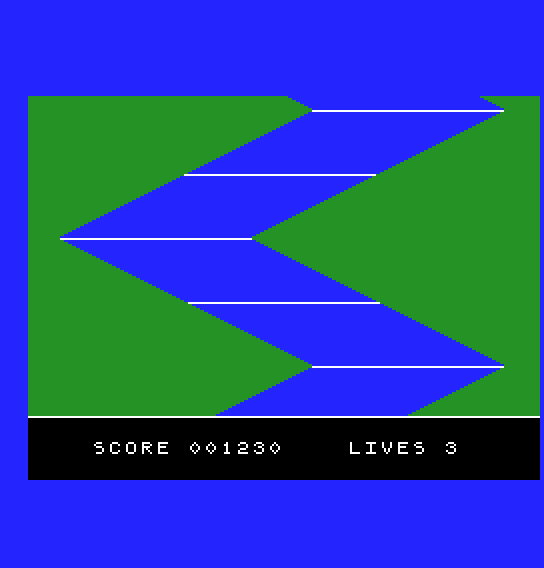
S14's river, scrolling up a line every frame, in the top 160 lines. Below it, starting with one white line, a black panel 32 lines deep reading SCORE 001230 LIVES 3. The river scrolls; the panel doesn't move at all, and the join stays on the same line in every frame. After ten seconds, MOS's screen and the prompt.
s15-split-screen.asm, change ADD A, 159 in onframe to ADD A, 160. Which line of the screen does the panel start on now, and which of its lines will you never see?LD A, L and ADD A, 159 out of onframe, and write LD A, 159 instead, so R#19 no longer allows for the scroll. What happens to the join?s15-colour-split.asm, take DEC A out of onframe. Where does the waterline land, compared with the line number in the comment?| Symptom | Cause |
|---|---|
| One line at the join shows the wrong thing | The line handler is too slow, so its second register write lands a line after the first. Do the visible changes first, with direct OUTs |
| The panel starts one line low and its top line never shows | R#19 set to the join's line, not the line above it |
You can interrupt your program at a line of your choice with R#19 and R#0 bit 4, tell the line interrupt from the frame interrupt by S#1's FH bit, and change the picture from the next line down: a backdrop colour, or R#2 and R#23 for a still panel under a scrolling playfield. Ask for the line above, add the scroll, keep the line handler short, and turn IE1 off before you give MOS its table back.
S16, The Blitter: Fill, Line, Point: the command engine S14 borrowed for its copy, taught properly.
