module
14

On the TC-01, writing register 23 leaves the picture where it is. A game that scrolls has to redraw the screen, every byte of it, every time it moves.
The 256's video chip can move the picture for you. Vertically, one register does the whole job and your program only draws the one line that comes into view. Sideways you move the picture yourself, but the command engine (S16) can copy a strip of the screen for you while the Z80 gets on with something else. And a third register shifts the whole picture by a few dots, for a shake or a nudge.
Register 23 is the vertical scroll. Write n to it and the picture moves up n lines: the chip starts showing the page at line n instead of line 0. One unit is one line.
        LD A, 16
        OUT (9), A
        LD A, 80h+23
        OUT (9), A      ; R#23 = 16: the picture up 16 lines
Try it on MOS's own Graphics II screen and the text slides up, but what appears at the bottom is not the lines that left the top. It is whatever else is in video memory there. Graphics II's screen is 192 lines, and register 23 doesn't wrap it.
In Graphics 4 it wraps. A Graphics 4 page is 256 lines tall and the screen shows 192 of them. Register 23 picks the line to start from, and the picture runs down from there to line 255, then carries on from line 0 of the same page. With R#23 = 200 you see lines 200 to 255, then 0 to 135. It never strays into the next page. So the page is a loop of 256 lines, and the screen is a 192-line window on it that you can slide round.
Register 23 is 8 bits, so it wraps too: after 255 comes 0, which is exactly what the loop needs.
At any moment 64 of the page's 256 lines are out of sight. That is the trick for an endless scroll:
Draw the line that has just left, not the one about to appear. The one about to appear is already on its way up the loop; the one that just left is the only one you can be sure the player won't see you drawing.
Keep two counters. The frame count is your position in the playfield, and it needs 16 bits or more: the playfield is longer than 256 rows. Its low byte is both the value for register 23 and, less one, the VRAM line to redraw:
onframe:
        LD HL, (TICKS)  ; frames so far: n
        LD A, L
        LD B, 23
        CALL setreg     ; R#23 = n (its low byte)
        DEC HL          ; the line just gone is (n - 1) mod 256 ...
        LD A, L
        INC H           ; ... and it gets playfield row n - 1 + 256
        JP drawrow
Do both in the frame interrupt (S7), and the scroll and the new line land between two pictures.
What it costs: one Graphics 4 page, 32K of video memory, and one line drawn a frame: 128 bytes. A scroll of two lines a frame means two lines fed in, and so on. Compare that with redrawing 24K for every step.
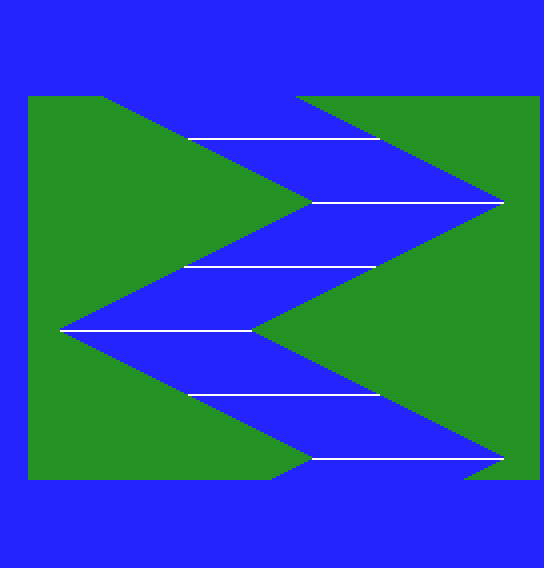
A river winds between green banks, and the screen scrolls up it a line a frame. The river's position on each row is worked out from the row number, so there is no map to store: the left bank is 16 + 2t dots, where t climbs from 0 to 63 and back again every 128 rows. Every 32nd row the water is white, so you can see it move.
; S14: an endless vertical scroll in Graphics 4.
; A river winds down between green banks and the screen scrolls up it,
; one line a frame, for ever - or, here, for 500 frames (10 seconds).
;
; The picture is one Graphics 4 page at 10000h: 256 lines of 128 bytes.
; The screen shows 192 of them, starting at the line in R#23. Each frame
; R#23 goes up by one, and the line that has just gone off the top is
; redrawn with the next row of the river. It comes back into view at the
; bottom 64 frames later.

        ORG 256

        DI
        ; --- sprites out of the way: an attribute table at 1FA00h that
        ;     holds only the end mark, Y = 216
        LD A, 7         ; R#14 = 7: the CPU's 16K page 1C000h-1FFFFh
        LD B, 14
        CALL setreg
        XOR A           ; offset 3A00h, for writing
        OUT (9), A
        LD A, 3Ah + 40h
        OUT (9), A
        LD A, 216
        OUT (8), A
        LD A, 0F7h      ; R#5 and R#11: attributes at 1FA00h
        LD B, 5
        CALL setreg
        LD A, 03h
        LD B, 11
        CALL setreg

        ; --- draw rows 0-255 of the river into lines 0-255
        LD HL, 0        ; HL = the river row
first:  LD A, L         ; A = the VRAM line it goes on
        CALL drawrow
        INC HL
        LD A, H
        OR A
        JR Z, first     ; until HL reaches 256

        ; --- Graphics 4, showing the page at 10000h, no scroll yet
        LD A, 06h       ; R#0: Graphics 4
        LD B, 0
        CALL setreg
        LD A, 5Fh       ; R#2: the page at 10000h
        LD B, 2
        CALL setreg
        XOR A           ; R#23 = 0
        LD B, 23
        CALL setreg

        ; --- start the frame interrupt (S7)
        CALL irqon
        LD A, 0E0h      ; R#1: display on, frame interrupt on
        LD B, 1
        CALL setreg
        EI

        ; --- the main loop has nothing to do: onframe does the scrolling
main:   CALL waitf
        LD HL, (TICKS)
        LD DE, 500      ; 500 frames: 10 seconds at 50 Hz
        OR A
        SBC HL, DE
        JR C, main

        ; --- put the machine back for MOS
        LD A, 0C0h      ; R#1 with the frame interrupt off
        CALL irqoff
        CALL tomos      ; R#0, R#2, R#5, R#11, R#14, then BE (which clears R#23)
        RET

; --- onframe: scroll one line, then redraw the line that went off the top
onframe:
        LD HL, (TICKS)  ; frames so far: n
        LD A, L
        LD B, 23
        CALL setreg     ; R#23 = n (its low byte: it wraps at 256)
        DEC HL          ; the line just gone is (n - 1) mod 256 ...
        LD A, L
        INC H           ; ... and it gets river row n - 1 + 256
        JP drawrow

; --- drawrow: draw river row HL on VRAM line A of the page at 10000h
;     A Graphics 4 line is 128 bytes, two dots a byte. HL kept.
drawrow:
        PUSH HL
        PUSH AF
        RLCA            ; lines 0-127 are in 10000h-13FFFh (R#14 = 4),
        AND 1           ; lines 128-255 in 14000h-17FFFh (R#14 = 5)
        ADD A, 4
        LD B, 14
        CALL setreg
        POP AF
        AND 7Fh         ; offset in that 16K = (line mod 128) * 128
        RRCA            ; A = the offset's high byte, with the line's
        LD C, A         ; bit 0 moved round to bit 7
        AND 80h
        OUT (9), A      ; low byte: 00h or 80h
        LD A, C
        AND 3Fh
        OR 40h
        OUT (9), A      ; high byte, plus 40h to write
        POP HL
        PUSH HL
        ; where the river is: t = row mod 128, folded to 0-63 and back
        LD A, L
        AND 7Fh
        CP 64
        JR C, dr1
        CPL             ; 127 - t
        AND 7Fh
dr1:    ADD A, 8        ; left bank: 8 + t bytes
        LD D, A
        LD A, L         ; every 32nd row the water is white
        AND 1Fh
        LD E, 44h       ; water: colour 4 in both dots
        JR NZ, dr2
        LD E, 0FFh
dr2:    LD C, 128       ; bytes left on this line
        LD A, 0CCh      ; the left bank: colour 12
        LD B, D
dr3:    OUT (8), A
        DEC C
        DJNZ dr3
        LD A, E         ; the river: 48 bytes, 96 dots
        LD B, 48
dr4:    OUT (8), A
        DEC C
        DJNZ dr4
        LD A, 0CCh      ; the right bank: the rest of the line
        LD B, C
dr5:    OUT (8), A
        DJNZ dr5
        POP HL
        RET

        INCLUDE "frame.asm"
Build and run
Save it as s14-scroll.asm next to frame.asm. Build and run it as in S2.
What you should see
Blue water zigzagging down between dark green banks, crossed by a white line every 32 lines. The whole picture moves up one line every frame, smoothly, for ten seconds. The river never breaks: every line joins the one above it, right through the moment, about a second and a quarter in, when the first rows drawn during the run come up from the bottom, and on round the loop.
Then MOS's screen comes back, cleared, with the register display and the prompt.
There is no horizontal scroll register. Registers 26 and 27, which might look like one in a register list, do nothing on the 256. To scroll sideways you move the picture itself.
With the CPU that is expensive. A strip 32 lines deep is 4,096 bytes in Graphics 4, and moving it one byte left means reading and writing all of them. So hand the job to the video chip. Its command engine copies rectangles of video memory while the Z80 does something else. S16 and S17 teach it properly; this section needs only one command, HMMM, which copies a rectangle from one place to another. You give it 15 bytes in registers 32 to 46, in this order:
| Registers | Value |
|---|---|
| 32-33 | SX, the source's left edge |
| 34-35 | SY, its top line |
| 36-37 | DX, the destination's left edge |
| 38-39 | DY, its top line |
| 40-41 | NX, the width in dots |
| 42-43 | NY, the height in lines |
| 44, 45 | 0, 0 |
| 46 | D0h: HMMM. Writing it starts the copy |
The lines are counted through every page: page 0 is lines 0-255, page 1 is 256-511, page 2 (10000h) is 512-767 and page 3 (18000h) is 768-1023. HMMM moves whole bytes, so in Graphics 4 its steps are two dots.
Each step of the scroll then is:
Copy from the shown page onto the other one, so that, as in S13, the player only ever sees a finished picture.
While the copy runs, your program has to check when it has finished, and that means reading status register 2, which leaves R#15 pointing away from S#0 and the frame interrupt's handler reading the wrong register. So blit in the listing sends the registers with interrupts off, then checks the finish one read at a time, each read inside its own DI ... EI with R#15 put back to 0. S16 explains why.
A strip of buildings scrolls left under a still sky, two dots a frame. The buildings come from a table of 16 heights, each 16 dots wide with a gap, so the skyline repeats every 128 columns.
; S14: scrolling sideways. A strip of skyline, 32 lines deep, scrolls
; left 2 dots a frame under a still sky, for 500 frames (10 seconds).
;
; There is no horizontal scroll register, so the picture itself moves:
; each step copies the strip 2 dots to the left onto the hidden page,
; draws the one new column at the right-hand edge, and shows that page
; at the next frame (S13's page flipping). The copy is one command to
; the video chip's command engine, HMMM; S16 and S17 explain it fully.
;
; Pages, as the command engine counts lines (256 to a page):
;   page A: lines 512-767, VRAM 10000h, shown by R#2 = 5Fh
;   page B: lines 768-1023, VRAM 18000h, shown by R#2 = 7Fh
; The strip is lines 80-111 of each page.

        ORG 256

        DI
        ; --- Graphics 4 first: only then does a run of VRAM writes carry
        ;     on from one 16K into the next (in Graphics II it wraps)
        LD A, 06h
        LD B, 0
        CALL setreg
        LD A, 5Fh       ; showing page A
        LD B, 2
        CALL setreg

        ; --- sprites out of the way (attribute table at 1FA00h: Y = 216)
        LD A, 7
        LD B, 14
        CALL setreg
        XOR A
        OUT (9), A
        LD A, 3Ah + 40h
        OUT (9), A
        LD A, 216
        OUT (8), A
        LD A, 0F7h
        LD B, 5
        CALL setreg
        LD A, 03h
        LD B, 11
        CALL setreg

        ; --- both pages: sky above, ground below
        LD A, 4         ; page A starts in the CPU's page 4 (10000h)
        CALL scene
        LD A, 6         ; page B in page 6 (18000h)
        CALL scene

        ; --- page A's strip: world columns 0-127
        LD A, 4
        LD (pgbase), A
        LD HL, 0        ; HL = world column
        LD E, 0         ; E = byte column on the page
init:   CALL column
        INC HL
        INC E
        BIT 7, E
        JR Z, init      ; 128 columns
        LD (world), HL  ; the next column to bring in: 128

        CALL irqon
        LD A, 0E0h      ; display on, frame interrupt on
        LD B, 1
        CALL setreg
        EI

; --- the main loop: one 2-dot step each time round
main:   LD A, (shown)   ; copy from the page on screen ...
        OR A
        LD HL, 512 + 80 ; page A's strip
        JR Z, m1
        LD HL, 768 + 80 ; page B's strip
m1:     LD (shift + 2), HL      ; SY
        XOR 1           ; ... onto the other one
        LD (draw), A
        LD HL, 512 + 80
        JR Z, m2
        LD HL, 768 + 80
m2:     LD (shift + 6), HL      ; DY
        LD HL, shift
        CALL blit       ; the strip, 2 dots to the left

        LD A, (draw)    ; the new column at the right-hand edge
        ADD A, A
        ADD A, 4
        LD (pgbase), A  ; R#14 = 4 (page A) or 6 (page B)
        LD HL, (world)
        LD E, 127
        DI
        CALL column
        EI
        INC HL
        LD (world), HL

        LD A, 1
        LD (flip), A    ; show it at the next frame ...
wait:   LD A, (flip)
        OR A
        JR NZ, wait     ; ... and wait until it is shown

        LD HL, (TICKS)
        LD DE, 500
        OR A
        SBC HL, DE
        JR C, main

        ; --- put the machine back for MOS
        LD A, 0C0h
        CALL irqoff
        CALL tomos
        RET

; --- onframe: if a new page is ready, show it
onframe:
        LD A, (flip)
        OR A
        RET Z
        LD A, (draw)
        LD (shown), A
        OR A
        LD A, 5Fh       ; page A
        JR Z, of1
        LD A, 7Fh       ; page B
of1:    LD B, 2
        CALL setreg
        XOR A
        LD (flip), A
        RET

; --- scene: A = the CPU page where a screen starts. Lines 0-79 sky
;     (colour 7), 80-111 left for the strip, 112-191 ground (colour 12).
;     In Graphics 4 the VRAM address runs on from one 16K into the next.
scene:  LD B, 14
        CALL setreg
        XOR A
        OUT (9), A
        LD A, 40h
        OUT (9), A      ; offset 0, writing
        LD D, 0         ; D = line
sc1:    LD A, D
        CP 112
        LD A, 0CCh      ; lines 112 on: ground
        JR NC, sc3
        LD A, 77h       ; above: sky (the strip starts as sky too)
sc3:    LD B, 128       ; one line
sc4:    OUT (8), A
        DJNZ sc4
        INC D
        LD A, D
        CP 192
        JR NZ, sc1
        RET

; --- column: world column HL at byte column E of the strip, on the page
;     starting at CPU page (pgbase). HL and E kept.
;     Buildings are 8 columns (16 dots) wide with a 1-column gap; building
;     n (= column / 8, mod 16) has the height heights+n and colour
;     colours+(n mod 2).
column: PUSH HL
        LD A, (pgbase)
        LD B, 14
        CALL setreg     ; lines 80-111 are in the page's first 16K
        LD A, L         ; which building?
        RRCA
        RRCA
        RRCA
        AND 0Fh
        PUSH HL
        LD C, A
        LD B, 0
        LD HL, heights
        ADD HL, BC
        LD A, 112
        SUB (HL)
        LD (roof), A    ; the first line of building
        LD A, C
        AND 1
        LD C, A
        LD HL, colours
        ADD HL, BC
        LD A, (HL)
        LD (wall), A
        POP HL
        LD A, L
        AND 7
        CP 7            ; the gap after each building
        JR NZ, col0
        LD A, 112
        LD (roof), A    ; all sky
col0:   LD D, 80        ; D = line
col1:   LD A, D         ; offset = line * 128 + E
        RRCA
        AND 80h
        OR E
        OUT (9), A
        LD A, D
        SRL A
        OR 40h
        OUT (9), A
        LD A, (roof)
        LD C, A
        LD A, D
        CP C
        LD A, 77h       ; above the roof: sky
        JR C, col2
        LD A, (wall)
col2:   OUT (8), A
        INC D
        LD A, D
        CP 112
        JR NZ, col1
        POP HL
        RET

; --- blit: send the 15 command bytes at HL to R#32-R#46 (R#46, last,
;     starts it), then wait for the command to finish. The registers go
;     under DI; the finish is checked one status read at a time, each
;     with R#15 put back to 0 before interrupts are on again (S16).
blit:   DI
        LD B, 32
blit1:  LD A, (HL)
        INC HL
        CALL setreg
        INC B
        LD A, B
        CP 47
        JR NZ, blit1
        EI
blit2:  DI
        LD A, 2
        LD B, 15
        CALL setreg     ; R#15 = 2: port 9 reads S#2
        IN A, (9)
        LD C, A
        XOR A
        LD B, 15
        CALL setreg     ; R#15 = 0 again
        EI
        BIT 0, C        ; CE: 1 while the command runs
        JR NZ, blit2
        RET

;               SX  SY        DX  DY        NX   NY
shift:  DEFW    2,  512 + 80, 0,  768 + 80, 254, 32
        DEFB    0,  0,  0D0h    ; CLR, ARG, then R#46: HMMM

heights: DEFB 20, 12, 28, 16, 8, 24, 14, 30, 18, 10, 26, 12, 22, 16, 28, 6
colours: DEFB 0EEh, 66h         ; grey, dark red

shown:  DEFB 0          ; the page on screen: 0 = A, 1 = B
draw:   DEFB 0          ; the page being drawn
flip:   DEFB 0          ; 1 = show the drawn page at the next frame
pgbase: DEFB 4
roof:   DEFB 0
wall:   DEFB 0
world:  DEFW 0

        INCLUDE "frame.asm"
Build and run
Save it as s14-hscroll.asm next to frame.asm. Build and run it as in S2.
What you should see
A cyan sky, green ground, and between them a row of grey and dark red buildings of different heights moving steadily to the left, two dots every frame, a whole screen width every 128 frames. Every frame shows a complete skyline, never a torn one.

After ten seconds, MOS's screen and the prompt.
Only the strip moves. The sky and ground were drawn once, on both pages, and nothing ever touches them again: copy only the part of the screen that scrolls.
Register 18 moves the whole picture, a dot or a line at a time. Its two halves work separately:
| R#18 | Low nibble (across) | High nibble (up and down) |
|---|---|---|
| 1 to 7 | 1 to 7 dots left | 1 to 7 lines up |
| 0 | centre | centre |
| 15 down to 8 | 1 to 8 dots right | 1 to 8 lines down |
MOS leaves the picture where 0Ah puts it: six dots right of centre. Treat 0Ah, not 0, as home, or your first write moves MOS's screen.
Register 18 only shifts the picture by up to eight dots, so it is no scroll on its own. What it does well is shake: a few frames of the picture jumping about sells an explosion better than anything you draw.
; S14: shaking the screen with R#18. The whole picture jumps about by a
; few dots and lines every frame - an explosion, or an earthquake - for
; two seconds, then settles where MOS had it.
;
; R#18's low nibble moves the picture sideways: 1-7 is 1-7 dots left,
; 15 down to 8 is 1 to 8 dots right. Its high nibble does the same up
; and down: 1-7 lines up, 15 down to 8 is 1 to 8 lines down. MOS's
; picture sits where 0Ah puts it: 6 dots right, no lines.

        ORG 256

        LD HL, message  ; something on the screen to shake
show:   LD A, (HL)
        OR A
        JR Z, start
        RST 8
        DEFB 158        ; print the character in A
        INC HL
        JR show

start:  CALL irqon      ; the frame interrupt (S7)
        LD A, 0E0h      ; R#1: MOS's screen with the frame interrupt on
        LD B, 1
        CALL setreg
        EI

main:   CALL waitf
        LD HL, (TICKS)
        LD DE, 200      ; 4 seconds in all
        OR A
        SBC HL, DE
        JR C, main

        LD A, 0C0h      ; frame interrupt off, MOS's table back
        CALL irqoff
        CALL tomos      ; and BE, which puts R#18 back too
        RET

; --- onframe: frames 50-149 shake; before and after, MOS's position
onframe:
        LD HL, (TICKS)
        LD A, 0Ah       ; MOS's own position
        LD DE, 50
        OR A
        SBC HL, DE
        JR C, still     ; before frame 50
        LD DE, 100
        SBC HL, DE      ; (carry is clear here)
        JR NC, still    ; frame 150 on
        LD HL, (TICKS)
        LD A, L
        AND 7           ; one of eight positions, a new one each frame
        LD E, A
        LD D, 0
        LD HL, shake
        ADD HL, DE
        LD A, (HL)
still:  LD B, 18
        JP setreg       ; R#18 = A

;       high nibble: lines (1-7 up, 15-8 down); low: dots (1-7 left, 15-8 right)
shake:  DEFB 0Ah        ; home: 6 right
        DEFB 1Ch        ; 4 right, 1 up
        DEFB 0F8h       ; 8 right, 1 down
        DEFB 2Eh        ; 2 right, 2 up
        DEFB 0Ah        ; home
        DEFB 0E9h       ; 7 right, 2 down
        DEFB 18h        ; 8 right, 1 up
        DEFB 0FCh       ; 4 right, 1 down

message: DEFB "EARTHQUAKE!", 0

        INCLUDE "frame.asm"
Build and run
Save it as s14-shake.asm next to frame.asm. Build and run it as in S2.
What you should see
EARTHQUAKE! on MOS's screen. A second later the whole picture starts jumping, a few dots and lines in a different direction every frame, for two seconds. Then it settles exactly where it was, and after one more second MOS clears the screen and shows the register display and the prompt.
s14-scroll.asm, change DEC HL in onframe to INC HL. Which VRAM line does the program redraw now, and where on the screen is that line at the moment it is drawn? What will the player see?s14-hscroll.asm, change SX in shift from 2 to 4 and NX from 254 to 252. How fast does the skyline move now, and what goes wrong at the right-hand edge? What else would you have to change?s14-shake.asm, change every entry of shake to 0Ah except one, 5Ah. What do you expect to see?| Symptom | Cause |
|---|---|
| The bottom third of the screen is blank and the top shows what should be at the bottom | The program filled the pages before setting Graphics 4. In Graphics II a run of writes wraps at the end of its 16K, so lines 128 on landed back on line 0. Set the mode first, then draw |
| Graphics II's screen scrolls, but something else comes up at the bottom | Graphics II doesn't wrap. Use Graphics 4's 256-line page |
You can scroll a Graphics 4 playfield vertically for ever: R#23 up one a frame from the frame interrupt, and the line just scrolled off redrawn with the next row, 128 bytes a frame. You can scroll a strip sideways two dots a step by copying it onto the hidden page with HMMM, adding one column, and flipping. And R#18 moves the whole picture up to eight dots or lines, from home at 0Ah.
S15, Splitting the Screen: the scroll moves the whole screen. A game wants a score panel that stays still underneath it.
