module
16

In the assembly course every dot on the screen was put there by the Z80, one OUT at a time. Clearing a Graphics 4 screen that way is 24,576 OUTs, and the Z80 can do nothing else while it does them.
The 256's video chip has a command engine of its own: the blitter. You tell it "fill this rectangle", "draw this line", "copy this block", and it does the work itself, straight into video memory, while your program carries on. This section covers the commands that draw: fills, lines and single dots. S17 covers the ones that copy.
A command is 15 bytes in registers 32 to 46:
| Register | Name | Meaning |
|---|---|---|
| 32, 33 | SX | source x (low byte, high byte) |
| 34, 35 | SY | source y |
| 36, 37 | DX | destination x |
| 38, 39 | DY | destination y |
| 40, 41 | NX | width in dots (for LINE, the long side) |
| 42, 43 | NY | height in lines (for LINE, the short side) |
| 44 | CLR | the colour, or the byte, to draw with |
| 45 | ARG | the direction and memory bits, below |
| 46 | CMR | the command, and its logical operation |
Writing R#46 starts it. Every other register is just a value waiting to be used, so write the other fourteen first and R#46 last.
The engine doesn't use addresses. It uses x and y, the dot and the line, and works out the address from the screen mode. In Graphics 4 a page is 256 lines, and y simply carries on through the pages: page 0 (00000h) is lines 0 to 255, page 1 (08000h) 256 to 511, page 2 (10000h) 512 to 767, page 3 (18000h) 768 to 1023. So a command can draw on a page that isn't shown just by adding 256, 512 or 768 to y.
The ARG bits you need:
| Bit | Name | 0 | 1 |
|---|---|---|---|
| 0 | MAJ | (LINE) long side across | long side up/down |
| 2 | DIX | right from DX | left from DX |
| 3 | DIY | down from DY | up from DY |
| 4 | MXS | source in main video memory | in the 64K expansion (S5) |
| 5 | MXD | destination in main video memory | in the expansion |
The engine runs on its own. While it works, bit 0 of S#2, CE, reads 1; when it has finished, 0. Don't write the next command's registers until CE is 0. To abandon a command part-way, write 00h (STOP) to R#46: it stops at once, whatever it has done so far left done.
Reading S#2 means setting R#15 to 2, and that is where a game with interrupts running gets into trouble. The frame interrupt's handler reads port 9 expecting S#0. If it arrives while R#15 is 2, it reads S#2 instead, the frame flag stays set, and the interrupt comes straight back, over and over, for as long as R#15 stays 2. Your program stops dead.
Turning interrupts off for the whole command isn't the answer either: a long command and the frame interrupts it holds off are lost frames. So:
cwait:  DI
        LD A, 2
        LD B, 15
        CALL setreg     ; R#15 = 2: port 9 reads S#2
        IN A, (9)
        LD C, A
        XOR A
        LD B, 15
        CALL setreg     ; R#15 = 0
        EI
        BIT 0, C        ; CE: 1 while the command runs
        JR NZ, cwait
        RET
One register at a time, value then 80h + n to port 9, fifteen times. It works, and it is what S14's blit did, but it is 30 OUTs and a loop.
Through port 0Bh with auto-increment. Write a register number to R#17 with bit 7 clear, and every byte you then send to port 0Bh goes to that register and moves R#17 on to the next. So R#17 = 32 and one OTIR of 15 bytes fills R#32 to R#46 and starts the command:
send:   DI
        LD A, 32
        LD B, 17
        CALL setreg     ; R#17 = 32, auto-increment on
        LD BC, 15*256 + 0Bh
        OTIR            ; 15 bytes to port 0Bh: R#32 ... R#46
        EI
        ...             ; then wait for CE, as above
With bit 7 of R#17 set instead, every byte goes to the same register.
Through MOS. MOS keeps a 15-byte command table at FC0Dh to FC1Bh, in the same order. Copy your command there and call D9, and MOS sends it. D9 doesn't wait for the command to finish: check CE yourself.
        LD HL, square
        LD DE, 0FC0Dh   ; MOS's command table
        LD BC, 15
        LDIR
        RST 8
        DEFB 0D9h       ; MOS sends it to the chip
        CALL cwait
In a program you write yourself, the OTIR is shorter and doesn't page in the ROM. D9 is there when you'd rather not touch R#17.
HMMV (CMR = C0h) fills a rectangle (DX, DY, NX, NY) with the byte in CLR. It works in whole bytes: in Graphics 4 a byte is two dots, so CLR = 44h fills with colour 4, and 4Fh with stripes of 4 and 15. Because it works in bytes, it ignores the lowest bit of DX and NX: a fill asked to start at x = 95 starts at 94.
LMMV (CMR = 80h + a logical operation) fills a rectangle dot by dot. CLR is one colour, 0 to 15, and the rectangle can start and end at any dot, odd or even. And each dot goes through a logical operation with what is already there.
Set DIX or DIY and either fill runs left from DX, or up from DY, instead.
The low four bits of CMR choose what happens when a dot of colour SC (the source: here, CLR) lands on a dot of colour DC already on the screen:
| Code | Name | The new dot |
|---|---|---|
| 0 | IMP | SC: just draw it |
| 1 | AND | SC AND DC |
| 2 | OR | SC OR DC |
| 3 | EOR | SC XOR DC |
| 4 | NOT | NOT SC |
| 8 | TIMP | SC, but where SC is 0 leave DC alone |
| 9, A, B, C | TAND, TOR, TEOR, TNOT | the same as 1-4, but where SC is 0 leave DC alone |
They work on the colour numbers, 4 bits at a time. Colour 2 ORed onto colour 4 gives colour 6; onto colour 1, colour 3. Arrange your palette (S6) so the numbers OR to the colours you want, and one command draws a shadow, a highlight or a glow. EOR drawn twice puts the screen back as it was: the old way to draw a moving cursor without saving what was under it.
The T forms make colour 0 transparent. That is what lets you draw a shape with holes in it over a background, which S17's software sprites need.
LINE (CMR = 70h + a logical operation) draws a straight line from (DX, DY). You give it as the two sides of a right-angled triangle: NX is the long side, NY the short side, both in dots, and the line is the hypotenuse. MAJ says which way the long side runs (0 across, 1 up and down), and DIX and DIY which way the line goes. It draws long side + 1 dots, one in every column (or every line) along the long side.
So a line from (128,191) to (224,155): long side 96 across, short side 36 up: NX = 96, NY = 36, ARG = 08h (DIY). To (128,95), straight up: NX = 96, NY = 0, ARG = 09h (MAJ and DIY).
PSET (CMR = 50h + a logical operation) sets the one dot at (DX, DY) to CLR, through the operation. It touches only that dot, so it is the plot of S11 without the arithmetic and the read-modify-write.
POINT (CMR = 40h) reads the dot at (SX, SY). When CE is 0 its colour is in S#7: R#15 = 7, read port 9, R#15 = 0. That is collision detection against the background: is the dot in front of the ship rock, or sky?
; S16: drawing with the command engine, in Graphics 4.
; The video chip draws while the Z80 hands it one command after another:
; HMMV fills, LMMV fills through a logical operation, LINE draws a fan
; of lines, PSET sprinkles stars and POINT reads two dots back. The
; picture stays for 5 seconds, then the program returns to MOS and
; prints the two colours POINT read.
;
; The picture is page 2 as the command engine counts it: lines 512-767,
; VRAM 10000h, shown by R#2 = 5Fh. MOS's own screen is left alone.

        ORG 256

        DI
        ; --- Graphics 4, showing page 2
        LD A, 06h
        LD B, 0
        CALL setreg
        LD A, 5Fh
        LD B, 2
        CALL setreg

        ; --- sprites out of the way (attribute table at 1FA00h: Y = 216)
        LD A, 7
        LD B, 14
        CALL setreg
        XOR A
        OUT (9), A
        LD A, 3Ah + 40h
        OUT (9), A
        LD A, 216
        OUT (8), A
        LD A, 0F7h
        LD B, 5
        CALL setreg
        LD A, 03h
        LD B, 11
        CALL setreg
        EI

        ; --- 1. HMMV: the whole screen black (colour 1, both dots: 11h)
        LD HL, clear
        CALL send
        ; --- 2. HMMV: a blue square - this one sent through MOS's D9
        LD HL, square
        LD DE, 0FC0Dh   ; MOS's command table: R#32-R#46 in order
        LD BC, 15
        LDIR
        RST 8
        DEFB 0D9h       ; MOS sends it to the chip
        CALL cwait      ; D9 does not wait for the command to finish
        ; --- 3. LMMV: colour 2 ORed over the square's corner, at odd X
        LD HL, orbox
        CALL send

        ; --- 4. POINT: read two dots back, before the lines cross them
        LD HL, pt1
        CALL send
        CALL reads7
        LD (seen), A
        LD HL, pt2
        CALL send
        CALL reads7
        LD (seen+1), A

        ; --- 5. LINE: a fan of 34 lines from (128,191)
        LD C, 0         ; C = line number 0-33
fan:    LD A, C         ; colour 8-15
        AND 7
        OR 8
        LD (line+12), A         ; CLR
        LD A, C         ; lines 0-16 lean right, 17-33 left (DIX)
        LD B, 08h       ; ARG: DIY = 1 (up)
        CP 17
        JR C, fan1
        SUB 17
        LD B, 0Ch       ; DIY and DIX (up and left)
fan1:   CP 9            ; 0-8: long side across, short side 0, 12 ... 96
        JR NC, fan2
        LD E, A
        JR fan3
fan2:   SET 0, B        ; 9-16: long side up (MAJ), short side 84 ... 0
        LD E, A
        LD A, 16
        SUB E
        LD E, A
fan3:   LD A, B
        LD (line+13), A         ; ARG
        LD A, E         ; short side = 12 * step
        ADD A, A
        ADD A, E
        ADD A, A
        ADD A, A
        LD (line+10), A         ; NY = the short side (Min)
        PUSH BC
        LD HL, line
        CALL send
        POP BC
        INC C
        LD A, C
        CP 34
        JR NZ, fan

        ; --- 6. PSET: 120 stars along the top, from a simple random number
        LD B, 120
stars:  PUSH BC
        CALL random
        LD (dot+4), A           ; DX: 0-255
        CALL random
        CALL random
        AND 0Fh                 ; DY: 512 + 0-15
        LD (dot+6), A
        LD HL, dot
        CALL send
        POP BC
        DJNZ stars

        ; --- show it for 250 frames (5 seconds): S#0 bit 7 rises each frame
        LD B, 250
hold:   IN A, (9)       ; R#15 is 0: port 9 reads S#0
        RLCA
        JR NC, hold
        DJNZ hold

        ; --- put the machine back for MOS, and report
        DI
        LD HL, mosregs
back:   LD B, (HL)
        INC HL
        LD A, (HL)
        INC HL
        CALL setreg
        LD A, (HL)
        CP 0FFh
        JR NZ, back
        EI
        RST 8
        DEFB 0BEh       ; MOS's screen back
        LD HL, report
rep:    LD A, (HL)
        OR A
        JR Z, rep1
        RST 8
        DEFB 158
        INC HL
        JR rep
rep1:   LD A, (seen)
        CALL digit
        LD A, ' '
        RST 8
        DEFB 158
        LD A, (seen+1)
        CALL digit
        RET

mosregs: DEFB 0,02h, 2,0Eh, 5,76h, 11,0, 14,0, 0FFh
report: DEFB "POINT: ", 0
seen:   DEFB 0, 0

; --- digit: print A (0-15) as a hex digit
digit:  ADD A, '0'
        CP '9'+1
        JR C, dg1
        ADD A, 'A'-'9'-1
dg1:    RST 8
        DEFB 158
        RET

; --- setreg: write A to register B
setreg: OUT (9), A
        LD A, B
        OR 128
        OUT (9), A
        RET

; --- send: the 15 bytes at HL to R#32-R#46 (writing R#46 starts the
;     command), then wait for it to finish. R#17 = 32 with bit 7 clear:
;     each byte to port 0Bh goes to the next register.
send:   DI
        LD A, 32
        LD B, 17
        CALL setreg     ; R#17 = 32, auto-increment on
        LD BC, 15*256 + 0Bh
        OTIR            ; 15 bytes to port 0Bh: R#32 ... R#46
        EI
        ; (falls through to cwait)

; --- cwait: wait until S#2 bit 0 (CE) is 0. One read at a time, with
;     R#15 back to 0 before interrupts are allowed again.
cwait:  DI
        LD A, 2
        LD B, 15
        CALL setreg     ; R#15 = 2: port 9 reads S#2
        IN A, (9)
        LD C, A
        XOR A
        LD B, 15
        CALL setreg     ; R#15 = 0
        EI
        BIT 0, C        ; CE: 1 while the command runs
        JR NZ, cwait
        RET

; --- reads7: A = S#7, the colour POINT found
reads7: DI
        LD A, 7
        LD B, 15
        CALL setreg
        IN A, (9)
        LD C, A
        XOR A
        LD B, 15
        CALL setreg
        EI
        LD A, C
        RET

; --- random: A = a new pseudo-random byte (a 16-bit shift register)
random: LD HL, (seed)
        ADD HL, HL      ; shift left; the bit falling out decides
        JR NC, rnd1
        LD A, L
        XOR 2Dh         ; feed it back into the low bits
        LD L, A
rnd1:   LD (seed), HL
        LD A, L
        XOR H
        RET
seed:   DEFW 0ACE1h

; The command blocks, in register order: SX, SY, DX, DY, NX, NY (two
; bytes each, low first), then CLR, ARG and the command for R#46.
;               SX  SY   DX   DY        NX   NY
clear:  DEFW    0,  0,   0,   512,      256, 192
        DEFB    11h, 0, 0C0h            ; HMMV: colour 1 both dots
square: DEFW    0,  0,   16,  512+24,   96,  96
        DEFB    44h, 0, 0C0h            ; HMMV: colour 4
orbox:  DEFW    0,  0,   63,  512+71,   95,  64
        DEFB    02h, 0, 82h             ; LMMV, OR: colour 2
line:   DEFW    0,  0,   128, 512+191,  96,  0
        DEFB    0,  0,  70h             ; LINE, IMP (NY, CLR, ARG set above)
dot:    DEFW    0,  0,   0,   512,      0,   0
        DEFB    0Fh, 0, 50h             ; PSET, IMP: colour 15
pt1:    DEFW    70, 512+100, 0, 0,      0,   0
        DEFB    0,  0,  40h             ; POINT (70,100): inside both
pt2:    DEFW    130, 512+100, 0, 0,     0,   0
        DEFB    0,  0,  40h             ; POINT (130,100): orbox alone
Build and run
Save it as s16-drawing.asm. It doesn't use frame.asm. Build and run it as in S2.
What you should see
A black screen with white stars scattered across the top 16 lines. A blue square at the left, and over its lower right corner a rectangle that is dark red where it covers the square and light green where it covers the black: one colour, 2, ORed with 4 and with 1. From the middle of the bottom edge, a fan of 34 lines in eight colours spreads out over everything.
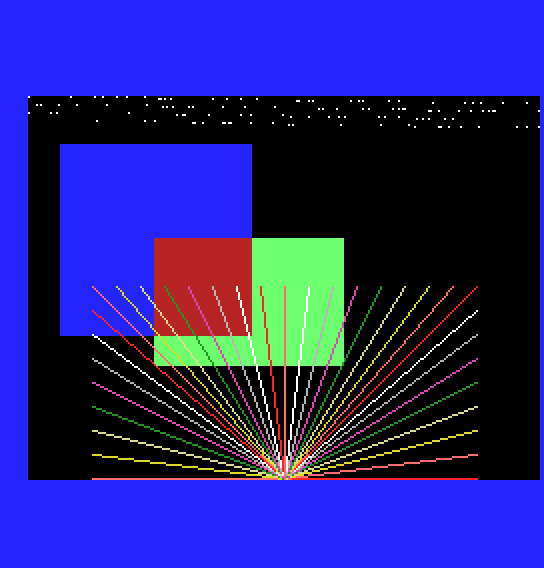
After five seconds MOS's screen comes back with
POINT: 6 3
above the register display: the two colours POINT read, colour 6 where the rectangle overlaps the square and 3 where it doesn't.
orbox, change the command from 82h to 83h (EOR). What colours do you expect where it covers the square, and where it covers the black? What will POINT report?orbox's command to 0C0h (HMMV) with CLR still 02h. Before you run it: what does a byte of 02h look like in Graphics 4, and why might the rectangle's left edge move?line, change ARG's 08h to 00h. Where do the right-hand lines go now?You can make the video chip fill rectangles (HMMV in bytes, LMMV in dots), draw lines and set and read single dots, with any of the logical operations, anywhere in video memory, by writing 15 registers and checking CE. Send them under DI, through port 0Bh with R#17 auto-incrementing or through MOS's D9, and check CE one read at a time so the frame interrupt never sees R#15 at anything but 0.
S17, The Blitter: Copying: the commands that move blocks of video memory about, and a sprite made of them.
