module
10

In the assembly course you steered with the keyboard: S21's keys through MOS, then S25's matrix scan for several keys at once. The 256 adds two joystick sockets, and reading a joystick is simpler than either. One IN gives you every direction and the fire button at once.
The 256's joysticks are digital: each direction is either pushed or not. Each joystick has a port of its own:
| Port | Joystick |
|---|---|
| 30h | A |
| 32h | B |
One byte tells you everything:
| Bit | 0 | 1 | 2 | 3 | 4 |
|---|---|---|---|---|---|
| Meaning | up | down | left | right | fire |
The bits are active low, as in S25's matrix: a bit reads 0 while that direction or button is held, and 1 when it's not. Push the stick up and left together and bits 0 and 2 both go to 0, so diagonals come for free.
Test bits 0 to 4 only. The other bits don't read the same on the two ports: with nothing held, port 30h reads 7Fh and port 32h reads 5Fh. If you want "is anything pressed?", mask first:
        IN A, (30h)
        AND 1Fh         ; the stick and fire only
        CP 1Fh
        JR NZ, pressed  ; some bit went to 0
Each fire button can also be read at port 20h. That port also carries SHIFT, CTRL and GRAPH, the keys S25's matrix scan can't see. It's active low too:
| Bit | 7 | 6 | 5 | 1 | 0 |
|---|---|---|---|---|---|
| Meaning | SHIFT | CTRL | GRAPH | joystick A's fire | joystick B's fire |
So joystick A's fire is bit 4 of port 30h and bit 1 of port 20h. Use whichever port you are reading anyway. A game that reads SHIFT for something else gets both fire buttons in the same IN.
The TC-01's joysticks were analogue, read through the converter at port 38h. S3 covered what happens to that code on the 256: port 38h still answers, but with only 00h, 7Fh or FFh, and the TC-01's "joystick 1" is the 256's joystick B. For new code, use ports 30h and 32h.
The loop is S21's, with the frame interrupt from S7 as its heartbeat: wait for the frame, read the stick, move, place the sprite, check fire. Each direction is a separate BIT test, so two directions held together both move the ship. Each move stops at the edge of the screen: X runs from 0 to 248 for an 8-pixel sprite on a 256-pixel line, and Y from 0 to 183, because a sprite's Y is the line above its top, and the screen is 192 lines tall.
Joystick A flies the ship one pixel a frame in any of eight directions. Its fire button ends the program. Save frame.asm from S7 in the same folder.
; S10: fly a ship with joystick A; its fire button ends the program.
;
; Once a frame (frame.asm, S7) the main loop reads port 30h, moves the
; ship one pixel for each direction held, and checks fire on port 20h.

        ORG 256

        ; --- the ship's shape: sprite pattern 128 (VRAM 1C00h), as S7
        DI
        LD A, 00h
        OUT (9), A
        LD A, 1Ch+64
        OUT (9), A
        LD HL, ship
        LD B, 8
shape:  LD A, (HL)
        OUT (8), A
        INC HL
        DJNZ shape

        ; --- sprite 0 the ship, sprite 1 ends the list
        CALL place
        LD A, 04h       ; VRAM 3B04h: sprite 1's Y
        OUT (9), A
        LD A, 3Bh+64
        OUT (9), A
        LD A, 208
        OUT (8), A

        ; --- the frame interrupt on (S7)
        LD A, 2
        LD B, 9
        CALL setreg     ; R#9 = 2: 50 frames a second
        CALL irqon
        LD A, 0E0h
        LD B, 1
        CALL setreg     ; R#1: frame interrupt on
        EI

        ; --- the game loop
main:   CALL waitf
        IN A, (30h)     ; joystick A: a bit goes to 0 while held
        LD C, A
        BIT 0, C
        CALL Z, up
        BIT 1, C
        CALL Z, down
        BIT 2, C
        CALL Z, left
        BIT 3, C
        CALL Z, right
        CALL place
        IN A, (20h)     ; joystick A's fire is bit 1 here
        BIT 1, A
        JR NZ, main     ; not pressed: round again

        ; --- fire pressed: back to MOS
        LD A, 0C0h
        CALL irqoff
        CALL tomos
        RET

; --- one pixel each way, stopping at the edges
up:     LD A, (shipy)
        OR A
        RET Z           ; already at the top
        DEC A
        LD (shipy), A
        RET

down:   LD A, (shipy)
        CP 183          ; 192 lines, less the ship's 8, less 1
        RET Z
        INC A
        LD (shipy), A
        RET

left:   LD A, (shipx)
        OR A
        RET Z
        DEC A
        LD (shipx), A
        RET

right:  LD A, (shipx)
        CP 248          ; 256 across, less the ship's 8
        RET Z
        INC A
        LD (shipx), A
        RET

; --- place: sprite 0 = Y, X, pattern 128, white
place:  DI
        LD A, 00h       ; VRAM 3B00h
        OUT (9), A
        LD A, 3Bh+64
        OUT (9), A
        LD A, (shipy)
        OUT (8), A
        LD A, (shipx)
        OUT (8), A
        LD A, 128
        OUT (8), A
        LD A, 15
        OUT (8), A
        EI
        RET

onframe:
        RET             ; nothing extra each frame

shipx:  DEFB 124
shipy:  DEFB 88

ship:   DEFB 00011000b
        DEFB 00011000b
        DEFB 00111100b
        DEFB 01111110b
        DEFB 11111111b
        DEFB 11111111b
        DEFB 00100100b
        DEFB 01000010b

        INCLUDE "frame.asm"
The direction routines use C, which none of them changes, so all four tests read the same joystick byte.
Build and run it as in S2, with frame.asm in the same folder. S2 says which keys stand in for the two joysticks.
What you should see
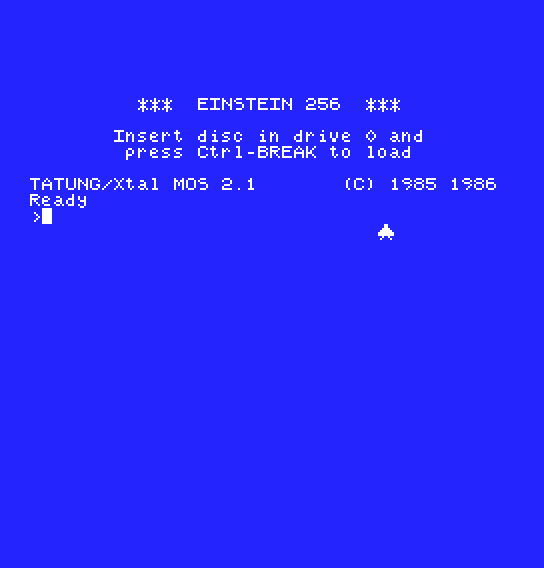
The ship sits in the middle of the screen, below MOS's text. Hold joystick A right for a second and it glides 50 pixels right; hold it up for half a second and it climbs 25 lines. Hold left and down together and it moves diagonally, one pixel left and one down each frame. Joystick B does nothing, its fire button included. Press joystick A's fire and the screen clears to MOS's blue, with the register display and the prompt.
IN A, (30h) to IN A, (32h), and BIT 1, A after IN A, (20h) to BIT 0, A. Which joystick flies the ship now?You can read both of the 256's joysticks: one IN from port 30h or 32h, five active-low bits for four directions and fire, and the fire buttons again on port 20h beside SHIFT, CTRL and GRAPH. Mask to the low five bits before comparing, and combinations need no extra code.
S11, A Bitmap of Your Own: Graphics 4, the first of the 256's bitmap modes.
