module
11

On the TC-01 the only bitmap you had was Graphics II, used as MOS uses it: 768 cells, each with a pattern of its own. It works, but every row of eight dots shares two colours, and finding a dot means a formula with four parts. A game that wanted a detailed, colourful screen had to fight it.
The 256 has real bitmap modes. This section takes the first of them, Graphics 4, and makes it yours.
You know this from the assembly course's S16 to S18. With MOS's name table counting 0 to 767, the dot at (x, y) is bit 80h >> (x mod 8) of the byte at
(y/64)*2048 + ((y/8) mod 8)*256 + (x/8)*8 + y mod 8
and its colour is whichever of the two in the colour table's matching byte that bit selects. Set a dot and its seven neighbours on that row can only be the same two colours. That still holds on the 256: MOS's start-up screen is laid out as the TC-01's.
Write 06h to register 0 and the chip is in Graphics 4: 256 dots across, the same width as Graphics II, but every dot has its own colour, any of the 16. There are no patterns, no name table and no colour table. The screen is one block of bytes:
y*128 + x/2
of the page, in the high nibble when x is even and the low nibble when it is odd.
So byte F4h is a white dot with a blue one to its right, and 11h is two black dots. In your source, each hex digit is a dot.
Colour 0 behaves as it always has: it shows the backdrop colour (register 7) rather than a colour of its own. A black sky is colour 1, not 0.
In S5 you met the four Graphics 4 pages. A Graphics 4 screen is a 32K page, and register 2 says which one is shown:
| R#2 | Page shown | R#14 to write it |
|---|---|---|
| 1Fh | 00000h | 0, 1 |
| 3Fh | 08000h | 2, 3 |
| 5Fh | 10000h | 4, 5 |
| 7Fh | 18000h | 6, 7 |
Lines 0-127 of a page are in its first 16K, lines 128-255 in its second. Register 14 picks the 16K, as in S5, and the rest of the address goes to port 9 as always.
Use the pages at 10000h and above. MOS's own screen, its font and its tables live in 00000h-03FFFh. Leave them alone and MOS's screen is still there, intact, when your program hands back.
Graphics 4 shows 192 lines, as Graphics II does. Set bit 7 of register 9 (LN) and it shows 212: lines 192 to 211 of the page appear under the other 192. Keep bit 1 set as well, which holds the frame rate at 50 Hz (S3):
        LD A, 82h       ; LN (212 lines) + 50 Hz
        LD B, 9
        CALL setreg
Twenty extra lines is room for a score panel under a full 192-line playfield.
| Graphics II (TC-01) | Graphics 4, 192 lines | Graphics 4, 212 lines | |
|---|---|---|---|
| Bytes | 12,288 (6K patterns, 6K colours) | 24,576 | 27,136 |
| Colours | 2 in every 8 dots | any of 16 at every dot | any of 16 at every dot |
| Screens in VRAM | 1 (in the TC-01's 16K) | 4 (in 128K) | 4 (in 128K) |
Twice the bytes of Graphics II, for a dot-by-dot colour. Every full redraw moves twice as much data through port 8, so the techniques below matter.
A dot shares its byte with its neighbour. To change one without the other you read the byte, change one nibble, and write it back:
y*128 + x/2.IN A,(8).AND 0Fh for a left dot, AND 0F0h for a right one. OR in the new colour, shifted to the high nibble for a left dot.OUT (8),A.The 256 needs no delay between the read and the write. The address works out neatly: y*128 is y/2 in the high byte, with y's bit 0 at the top of the low byte. So
        LD A, D         ; D = y
        SRL A           ; A = y/2, carry = y's bit 0
        LD H, A
        LD A, E         ; E = x
        RRA             ; y's bit 0 into bit 7, x/2 below it; carry = x's bit 0
        LD L, A         ; HL = y*128 + x/2, and carry says which nibble
gives you the address in HL and the nibble in the carry flag in six instructions. plot in the listing does the rest.
That costs eight port operations for one dot: two for register 14, two for the read address, the read, two for the write address, the write. Fine for stars and bullets, slow for anything large.
When both dots of a byte change together you skip the read entirely. Set the address once and stream bytes to port 8: one port operation for two dots.
A run of writes carries on across a 16K boundary in Graphics 4: register 14 advances by itself. (In Graphics II it wraps back to the start of the 16K, as S5 showed.) So you can clear a whole 212-line page from one address, 27,136 bytes in one go. But the carry only happens once the chip is in Graphics 4: write register 0 first, then draw.
The fastest loop is the one with least around each OUT. Sixteen in a row, counted by DJNZ, keeps A free to hold the byte:
        LD A, 11h       ; two black dots
        LD D, 106       ; 106 x 16 x 16 = 27,136 bytes
clr1:   LD B, 16
clr2:   OUT (8), A      ; ... sixteen of these ...
        DJNZ clr2
        DEC D
        JR NZ, clr1
So design a game's graphics to whole bytes where you can: backgrounds, panels and anything that moves two dots at a time. Keep single dots for the places that need them. S16 shows the chip filling rectangles for you.
Switch to Graphics 4 with nothing else changed and coloured specks appear over your picture. In the bitmap modes the sprites are in sprite mode 2 (S8), and register 5 still points at MOS's sprite table, so the chip reads MOS's tables as sprites.
Give Graphics 4 a sprite table of its own, even if your game uses no sprites. One byte will do: Y = 216 in the first entry ends the list. The listing puts it at 1FA00h, out of sight in a page it doesn't show, with R#5 = F7h and R#11 = 03h, as S8 explains.
MOS's MCAL BE puts back register 9, the palette and the rest, but not a mode you set by writing register 0. tomos in frame.asm (S7) does both: R#0 = 02h, R#2 = 0Eh, R#5 = 76h, R#11 = 0, R#14 = 0, then BE. Because the program never wrote below 10000h, MOS's screen comes back as it was, and BE clears it.
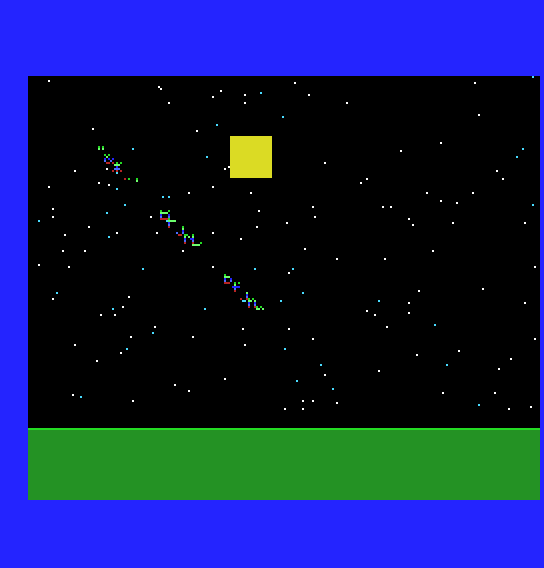
A night sky over open ground: a game's backdrop. The program clears a 212-line page at 10000h with whole bytes, lays the ground with whole bytes, then plots 150 stars and a moon one dot at a time. The moon is a 16 x 16 shape written in binary at the end of the listing, so you can see it: each 1 becomes a dot. Its left edge is at x = 101, an odd x, so its edge dots are low nibbles sharing a byte with the sky. It holds the picture for 250 frames (five seconds) and hands back.
; S11: a night sky in Graphics 4 - 256 x 212, a colour for every pixel.
;
; The screen is a 32K page at 10000h, above MOS's own screen, so MOS's
; screen is still there when the program ends. Dot (x,y) is in byte
; y*128 + x/2 of the page: the left dot in the high nibble, the right dot
; in the low nibble.
;
; It clears the page to black with whole bytes, lays the ground with whole
; bytes, then plots stars and a moon one pixel at a time. It shows the
; picture for 250 frames (5 seconds), then gives MOS its screen back.

        ORG 256

        DI
        ; --- the sprites: Graphics 4 uses sprite mode 2, so give it an
        ;     attribute table of its own at 1FA00h, holding only Y = 216
        LD A, 7
        LD B, 14
        CALL setreg     ; R#14 = 7: VRAM 1C000h-1FFFFh
        XOR A
        OUT (9), A      ; address 3A00h in that 16K, for writing
        LD A, 3Ah + 40h
        OUT (9), A
        LD A, 216       ; Y = 216: the sprite list ends here
        OUT (8), A
        LD A, 0F7h
        LD B, 5
        CALL setreg     ; R#5 = F7h  } attributes at 1FA00h
        LD A, 03h
        LD B, 11
        CALL setreg     ; R#11 = 03h }

        ; --- Graphics 4 first: only then does a run of writes carry on past
        ;     16K. Show the page at 10000h, 212 lines
        LD A, 06h
        LD B, 0
        CALL setreg     ; R#0 = 06h: Graphics 4
        LD A, 5Fh
        LD B, 2
        CALL setreg     ; R#2 = 5Fh: show the page at 10000h
        LD A, 82h
        LD B, 9
        CALL setreg     ; R#9 = 82h: 212 lines (bit 7), 50 Hz (bit 1)

        ; --- clear the whole page to colour 1 (black): 212 lines x 128
        ;     bytes = 27,136 bytes, from one address, sixteen OUTs a loop
        LD A, 4
        LD B, 14
        CALL setreg     ; R#14 = 4: the page at 10000h
        XOR A
        OUT (9), A
        LD A, 40h       ; address 0000h, for writing
        OUT (9), A
        LD A, 11h       ; colour 1 in both nibbles: two black dots
        LD D, 106       ; 106 x 16 x 16 = 27,136
clr1:   LD B, 16
clr2:   OUT (8), A
        OUT (8), A
        OUT (8), A
        OUT (8), A
        OUT (8), A
        OUT (8), A
        OUT (8), A
        OUT (8), A
        OUT (8), A
        OUT (8), A
        OUT (8), A
        OUT (8), A
        OUT (8), A
        OUT (8), A
        OUT (8), A
        OUT (8), A
        DJNZ clr2
        DEC D
        JR NZ, clr1     ; the address runs on past 16K by itself

        ; --- the ground, in whole bytes: grass on line 176, earth below
        LD D, 176       ; line
        LD H, 1         ; one line
        LD A, 22h       ; colour 2, both dots
        CALL lines
        LD D, 177
        LD H, 35        ; lines 177-211
        LD A, 0CCh      ; colour 12, both dots
        CALL lines

        ; --- 150 stars, one dot each, anywhere above the ground
        LD B, 150
star:   PUSH BC
        CALL random
        LD E, A         ; x: 0-255
sty:    CALL random
        CP 170
        JR NC, sty      ; y: 0-169
        LD D, A
        LD C, 15        ; white ...
        AND 3
        JR NZ, sto
        LD C, 7         ; ... and one in four cyan
sto:    CALL plot
        POP BC
        DJNZ star

        ; --- a moon: one dot of colour 10 for each 1 in the shape below,
        ;     with its left edge at x = 101 (odd: a right-hand dot)
        LD HL, moon
        LD D, 30        ; top line
mn1:    LD E, 101       ; left edge
        LD A, 2         ; two bytes to a row
mn2:    PUSH AF
        LD A, (HL)      ; the next 8 dots of the shape
        INC HL
        LD B, 8
mn3:    RLA             ; the leftmost dot into carry
        JR NC, mn4      ; a 0: sky, leave it
        PUSH AF
        PUSH BC
        PUSH HL
        LD C, 10        ; yellow
        CALL plot
        POP HL
        POP BC
        POP AF
mn4:    INC E           ; the next dot to the right
        DJNZ mn3
        POP AF
        DEC A
        JR NZ, mn2
        INC D           ; the next line down
        LD A, D
        CP 46           ; 30 + 16 lines
        JR NZ, mn1

        ; --- show it for 250 frames, then MOS's screen back
        CALL irqon
        LD A, 0E0h
        LD B, 1
        CALL setreg     ; display on, frame interrupt on
        EI
        LD B, 250
hold:   PUSH BC
        CALL waitf
        POP BC
        DJNZ hold
        LD A, 0C0h
        CALL irqoff     ; frame interrupt off, MOS's table back
        CALL tomos      ; MOS's screen back (BE resets R#9 too)
        RET

onframe: RET            ; nothing to do each frame

; --- plot: one dot of colour C (0-15) at x = E, y = D (0-211), on the
;     page at 10000h. Reads the byte, changes one nibble, writes it back.
;     Uses AF, B, HL.
plot:   LD A, D
        SRL A           ; A = y / 2, carry = y's bit 0
        LD H, A
        LD A, E
        RRA             ; A = y's bit 0, then x / 2; carry = x's bit 0
        LD L, A         ; HL = y*128 + x/2
        LD B, 0
        RL B            ; B = 1 for a right-hand (odd x) dot
        LD A, H
        RLCA
        RLCA
        AND 3           ; HL's top two bits: which 16K
        ADD A, 4        ; ... of the page at 10000h
        OUT (9), A
        LD A, 80h + 14
        OUT (9), A      ; R#14
        LD A, L
        OUT (9), A
        LD A, H
        AND 3Fh         ; address, for reading
        OUT (9), A
        IN A, (8)       ; the byte holding our dot and its neighbour
        DEC B
        JR Z, right
        AND 0Fh         ; left dot: keep the right one (low nibble) ...
        LD B, A
        LD A, C
        RLCA
        RLCA
        RLCA
        RLCA            ; ... and put the colour in the high nibble
        JR both
right:  AND 0F0h        ; right dot: keep the left one (high nibble) ...
        LD B, A
        LD A, C         ; ... and put the colour in the low nibble
both:   OR B
        LD B, A         ; the new byte
        LD A, L
        OUT (9), A
        LD A, H
        AND 3Fh
        OR 40h          ; the same address, for writing
        OUT (9), A
        LD A, B
        OUT (8), A
        RET

; --- lines: fill H whole lines from line D with byte A (page 10000h)
lines:  LD E, A
        LD A, D
        SRL A           ; D*128 = (D/2)*256 + (D's bit 0)*128
        LD B, A
        LD A, 0
        RRA
        LD C, A         ; BC = D*128
        LD A, B
        RLCA
        RLCA
        AND 3
        ADD A, 4
        OUT (9), A
        LD A, 80h + 14
        OUT (9), A      ; R#14
        LD A, C
        OUT (9), A
        LD A, B
        AND 3Fh
        OR 40h
        OUT (9), A      ; address, for writing
li1:    LD B, 128       ; one line
li2:    LD A, E
        OUT (8), A
        DJNZ li2
        DEC H
        JR NZ, li1      ; the next line follows on
        RET

; --- random: A = the next of 65,535 pseudo-random numbers (a 16-bit
;     xorshift: the seed's bits shuffled against themselves)
random: PUSH HL
        LD HL, (seed)
        LD A, H
        RRA
        LD A, L
        RRA
        XOR H
        LD H, A
        LD A, L
        RRA
        LD A, H
        RRA
        XOR L
        LD L, A
        XOR H
        LD H, A
        LD (seed), HL
        POP HL
        RET

seed:   DEFW 1234

; --- the moon: 16 x 16, two bytes a row, 1 = a dot
moon:   DEFB 00000111b,11100000b
        DEFB 00011111b,11111000b
        DEFB 00111111b,11111100b
        DEFB 01111111b,11111110b
        DEFB 01111111b,11111110b
        DEFB 11111111b,11111111b
        DEFB 11111111b,11111111b
        DEFB 11111111b,11111111b
        DEFB 11111111b,11111111b
        DEFB 11111111b,11111111b
        DEFB 11111111b,11111111b
        DEFB 01111111b,11111110b
        DEFB 01111111b,11111110b
        DEFB 00111111b,11111100b
        DEFB 00011111b,11111000b
        DEFB 00000111b,11100000b

        INCLUDE "frame.asm"
Build and run
Save it as s11-night-sky.asm next to frame.asm. Build and run it as in S2.
What you should see
The screen goes black from edge to edge, 212 lines tall, with a thin line of bright green grass on line 176 and dark green ground below it to the bottom of the picture. About 150 single dots are scattered over the sky, most of them white and one in four cyan, and a round yellow moon, 16 dots across, sits near the top, left of centre: the shape from the listing, dot for dot. Each star is exactly one dot: no neighbour changed with it.

After five seconds MOS's screen comes back, cleared, with the register display and the prompt.
plot, swap AND 0Fh and AND 0F0h. What happens to the stars that land next to each other, and to the moon's left edge?| Symptom | Cause |
|---|---|
| Coloured specks and streaks over the picture | The sprites are reading MOS's table as sprite mode 2 attributes. Give the mode its own table (Y = 216) and point R#5/R#11 at it |
| Only the top 128 lines turn black; below them, down to the ground, is whatever the page held before | The clear ran before R#0 was set to Graphics 4, so its writes wrapped round inside the first 16K instead of carrying on |
You can set up Graphics 4 at 192 or 212 lines on a page of your choosing, plot a single dot by read-modify-write, fill whole bytes at one port write per two dots, and hand MOS back its screen intact. Every dot has its own colour, at twice the VRAM cost of Graphics II.
S12, More Pixels, More Colours: Graphics 5, 6 and 7, with 512 dots across or 256 colours, and what each costs.
