module
9

On the TC-01 a sprite has one colour. The assembly course's S20 drew a ship in one colour, and anything more colourful meant layering sprites, at the cost of two of your four a line. The 256's sprite mode 2 gives every line of a sprite its own colour, lets two sprites mix their colours where they overlap, and lets you say which lines count for collisions.
This section builds a ship with three colours on a line and an exhaust flame that rocks can pass through without the game noticing.
In S8 you filled the colour table with sixteen identical bytes a sprite. They don't have to be identical. The chip takes line n of sprite s from byte 16 x s + n of the colour table, so a 16x16 sprite can have sixteen different colours, top to bottom. The fourth attribute byte, which held the colour on the TC-01, is not used at all.
The cost is small. The colour table is 512 bytes whatever you put in it, and changing a sprite's colours is sixteen bytes to video memory. A flashing shot or a flickering flame is a few bytes a frame, with no new patterns.
Each byte holds more than a colour:
| Bit | 7 | 6 | 5 | 4 | 3-0 |
|---|---|---|---|---|---|
| Name | EC | CC | IC | - | colour |
Leave bit 4 at 0.
Set CC on a line of a sprite, and that line doesn't cover what's beneath it. Where it lies over a lower-numbered sprite, the two colour numbers are OR-ed together.
So take a ship, sprite 0, coloured line by line, and lay a second sprite, sprite 1, at exactly the same X and Y, with CC set on its lines and colour 8. On every line you can now have three colours:
c, where sprite 1 has nothingc OR 8 where both have pixelsWith the default colours, 7 (cyan) OR 8 is 15 (white), 5 (light blue) OR 8 is 13 (magenta), 2 (green) OR 8 is 10 (dark yellow). Choose the two sprites' colours so their OR is a colour you want. It is the colour numbers that are OR-ed.
Three rules come with it:
Bit 5 of the status register, the collision flag from the assembly course's S24, is still there in sprite mode 2: it is set when two sprites' pixels overlap. It says only that something touched, which is why S24 worked out collisions from the coordinates. But it is a quick, free check that anything touched at all, and a game can skip its own tests in a frame when the flag is clear.
That only works if the flag means what the game means. A ship's exhaust flame, a shadow, a glow round a power-up: none of these should kill the player. Set IC on those lines and they are left out of collision detection. They are drawn as usual, but they never set the flag.
s09-ship.asm: the ship, its CC overlay, and two rocks drifting left. The ship's bottom four lines, the exhaust, have IC set. One rock passes through the exhaust, the other through the nose. In any frame with a collision the backdrop turns red, colour 8. After 600 frames, twelve seconds, MOS's screen comes back.
The tables are where S8 put them, and the program waits for each frame by polling, as in S8. Reading the status register clears the collision flag, so nextf ORs every read of the frame together, and bit 5 of what it returns says whether anything touched while the frame was drawn.
; S9: a ship in three colours a line, with an exhaust that never collides.
;
; Sprite 0 is the ship: a colour on every line, its exhaust (the bottom
; four lines) marked IC so it takes no part in collisions.
; Sprite 1 sits on top of it with CC set on every line: its colour, 8,
; is OR-ed with the ship's where they overlap, and the pair never counts
; as a collision with each other.
; Sprites 2 and 3 are rocks drifting left: one through the exhaust, one
; through the nose. The border turns red (colour 8) in any frame with a
; collision. After 600 frames (12 seconds) MOS's screen comes back.
;
; Tables as in S8, in VRAM page 2: patterns A000h, colours 9C00h,
; attributes 9E00h.

        ORG 256

        DI                      ; we poll the frame flag: no interrupts
        IN A, (9)               ; throw away the first status read

; --- the patterns: ship (0-3), its overlay (4-7), a rock (8-11)
        LD HL, 0A000h
        CALL vaddr
        LD HL, pats
        LD BC, 96*256+8         ; B = 96 bytes, C = port 8
        OTIR

; --- the colour table: 16 lines for each of the four sprites
        LD HL, 9C00h
        CALL vaddr
        LD HL, colours
        LD BC, 64*256+8
        OTIR

; --- Graphics 3, and the sprite tables moved
        LD HL, g3regs
        CALL setregs
        CALL sendatt

; --- the game loop: one pass a frame
loop:   CALL nextf              ; wait for the frame; A = every flag seen
        BIT 5, A                ; a collision in the frame just shown?
        LD A, 0F4h              ; no: MOS's backdrop, colour 4
        JR Z, border
        LD A, 0F8h              ; yes: colour 8
border: LD B, 7
        CALL setreg

        CALL sendatt            ; last frame's moves, sent in one go
        LD HL, att+9            ; rock 1's X
        DEC (HL)                ; one pixel left a frame
        LD HL, att+13           ; rock 2's X
        DEC (HL)

        LD HL, (frames)
        INC HL
        LD (frames), HL
        LD DE, 600
        OR A
        SBC HL, DE              ; 600 frames yet?
        JR C, loop

; --- back to MOS
        LD HL, mosregs
        CALL setregs
        EI
        RST 8
        DEFB 0BEh               ; MOS: clear to its 40-column screen
        RET

; --- sendatt: copy the attribute table from RAM to 9E00h
sendatt:
        LD HL, 9E00h
        CALL vaddr
        LD HL, att
        LD BC, 17*256+8         ; 4 sprites of 4 bytes, and the end mark
        OTIR
        RET

; --- nextf: read the status until the frame flag is set.
; Returns A = every status bit seen since the last call.
nextf:  LD C, 0
nf1:    IN A, (9)
        OR C
        LD C, A
        BIT 7, A
        JR Z, nf1
        RET

; --- vaddr: set the VRAM write address HL, in page 2 (8000h-BFFFh)
vaddr:  LD A, 2
        LD B, 14
        CALL setreg             ; R#14 = 2
        LD A, L
        OUT (9), A
        LD A, H
        AND 3Fh
        OR 64
        OUT (9), A
        RET

; --- setreg: write A to register B
setreg: OUT (9), A
        LD A, B
        OR 128
        OUT (9), A
        RET

; --- setregs: register, value pairs from HL, ending with FFh
setregs:
        LD B, (HL)
        INC HL
        LD A, (HL)
        INC HL
        CALL setreg
        LD A, (HL)
        CP 0FFh
        JR NZ, setregs
        RET

g3regs: DEFB 0, 04h             ; Graphics 3
        DEFB 5, 3Fh, 11, 01h    ; attributes 9E00h, colours 9C00h
        DEFB 6, 14h             ; patterns A000h
        DEFB 1, 0C2h            ; display on, 16x16 sprites, no interrupt
        DEFB 0FFh
mosregs: DEFB 0, 02h, 1, 0C0h, 5, 76h, 11, 00h, 6, 03h, 14, 0
        DEFB 7, 0F4h            ; MOS's backdrop
        DEFB 0FFh

frames: DEFW 0

; colour bytes: bit 6 CC, bit 5 IC, bits 3-0 the colour
CC:     EQU 40h
IC:     EQU 20h
colours:
        DEFB 7, 7, 7, 7, 5, 5, 5, 5             ; sprite 0, the ship:
        DEFB 2, 2, 2, 2                         ;   cyan, light blue, green
        DEFB IC+11, IC+10, IC+11, IC+10         ;   exhaust: yellow, IC
        DEFB CC+8, CC+8, CC+8, CC+8, CC+8, CC+8, CC+8, CC+8   ; sprite 1
        DEFB CC+8, CC+8, CC+8, CC+8, CC+8, CC+8, CC+8, CC+8
        DEFB 14, 14, 14, 14, 1, 1, 1, 1         ; sprite 2, a rock: grey
        DEFB 0, 0, 0, 0, 0, 0, 0, 0             ;   and black
        DEFB 14, 14, 14, 14, 1, 1, 1, 1         ; sprite 3, the other
        DEFB 0, 0, 0, 0, 0, 0, 0, 0

; the attribute table in RAM: Y, X, pattern, (unused)
att:    DEFB 99, 120, 0, 0      ; the ship
        DEFB 99, 120, 4, 0      ; its overlay, at the same place
        DEFB 111, 230, 8, 0     ; rock 1: lines 112-119, the exhaust's
        DEFB 95, 40, 8, 0       ; rock 2: lines 96-103, the nose's
        DEFB 216                ; the end of the list

; 16x16 patterns, one 8x8 quarter at a time, in the order the chip reads
; them: top-left, bottom-left, top-right, bottom-right. 1 = a pixel.
pats:
; ship (pattern 0): top-left
        DEFB 00000001b
        DEFB 00000011b
        DEFB 00000011b
        DEFB 00000111b
        DEFB 00000111b
        DEFB 00001111b
        DEFB 00011111b
        DEFB 00111111b
; ship (pattern 1): bottom-left
        DEFB 01111111b
        DEFB 11111111b
        DEFB 11110111b
        DEFB 11100011b
        DEFB 00000011b
        DEFB 00000001b
        DEFB 00000011b
        DEFB 00000001b
; ship (pattern 2): top-right
        DEFB 10000000b
        DEFB 11000000b
        DEFB 11000000b
        DEFB 11100000b
        DEFB 11100000b
        DEFB 11110000b
        DEFB 11111000b
        DEFB 11111100b
; ship (pattern 3): bottom-right
        DEFB 11111110b
        DEFB 11111111b
        DEFB 11101111b
        DEFB 11000111b
        DEFB 11000000b
        DEFB 10000000b
        DEFB 11000000b
        DEFB 10000000b
; overlay (pattern 4): top-left
        DEFB 00000000b
        DEFB 00000000b
        DEFB 00000001b
        DEFB 00000001b
        DEFB 00000001b
        DEFB 00000000b
        DEFB 01100000b
        DEFB 00000000b
; overlay (pattern 5): bottom-left
        DEFB 10000001b
        DEFB 11000000b
        DEFB 00000000b
        DEFB 00000000b
        DEFB 00000000b
        DEFB 00000000b
        DEFB 00000000b
        DEFB 00000000b
; overlay (pattern 6): top-right
        DEFB 00000000b
        DEFB 00000000b
        DEFB 10000000b
        DEFB 10000000b
        DEFB 10000000b
        DEFB 00000000b
        DEFB 00000110b
        DEFB 00000000b
; overlay (pattern 7): bottom-right
        DEFB 10000001b
        DEFB 00000011b
        DEFB 00000000b
        DEFB 00000000b
        DEFB 00000000b
        DEFB 00000000b
        DEFB 00000000b
        DEFB 00000000b
; rock (pattern 8): top-left
        DEFB 00000111b
        DEFB 00011111b
        DEFB 00111111b
        DEFB 01111111b
        DEFB 01111111b
        DEFB 00111111b
        DEFB 00011111b
        DEFB 00000111b
; rock (pattern 9): bottom-left
        DEFB 00000000b
        DEFB 00000000b
        DEFB 00000000b
        DEFB 00000000b
        DEFB 00000000b
        DEFB 00000000b
        DEFB 00000000b
        DEFB 00000000b
; rock (pattern 10): top-right
        DEFB 11000000b
        DEFB 11110000b
        DEFB 11111000b
        DEFB 11111100b
        DEFB 11111100b
        DEFB 11111000b
        DEFB 11110000b
        DEFB 11000000b
; rock (pattern 11): bottom-right
        DEFB 00000000b
        DEFB 00000000b
        DEFB 00000000b
        DEFB 00000000b
        DEFB 00000000b
        DEFB 00000000b
        DEFB 00000000b
        DEFB 00000000b
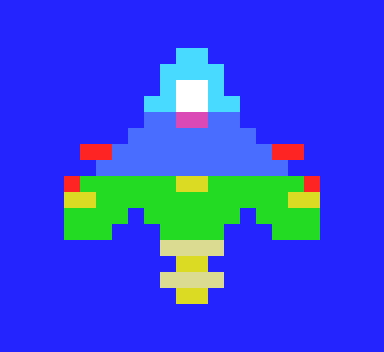
The overlay, sprite 1, is mostly empty. It puts a cockpit on lines 2-4, a pod either side of line 6, and a stripe and wing tips on lines 8 and 9. Everywhere else the ship shows in its own colours.
Build and run it as in S2.
What you should see
A ship in the middle of the screen, nose up, magnified here:
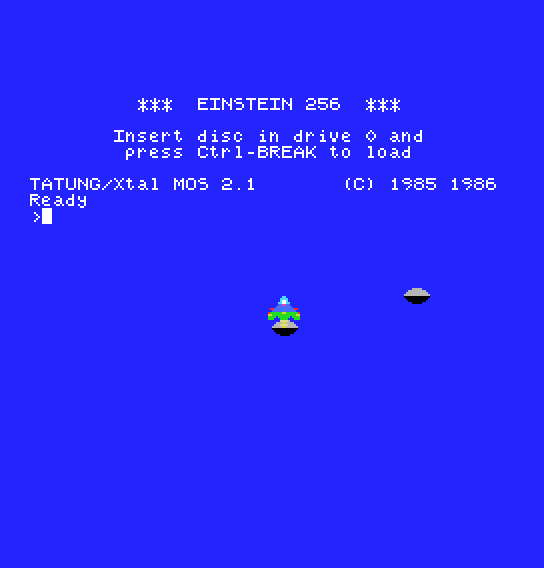
Two grey rocks drift left. The first passes through the exhaust. It goes behind the flame, and nothing else happens:
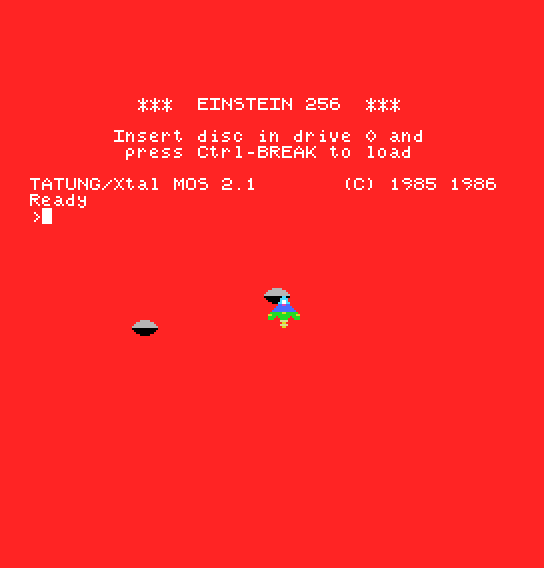
The second hits the nose, and for as long as they overlap, the whole background turns red:
After twelve seconds the program clears to MOS's 40-column screen, with the register display and the > prompt.
IC+ off the exhaust's four colour bytes. What happens now when the first rock passes the flame?CC: EQU 40h to CC: EQU 0. Predict both the colours of the ship and the colour of the background before you run it.att, so the overlay is sprite 0. Which colours survive, and why?80h to the ship's first four colour bytes (87h instead of 7). Where is the nose now?| Symptom | Cause |
|---|---|
| The background is red all the time | The overlay doesn't have CC set: it collides with the ship every frame |
You can colour a sprite line by line from its 16 colour-table bytes. You can lay a CC sprite over another for three colours on a line, without the pair colliding, and you can mark lines with IC so that the collision flag only means what your game cares about. Collisions are still worked out from the coordinates, as in the assembly course's S24. The flag tells you when it's worth doing.
S10, Joysticks: the 256's two digital joysticks, so the player can fly this ship.
