module
11

Everything you have defined so far lives in the machine's memory and nowhere else. Switch it off and it is gone: not damaged, not recoverable, simply not there any more.
This section is how you stop that happening.
save "shapes
That writes everything you have defined, every procedure in the workspace, not just the last one, onto the disc, under the name shapes.
It goes on the same disc Dr Logo came from. There is plenty of room: Dr Logo and the two programs that came with it take about a third of it, and the other 128K is yours.
If it works, nothing is printed at all. Dr Logo is quiet when things go right.
To see what is there:
dir
which answers with a list of names.
Next time you start the machine:
load "shapes
and every procedure in that file is defined again, ready to use. The machine tells you what it has learned as it goes.
load adds to what is already there. It does not clear the workspace first. If you have star defined and load a file that has a different star in it, the one from the file wins, but anything the file does not mention is left exactly as it was. That is usually what you want and occasionally very confusing.
Dr Logo will not overwrite a file. Save under a name that is already there and it says so:
?save "shapes
File shapes already exists
Nothing is written, and the old file is untouched. To replace it, take the old one away first:
erasefile "shapes
save "shapes
You will hit this the second time you save. It is not a mistake on your part and there is no option to force it: erase, then save.
to star
repeat 5 [fd 60 rt 144]
end
save "shapes
dir
Starting from
A fresh boot, at the ? prompt.
What you should see
star defined when the definition closes, nothing at all from the save, and then the listing:
[QUIZ SKETCH SHAPES]
SHAPES is yours. QUIZ and SKETCH were already on the disc; they are the two programs Tatung shipped with Dr Logo in 1984, and Appendix II says what they are. Leave them alone and they will not get in your way.
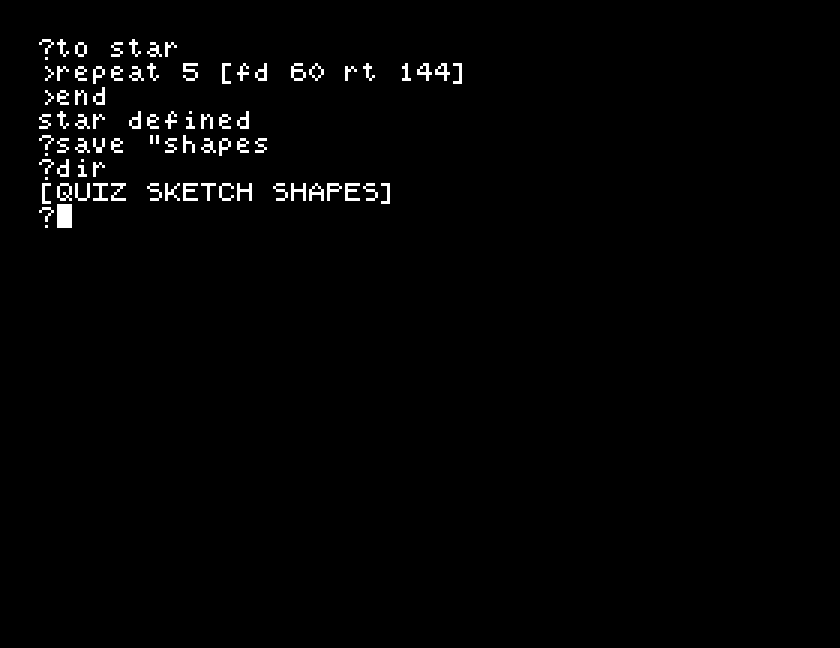
The name comes back in capitals. That is how the disc stores it, and load "shapes in lower case will still find it.
Now switch the machine off. Start it again, type load "shapes, then star. That is the whole point of this section.
save "shapes a second time. Read what it says, then get the save to work without changing the name.erall, then star. Then load "shapes and star again. What did erall do, and what brought it back?po "star before you save, and again after a load. Is what comes back identical to what you typed in?| Symptom | Cause |
|---|---|
File shapes already exists | Dr Logo will not overwrite. erasefile "shapes first. |
File shapes not found | Nothing of that name on the disc. Check with dir. |
No Drive 1: and every key you press gives it again | You have typed b: in front of a name, asking for a second disc drive that is not there. Close the emulator and start it again. Anything unsaved is lost. |
Disk is full | The disc has no room left. erasefile something you no longer want. |
| Everything came back except one procedure | load only defines what is in the file. Something you defined after the last save was never saved. |
save "name writes your whole workspace to the disc and load "name brings it back, including after the machine has been off. dir lists what is there. Dr Logo refuses to overwrite, so erasefile first. Save often.
If you would rather keep Dr Logo's disc pristine, the machine has a second drive: start MAME with a second -flop2 somedisc.mfi and put b: in front of every name: save "b:shapes, dir "b:. It is not necessary and the course does not use it.
S12, giving a procedure a number: one square that can draw any size, instead of one for every size you want.
This form is protected by reCAPTCHA, and the Google Privacy Policy and Terms of Service apply.
