module
12

square draws a square of fifty steps and will never draw one of any other size. Defining square30, square40 and square60 is obviously the wrong answer.
What you want is one procedure with a gap in it, and a way to fill the gap when you ask.
Put a name after a colon on the to line:
to box :size
:size is a gap. Inside the body, writing :size means whatever number was given when the procedure was called:
to box :size
repeat 4 [fd :size rt 90]
end
Now box 30 draws a square of 30 and box 60 draws one of 60. One definition, any size.
The colon is doing real work and is not decoration; it is how Dr Logo tells the value that was passed in from a word. S17 comes back to that properly.
The name is yours to choose. :size could be :n or :howbig; what matters is that the name on the to line matches the name used in the body.
You can leave more than one gap, and they are filled in order:
to rect :w :h
repeat 2 [fd :h rt 90 fd :w rt 90]
end
rect 80 40 draws 80 wide by 40 tall. Get them the wrong way round and you get a rectangle, just not the one you meant; there is nothing to warn you, because both numbers are perfectly good numbers.
to box :size
repeat 4 [fd :size rt 90]
end
ss
cs
ht
box 20
box 40
box 60
Starting from
A fresh boot, at the ? prompt.
What you should see
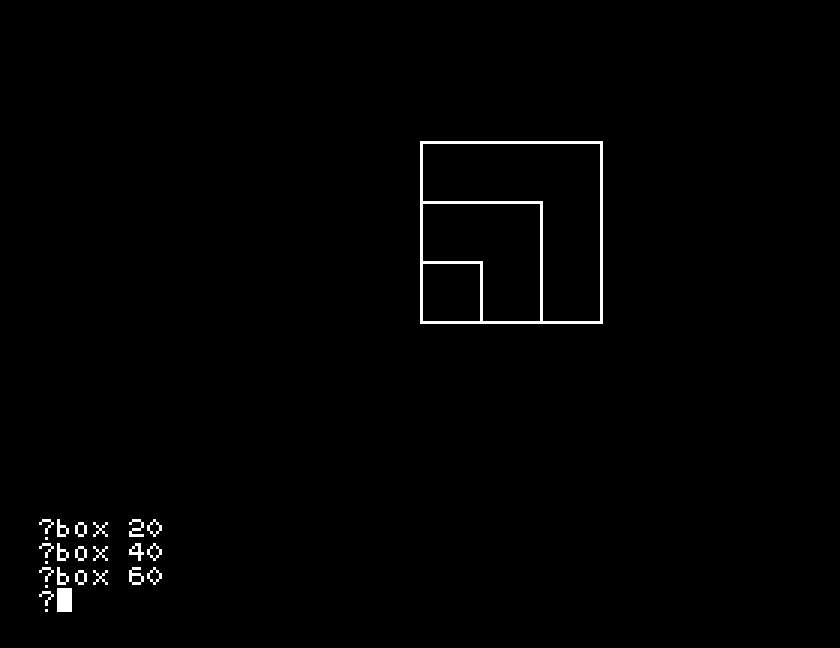
Three squares sharing their bottom left corner, of 20, 40 and 60 steps. One procedure drew all three.
box 100 on the end. Something is different about that one, and it is not the procedure's fault; S8 explains it.box on its own, with no number at all. What does Dr Logo say? Read the wording: it tells you what it was expecting.rect as above, then run rect 80 40 and rect 40 80. Both work and they are different. What would have to be true for Dr Logo to catch you getting them the wrong way round, and can it?| Symptom | Cause |
|---|---|
| The shape is always the same size whatever number you give | The body is using a fixed number rather than :size. Check it with po "box. |
box has no value or similar | The name in the body does not match the one on the to line. They have to be spelled the same. |
| Part of the shape is missing | The number is big enough to run off the screen. |
| The rectangle is the wrong way round | Inputs are filled in the order they are written. |
A name after a colon on the to line leaves a gap; the number you type after the procedure's name fills it. Several gaps are filled in order. One definition then draws a whole family of shapes.
S13, getting an answer back: procedures that work something out and hand you the result, rather than drawing.
This form is protected by reCAPTCHA, and the Google Privacy Policy and Terms of Service apply.
