module
10

A procedure you have defined is not fixed. You will want to change one, to make a shape bigger, or fix a number you got wrong, and typing the whole definition again is not the way.
ed "star
The screen clears and your procedure appears on it, with a line across the bottom:
Logo Editor:^C to accept,<ESC> to quit
That is a different kind of screen from the ? prompt. Nothing you type here runs; you are changing text, and it takes effect when you leave.
Note the " before the name. That mark matters and S17 explains it properly; for now, ed wants it.
Give it a moment. The editor takes a second to draw, and for that second you may see the status line with nothing above it.
The Einstein's two cursor keys work in here. They are the grey pair at the right-hand end of the QWERTY row: the horizontal one moves right, or left with SHIFT held; the vertical one moves down, or up with SHIFT. The three keys marked with a single arrow are not cursor keys: at the ? prompt ← and → type [ and ], and in the editor they do nothing at all. Moving about is also done with CONTROL, which is what this section uses.
In MAME: the horizontal cursor key is Tab and the vertical one is the Down arrow; your Left, Right and Up arrows are the three character keys.
| Press | What it does |
|---|---|
| CTRL-J | Down one line |
| CTRL-E | To the end of the line |
| CTRL-Y | Delete the character before the cursor |
| CTRL-C | Keep the changes and leave |
Typing inserts at the cursor. Nothing is ever overwritten, so to replace something you delete it first.
When the editor opens, the cursor is at the end of the first line, after the procedure's name.
There are about twenty more keys. Appendix I has the ones that are worth knowing; these four are enough for most changes.
to star
repeat 5 [fd 60 rt 144]
end
Type that in, then ss, cs, ht and star to see what it draws: a five-pointed star.
Now change the 144 to 72:
ed "star144]; the closing bracket counts72]Starting from
A fresh boot, at the ? prompt.
What you should see
While you are in the editor, after the deletes and retyping, the second line reads:
repeat 5 [fd 60 rt 72]
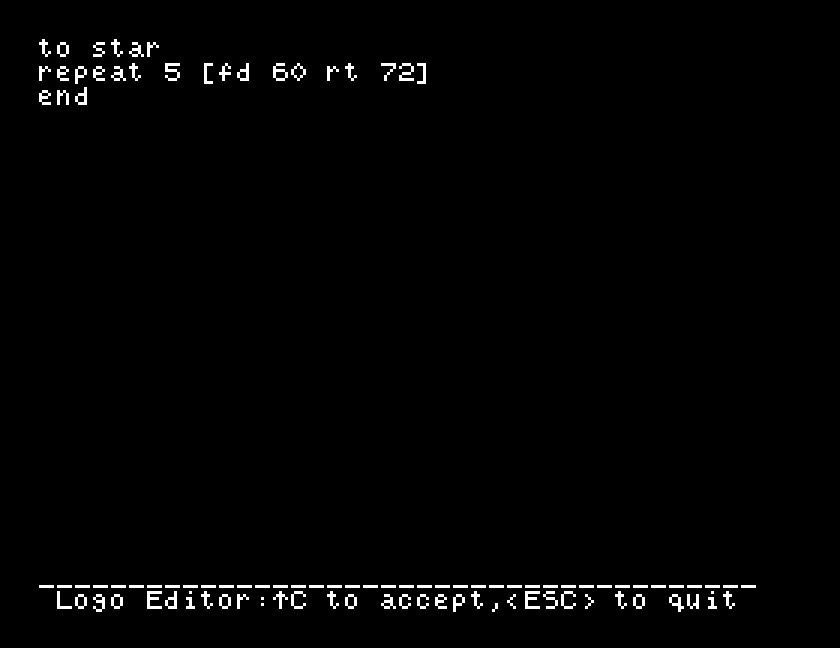
CTRL-C prints star defined and takes you back to ?. Then cs and star draws a pentagon.
The procedure is still called star, and now draws something that is not one. Nothing stops you renaming it; the name is on the first line and you can edit that too.
star. Which shape do you get, and what does that tell you about when a change takes effect?ed "star and press CTRL-C straight away, without touching anything. What does Dr Logo say, and is it telling the truth?ed "wheel, which you have never defined. What appears? What does that suggest about another way to write a procedure from scratch?| Symptom | Cause |
|---|---|
| The arrow keys do nothing | In MAME your Left and Right arrows are the Einstein's [ and ] keys, which do nothing in the editor. Use Tab and SHIFT-Tab, or CTRL-H and CTRL-D, to go left and right. |
Pressing [ gives you a bracket where you did not want one | You are at the ? prompt, not in the editor. |
| The editor opens with nothing in it but the status line | Give it a second to draw. |
You get to wheel and end and nothing between | That name has no procedure. ed offers you the frame for a new one. |
| Your change did not take | ESC throws changes away. CTRL-C keeps them. |
| You counted the deletes wrong and the number is odd | Delete the rest of it and type the whole number again; the editor always inserts, so half-deleted numbers stay put. |
ed "name opens a procedure for editing. The cursor keys move, as do CTRL-J and CTRL-E; CTRL-Y deletes backwards, and typing inserts. CTRL-C keeps the change, ESC throws it away. Appendix I has the rest of the keys.
S11, keeping your work: saving what you have written to the disc, so it is still there tomorrow.
This form is protected by reCAPTCHA, and the Google Privacy Policy and Terms of Service apply.
