module
29
A ball that bounces off three walls and falls out of the fourth is a demonstration. Put a bat in its way that the player can move, and it is a game. This stage does three things: reads the arrow keys inside the loop without stopping it, moves the bat by one column and redraws only the two characters that changed, and makes the ball bounce off the bat - at an angle that depends on where it hit, because a ball that always came off at the same angle would never reach the corners.
c = kbd();
if (c == LEFTKEY)
    move_bat(&paddle, -1);
if (c == RIGHTKEY)
    move_bat(&paddle, 1);
One call a tick, at the top of the loop, and the loop carries on whether or not a key was down (S22). LEFTKEY and RIGHTKEY are #defined as '[' and ']', the characters the arrow keys send. A held key is seen on every tick, so the bat keeps moving while the key is down - one column every three frames, six columns a second, which is a speed that can be tuned by moving two columns a tick if the game wants it. There is no waiting for release: a bat wants to be held.
void move_bat(p, dir) bat *p; int dir;
{
    if (dir < 0 && p->left > PLAYLEFT) {
        p->left--;
        curat(p->left + p->width, BATROW);
        putchar(' ');
        draw_bat(p);
    }
    if (dir > 0 && p->left + p->width - 1 < PLAYRIGHT) {
        curat(p->left, BATROW);
        putchar(' ');
        p->left++;
        draw_bat(p);
    }
}
Each way, the same three steps: check the bat has room - its left end still past PLAYLEFT, or its right end short of PLAYRIGHT, the same margin the ball keeps - rub out the character it is leaving behind, and draw it in its new place. Moving left, the character left behind is the one just past the new right end; moving right, it is the old left end, so that one is rubbed out before left changes. Six characters a move. A bat that moves faster than the ball's tick could smear if it moved more than one column between draws; this one cannot.
if (p->y == BATROW && p->x >= q->left && p->x < q->left + q->width) {
    p->dy = -1;
    p->y = BATROW - 1;
    hit = p->x - q->left;
    if (hit == 0)
        p->dx = -1;
    if (hit == q->width - 1)
        p->dx = 1;
}
move_ball now takes the bat as well. After the step, if the ball has landed on the bat's row and its column is within the bat, it bounces: straight back up (dy = -1), and lifted onto the row above so that it is never drawn on top of the bat. Then the angle. hit is how far along the bat the ball landed, 0 to width - 1; off the left end it goes left, off the right end it goes right, and off the middle it keeps whatever dx it had. Five columns of bat, three behaviours; a wider bat could have more. This is the whole of the game's skill: where on the bat you catch the ball decides where it goes next.
The loop no longer tests b.y in its condition. It moves the ball and then asks whether it is on the bat's row - if (b.y >= BATROW) break; - before drawing. A ball that reached that row and met the bat has already been lifted back to row 20 by the bounce, so a ball still on row 21 has missed, and it is lost there and then, without ever being drawn. That matters: the first version of this stage drew it beside the bat and lost it a tick later, and if the bat had slid under it in between, the ball's rub-out took a character out of the bat. After the loop, one rub-out at oldx, oldy takes the last ball off the screen.
BREAK2.C with these changes, saved as BREAK3.C: two #defines, move_bat, the new move_ball and the loop.
#define LEFTKEY '['
#define RIGHTKEY ']'
void move_bat(p, dir) bat *p; int dir;
{
    if (dir < 0 && p->left > PLAYLEFT) {
        p->left--;
        curat(p->left + p->width, BATROW);
        putchar(' ');
        draw_bat(p);
    }
    if (dir > 0 && p->left + p->width - 1 < PLAYRIGHT) {
        curat(p->left, BATROW);
        putchar(' ');
        p->left++;
        draw_bat(p);
    }
}

void move_ball(p, q) ball *p; bat *q;
{
    int hit;
    p->oldx = p->x;
    p->oldy = p->y;
    p->x += p->dx;
    p->y += p->dy;
    if (p->x <= PLAYLEFT || p->x >= PLAYRIGHT)
        p->dx = -p->dx;
    if (p->y <= TOPWALL + 1)
        p->dy = -p->dy;
    if (p->y == BATROW && p->x >= q->left && p->x < q->left + q->width) {
        p->dy = -1;
        p->y = BATROW - 1;
        hit = p->x - q->left;
        if (hit == 0)
            p->dx = -1;
        if (hit == q->width - 1)
            p->dx = 1;
    }
}
and in main, int c; among the declarations, the ball starting at b.y = BATROW - 1, and the loop:
    for (;;) {
        c = kbd();
        if (c == LEFTKEY)
            move_bat(&paddle, -1);
        if (c == RIGHTKEY)
            move_bat(&paddle, 1);
        move_ball(&b, &paddle);
        if (b.y >= BATROW)
            break;
        draw_ball(&b);
        wait_frames(TICK);
    }
    curat(b.oldx, b.oldy);
    putchar(' ');
The whole file is BREAK3.C in Appendix III.
Starting from
BREAK2.C, edited as above; HC BREAK3.C; BREAK3.
What you should see
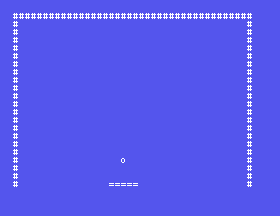
The ball sets off from just above the bat. Hold RIGHT and the bat slides right, one column at a time, leaving nothing behind; LEFT, and it slides back. Catch the ball and it bounces; catch it on an end and it comes off that way. Miss it and Lost. Press ENTER appears. ENTER, and the prompt - clean, because of the gets.
p->left-- and p->left++ to move by 2. What happens to the drawing, and why?p->y = BATROW - 1; line. Where is the ball drawn on a bounce, and what does the bat look like afterwards?hit == 0 to hit <= 1 and hit == q->width - 1 to hit >= q->width - 2. How does the game feel?29.1 Make the bat 7 wide, and give the ends, the next ones in, and the middle three different behaviours.
29.2 Add a #define for the bat's speed in columns per tick, and make move_bat honour it without smearing (rub out as many characters as it moves).
29.3 Let Q end the game from the loop, as S12's FOREVER did.
Worked solutions are in Appendix II.
| Symptom | Cause |
|---|---|
| The bat leaves a trail | It moved more columns than were rubbed out. |
| The bat goes through the wall, or touches it | The room check is off by one: left > PLAYLEFT before moving left, left + width - 1 < PLAYRIGHT before moving right. |
| The ball passes through the bat | The bounce test runs on the wrong row, or the loop breaks before move_ball has been given the bat. |
| The ball sticks on the bat's row | p->y = BATROW - 1 is missing. |
| A character of the bat disappears now and then | The ball was drawn on the bat's row beside the bat, the bat moved under it, and the ball's rub-out cleared it. Lose the ball at >= BATROW, before it is drawn. |
| The bat does not respond | CAPS LOCK is irrelevant here, but the keys are [ and ] - the arrows - not letters. |
| Letters at the prompt afterwards | No gets at the end. |
kbd() once a tick; the bat moves one column with room checks, rubs out one character and redraws itself; the ball bounces off the bat's row and its dx depends on where along the bat it hit. Six characters a move, two a tick for the ball.
S30, The Bricks - a grid of char, drawn once, each brick removed when the ball hits it, and a score.
