module
28
The court is drawn; now something has to happen on it. This stage puts a ball in play: one character that moves one square every tick, keeps going until it meets a wall, and bounces. There is no bat to hit it with yet, so it reaches the bottom row and the stage ends. Two ideas carry the whole of the rest of the game: a tick, and drawing only what changed.
typedef struct {
    int x, y, dx, dy;
    int oldx, oldy;
} ball;

ball b;
Where it is; which way it is going, as a step in each direction of -1, 0 or 1; and where it was last tick. dx = 1, dy = -1 is up and to the right; bouncing off a side wall is dx = -dx, and off the top, dy = -dy. The old position is kept because the ball has to be rubbed out from there before it is drawn in its new place, and by the time draw_ball runs, x and y are already the new ones.
while (b.y < BATROW) {
    move_ball(&b);
    draw_ball(&b);
    wait_frames(TICK);
}
That is a game loop. Move everything; draw everything that moved; wait for the next tick; go round. Nothing in it depends on how long the moving and drawing took, because the wait is for the video chip's frame (S26), not for a count: with TICK at 3 the loop goes round every three frames, sixteen or seventeen times a second, and the ball crosses the court in a little over two seconds. Change TICK and the game changes speed, and nothing else changes.
void wait_frames(n) int n;
{
    while (n-- > 0)
        while ((inp(9) & 0x80) == 0)
            ;
}
n-- > 0 tests n and then counts it down, so the body runs n times. (It does here: a loop of that shape counted 50, 3, 1 and 0 correctly.)
void move_ball(p) ball *p;
{
    p->oldx = p->x;
    p->oldy = p->y;
    p->x += p->dx;
    p->y += p->dy;
    if (p->x <= PLAYLEFT || p->x >= PLAYRIGHT)
        p->dx = -p->dx;
    if (p->y <= TOPWALL + 1)
        p->dy = -p->dy;
}
Remember where it was, step, and if the step has put it at the edge of the play area, reverse that direction for the next tick. The ball never enters a wall, and never touches one either: PLAYLEFT is column 2 and PLAYRIGHT column 37, one clear column inside each side wall, while the top has no such margin (TOPWALL + 1). The margin is for S33, where the game gets colour: the video chip colours the screen in cells eight pixels wide and the 40-column screen's characters are six, so a coloured ball touching the wall would colour the wall. The bottom has no test, because the bottom is where the ball is lost, and main's loop condition watches for that.
void draw_ball(p) ball *p;
{
    curat(p->oldx, p->oldy);
    putchar(' ');
    curat(p->x, p->y);
    putchar(BALLCHAR);
}
Two characters a tick: a space where the ball was, the ball where it is. Eight milliseconds of the sixty a tick has. S24 said this is how a game draws, and this is the whole of it. The court is never redrawn; it does not change.
#include STDIO.H

#define LEFTWALL 0
#define RIGHTWALL 39
#define TOPWALL 0
#define BATROW 21
#define PLAYLEFT 2
#define PLAYRIGHT 37
#define WALL '#'
#define BATCHAR '='
#define BALLCHAR 'o'
#define TICK 3

typedef struct {
    int left, width;
} bat;

typedef struct {
    int x, y, dx, dy;
    int oldx, oldy;
} ball;

bat paddle;
ball b;

void draw_court()
{
    int i;
    cls40();
    for (i = LEFTWALL; i <= RIGHTWALL; i++) {
        curat(i, TOPWALL);
        putchar(WALL);
    }
    for (i = TOPWALL + 1; i <= BATROW; i++) {
        curat(LEFTWALL, i);
        putchar(WALL);
        curat(RIGHTWALL, i);
        putchar(WALL);
    }
}

void draw_bat(p) bat *p;
{
    int i;
    curat(p->left, BATROW);
    for (i = 0; i < p->width; i++)
        putchar(BATCHAR);
}

void move_ball(p) ball *p;
{
    p->oldx = p->x;
    p->oldy = p->y;
    p->x += p->dx;
    p->y += p->dy;
    if (p->x <= PLAYLEFT || p->x >= PLAYRIGHT)
        p->dx = -p->dx;
    if (p->y <= TOPWALL + 1)
        p->dy = -p->dy;
}

void draw_ball(p) ball *p;
{
    curat(p->oldx, p->oldy);
    putchar(' ');
    curat(p->x, p->y);
    putchar(BALLCHAR);
}

void wait_frames(n) int n;
{
    while (n-- > 0)
        while ((inp(9) & 0x80) == 0)
            ;
}

main()
{
    char line[40];
    paddle.width = 5;
    paddle.left = 18;
    b.x = 20;
    b.y = 12;
    b.dx = 1;
    b.dy = -1;
    b.oldx = b.x;
    b.oldy = b.y;
    draw_court();
    draw_bat(&paddle);
    curoff();
    while (b.y < BATROW) {
        move_ball(&b);
        draw_ball(&b);
        wait_frames(TICK);
    }
    curon();
    curat(0, 22);
    printf("Lost. Press ENTER");
    gets(line);
    cls40();
}

#include ?EIN.LIB?
#include ?STDIO.LIB?
draw_bat's argument is p now, not b, because b is the ball.
Starting from
BREAK1.C from S27, with the ball added; saved as BREAK2.C, compiled and run.
What you should see
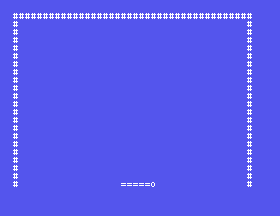
The court and bat as before, and a ball that sets off from the middle up and to the right, bounces off the top and the right wall, comes down past the bat, and stops on row 21 after about two seconds, with Lost. Press ENTER on the bottom row. ENTER, and the prompt.
TICK to 1, run, then to 10. The second is the speed of a game you could not lose; the first is one you could not win.b.dx = 1 to b.dx = 2. What happens at the right wall, and why does the test in move_ball not catch it?curat(p->oldx, p->oldy); putchar(' '); lines out of draw_ball. What is drawn?28.1 Make the ball bounce off row 21 as well, so that it never stops, and end the loop on Q with kbd() instead.
28.2 Start the ball moving straight up - dx = 0 - and see what the game becomes. Then make the first bounce off the top give it a sideways direction.
28.3 Count ticks in a global and print the count on the bottom row when the ball is lost.
Worked solutions are in Appendix II.
| Symptom | Cause |
|---|---|
| The ball leaves a trail | It is not rubbed out at oldx, oldy, or they were not updated before the move. |
| The ball goes into a wall and comes back | dx or dy is bigger than 1, or the edge test uses < where <= is needed. |
| The ball touches the wall | PLAYLEFT is 1 or PLAYRIGHT 38. The margin is deliberate; S33 says why. |
| The ball moves at a different speed in MAME | The wait is a counted loop. Wait for frames. |
| Nothing moves | The wait never returns: check & 0x80 and the port, 9. |
duplicate declaration at a global | A name shared with a structure member. |
A ball with x, y, dx, dy and its old position; a tick that moves, draws what moved and waits for frames; a bounce is a sign change on the square inside the wall. Two characters drawn a tick.
S29, The Bat - the player: kbd() in the loop, the bat moving without smearing, and the ball coming off it at an angle that depends on where it hit.
