module
24
Everything so far has printed at the bottom of the screen and scrolled up. A game does not scroll: the court stays where it is, the ball is rubbed out here and drawn there, the score changes in its corner. That needs the screen as a grid you can address, and the Einstein library gives you it in three calls. It also needs to be quick, and this section measures it.
The 40-column screen is forty characters across and twenty-four rows down, and the library numbers them from 0: column 0 to 39, row 0 at the top. curat(h, v) puts the cursor at column h, row v, and the next thing printed starts there:
curat(10, 5);
printf("X");
puts an X at the eleventh column of the sixth row. Column first, then row - the other way round from board[row][col] in S15, and worth a #define or a function of your own (at(col, row)) so that you only get it wrong once. EINLIB.HLP gives the row range as 0 to 22 - the last row is best left to the operating system - and says that a position off the screen has "unpredictable" results, so keep both numbers in range yourself; nothing else will.
cls40() clears the screen and puts the cursor at the top left, and sets 40-column mode while it is at it. Every program that draws starts with it.
Behind the calls there is nothing mysterious, as S23 showed: cls40 prints the control code 14, and curat writes the two numbers into the bytes where MOS keeps its cursor. The library is a convenience; the screen belongs to MOS.
tcol(0xF1);
sets the text colour: the first hex digit is the ink, the second the paper, from the Einstein's sixteen - 1 black, 4 dark blue, 6 dark red, 7 cyan, F white, and the rest in EINLIB.HLP. 0xF1 is white on black; 0x1F black on white; 0x3B light green on light yellow. It takes effect for everything printed after it, and stays until changed.
bcol(c) sets the border, which on the Einstein is also the backdrop of the whole display - set it to 4 and the screen behind the text turns dark blue, which is in fact what the machine starts with; set it to 1 and it is black. It stays set after the program ends, so a game that changes it should put it back.
There is no library call to read the colour back. Keep your own copy of what you set.
The control codes the library uses are yours too: putchar(12) clears the screen just as cls() does, and three others move the cursor without the library's help:
| Code | Does |
|---|---|
| 8 | back one place: AB, then 8, then C shows AC |
| 13 | back to column 0 of the same row: DE, then 13, then F shows FE |
| 10 | down a row and back to column 0 - the C library sends 13 with it |
| 12 | clear the screen |
Code 8 and code 13 are the ones a program uses: to overwrite the last character printed, or to redraw a whole row in place. Code 10 through putchar is the same as \n, which is why printf never leaves the cursor hanging mid-line the way MOS's own line feed would.
This is the number the game is built around. A loop of curat and putchar - position the cursor, print one character - ran a thousand times in 3.5 seconds: about four milliseconds a character. A thousand putchars in a row, with no curat, took 3.7 seconds; a thousand printfs of a number, scrolling as they went, eighteen seconds - four or five characters each. So the cost is the character, not the positioning: curat is two pokes and costs nothing worth measuring, and every character MOS draws on the screen costs about four milliseconds whether it is the next one along or somewhere else.
So a program can put about 250 characters a second on the screen if it positions each one, and a game that redraws the whole court every tick - 920 characters - would manage one tick every four seconds. It cannot redraw the court. It draws the court once, and each tick it prints the few characters that changed: rub out the ball where it was, print it where it is, and the same for the bat. Three or four curats and putchars a tick, twenty milliseconds, and the rest of the tick is free. That is how every game on a machine like this works, and it is why S28 keeps the ball's old position as well as its new one.
#include STDIO.H

main()
{
    cls40();
    curat(0, 0);
    printf("top left");
    curat(10, 5);
    printf("X");
    curat(30, 10);
    printf("thirty ten");
    curat(0, 22);
    printf("bottom");
    curat(20, 12);
    rawin();
    curoff();
    curat(0, 15);
    printf("no cursor");
    rawin();
    curon();
    cls40();
}

#include ?EIN.LIB?
#include ?STDIO.LIB?
rawin() (S14) holds the screen until a key is pressed, so that you can look at it; the last cls40() leaves things tidy for the prompt. curoff() and curon() are the library's calls for hiding the cursor and showing it again - a game hides it - and EINLIB.HLP describes them; what you see of the cursor while a program waits for a key is not much either way.
Starting from
Typed as SCREEN.C; compiled and run. Press a key twice to finish.
What you should see
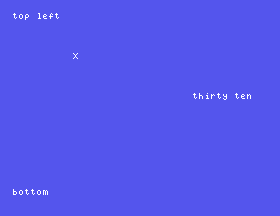
A clear screen with top left in the corner, an X alone on the sixth row, thirty ten on the right of the eleventh, and bottom on the last row but one. After a key, no cursor appears on row 15; after another, the screen clears and the prompt returns.
curat(30, 10) to curat(35, 10). Where does thirty ten go, and what happens to the part that does not fit?tcol(0x1F); before printf("X"); and tcol(0xF4); after it. What colour is the X, and what colour is thirty ten?curat(10, 5); printf("X"); with printf("XY"); putchar(8); printf("Z"); and predict the result before you run it.24.1 Draw a box: # along row 0 and row 20, and down column 0 and column 39, using curat in loops.
24.2 Print the numbers 0 to 9 down the right-hand edge of the screen, one per row, right-aligned in the last two columns.
24.3 Print Score: 0 at the top right, then count it up to 20 in a loop, redrawing only the number each time.
Worked solutions are in Appendix II.
| Symptom | Cause |
|---|---|
| Text appears in the wrong place | curat's arguments are column then row. |
| Text appears somewhere strange, or the screen goes wrong | A position off the screen. Keep the column under 40 and the row under 23. |
| The screen is a different colour after your program | bcol was changed and not put back. |
| The colours of everything changed, not just the next line | tcol stays set. Set it back after the special text. |
undefined symbol curat at the end of the compile | No #include ?EIN.LIB?, or it is after ?STDIO.LIB?. |
| The game is slow | It redraws too much. Draw what changed. |
cls40() clears; curat(col, row) positions, columns 0-39, rows 0-22; tcol(ink paper) and bcol(n) colour, and stay set. Codes 8, 13, 10 and 12 through putchar move and clear by hand. Four milliseconds a positioned character: draw the court once, and then only what changed.
S25, Reaching The Machine - past the library: bytes in memory, ports, the video chip's own memory, a character of your own design, a line, and a sprite.
