module
25
C hides the machine less than any other language in this set of courses, and this is the section where it stops hiding it at all. The library's calls in S23 turned out to be pokes and outs with the right numbers; here are the numbers, and the four things Breakout needs from them: a brick and a ball that look like a brick and a ball, a line for the court's edge, a sprite for the ball if you want one, and a clock.
peek(addr) reads a byte and poke(addr, c) writes one, anywhere in the 64K, and S16 said they are a pointer with a library name. doke(addr, n) from the Einstein library writes an int as two bytes, the low one first - doke(0x7000, 1234) leaves 210 at 7000h and 4 at 7001h, since 1234 is 4 × 256 + 210 - which is the order the Z80 keeps every two-byte number in. There is no dpeek; exercise 23.3 wrote one.
What is worth poking? MOS's workspace, near the top of memory, is where the operating system keeps what it knows: the cursor at FB4Ah and FB4Bh, the text colour at FB38h, the line pattern for drawing at FBA8h. EIN.LIB is the map to it. The 64K is also where your program and the DOS live, and a poke into either is the fastest way to a restart.
The Z80 has a second address space, 256 ports, and the chips that are not memory are on it: the video chip, the sound chip, the keyboard, the discs. out(data, port) sends a byte - data first, port second - and inp(port) reads one. They are in STDIO.LIB as a few bytes of inline each.
The video chip is on ports 8 and 9. Port 9 is where you tell it what you are about to do; port 8 is where the bytes go. Two conversations matter to this course, and EIN.LIB has both.
Setting a register. The chip has eight registers that decide the display's shape and colours. Send the value, then 0x80 plus the register number, both to port 9. bcol does exactly that for register 7, whose low four bits are the backdrop colour: out(colour, 9); out(0x87, 9);. mag does it for register 1, which holds the sprite size.
Writing to the chip's memory. The video chip has 16K of memory of its own, which the Z80 cannot see. To put a byte there you send the address to port 9 in two halves - low byte, then high byte with 0x40 added to say "I am writing" - and then the byte to port 8. That is all vpoke(addr, c) is. What is in that memory is what makes it interesting: the shapes of every character, from 1800h; and the sprite table, at 3B00h.
Every character on the screen is an 8 by 8 pattern of bits, eight bytes, kept in the video chip's memory at 1800h plus eight times the character's code. shapedef(n, a, b, c, d, e, f, g, h) writes eight bytes there, and from then on character n looks like whatever you gave it, wherever it is printed:
shapedef(200, 0x18, 0x3c, 0x7e, 0xff, 0xff, 0x7e, 0x3c, 0x18);
printf("%c", 200);
Each byte is one row, top first; each bit is one pixel, left first, and 0x18 is 00011000 - two pixels in the middle. Those eight rows are a diamond, and %c of 200 prints one - or most of one. The 40-column screen shows only the top six bits of each row. Forty characters of six pixels fill 240 of the 256 across, so the last two columns of every shape are never drawn: a row of 0xff shows six pixels, and 0x03 shows nothing. Design a shape in bits 7 to 2 and leave the last two clear; the diamond here loses its right-hand edge, and the game's ball and bricks (S30) are drawn to fit.
One more thing the six pixels do, which S33 meets: the video chip keeps colours in cells eight pixels wide, so most characters share a cell with a neighbour, and colouring one recolours the shared part of the other. A white character printed against a blue one leaves two pixels of blue. Keep a blank column between things of different colours.
Breakout's ball is a character defined this way, and so is a brick, and printing them costs no more than printing a letter.
Codes 128 to 255 are the safe ones to redefine; the letters and digits are below, and the prompt uses them.
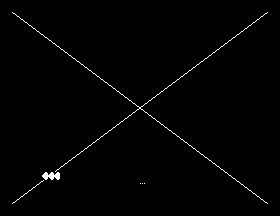
line(0xff, 0, 0, 0) chooses a solid line and draw(x1, y1, x2, y2) draws one, in a space 256 pixels wide by 192 high with the origin at the bottom left - draw(0, 0, 100, 50) runs from the bottom-left corner up and to the right. plot(x, y) sets one pixel the same way. (EINLIB.HLP says y is measured downward from the top. It is not. The shipped help is wrong on this and the machine is right.) The lines are drawn over the text, and text printed afterwards is drawn over them; cls40() clears both.
The court's walls could be drawn this way. The course draws them with characters instead, for a reason S24 gave: a character is placed in four milliseconds and a line takes longer, and the walls do not move.
The video chip can also show up to thirty-two sprites: small shapes it draws itself, at any pixel position, over everything else, which move when you change two bytes. Each sprite has four bytes in a table at 3B00h in the chip's memory - its row, its column, its shape's character code, and its colour - and the library sets them with vpoke:
spriteshape(0, 'B');
spritecol(0, 0x0F);
spritepos(0, 100, 50);
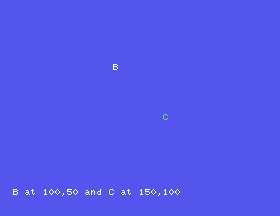
puts a white B at column 100, row 50 - sprite rows are measured from the top, unlike plot's - and spritepos again moves it, without a rub-out, without a redraw. The shape is a character code: any of the characters, including one you made with shapedef.
spriteshape is not in the library. EIN.LIB's spritedef has its vpoke arguments reversed (S23) and puts nothing on the screen; the listing defines spriteshape with the line corrected, and the game's BREAKOUT.H will carry it.
A sprite ball is the right answer for a fast game. This course's ball is a character, because a character is what the rest of the court is made of and the bricks have to know where the ball is; the sprite is here so that you know it exists, and exercise 25.3 moves one.
The video chip redraws the screen fifty times a second, and each time it sets a bit - the top bit of the byte read from port 9. Reading the port clears it again. So
while ((inp(9) & 0x80) == 0)
    ;
waits for the next frame, and a loop that waits like that once per tick runs at exactly fifty ticks a second on any Einstein, however fast the rest of the tick was. Two hundred and fifty frames took 4.94 seconds in the run for this section. S26 has the alternatives, and S28 picks one.
beep() is rawout(7) and beeps. psg(register, value) is out(register, 2); out(value, 3); - the sound chip's registers on ports 2 and 3 - and what the registers mean is in the Einstein's own BASIC manual, which the shared hardware reference for these courses also covers. The game uses beep.
#include STDIO.H

void spriteshape(s, n)
{
    s <<= 2;
    s += 0x3b02;
    vpoke(s, n);
}

main()
{
    cls40();
    mag(0);
    spriteshape(0, 'B');
    spritecol(0, 0x0F);
    spritepos(0, 100, 50);
    spriteshape(1, 'C');
    spritecol(1, 0x03);
    spritepos(1, 150, 100);
    curat(0, 22);
    printf("B at 100,50 and C at 150,100");
    rawin();
    cls40();
}

#include ?EIN.LIB?
#include ?STDIO.LIB?
And the second program, GRAPH.C, which draws:
#include STDIO.H

main()
{
    cls40();
    line(0xff, 0, 0, 0);
    draw(0, 0, 255, 191);
    draw(0, 191, 255, 0);
    plot(128, 20);
    plot(130, 20);
    plot(132, 20);
    shapedef(200, 0x18, 0x3c, 0x7e, 0xff, 0xff, 0x7e, 0x3c, 0x18);
    curat(5, 20);
    printf("%c%c%c", 200, 200, 200);
    rawin();
    cls40();
}

#include ?EIN.LIB?
#include ?STDIO.LIB?
Starting from
Typed as SPRITE.C and GRAPH.C; each compiled and run; a key ends each.
What you should see
SPRITE: a white B a third of the way down and a green C past the middle, on an otherwise empty screen, with the caption at the bottom. GRAPH: two diagonals corner to corner, three dots near the bottom centre, and three diamonds at the left of row 20.
SPRITE.C, change spriteshape(0, 'B') to spritedef(0, 'B'), the library's own. What appears?GRAPH.C, change draw(0, 191, 255, 0) to draw(0, 0, 100, 50) and take the first draw out. Which corner does the line start in?GRAPH.C, change the eight bytes of the shapedef to 0xff, 0x81, 0x81, 0x81, 0x81, 0x81, 0x81, 0xff. Work out the shape on paper first.25.1 Define character 201 as a brick - a filled rectangle with a one-pixel gap at the bottom and the right - and print a row of twenty of them.
25.2 Set the backdrop to every colour from 1 to 15 in turn with bcol, waiting for a key between each, and put it back to 4.
25.3 Move sprite 0 across the screen from column 0 to 240 in steps of 4, waiting for a frame between steps with inp(9).
Worked solutions are in Appendix II.
| Symptom | Cause |
|---|---|
A sprite defined with spritedef does not appear | The library's bug. Use spriteshape from the listing. |
| A line or a dot is upside down | draw and plot count rows from the bottom; sprites from the top. |
| A redefined character changes the prompt or the listing | Its code is below 128. Use 128-255. |
The machine restarts after a poke | The address was inside the program, the DOS or MOS's workspace. |
undefined symbol vpoke | No #include ?EIN.LIB?, or after ?STDIO.LIB?. |
Nothing seems to happen after out | The port, or the order of the two bytes, is wrong. Check against EIN.LIB. |
peek/poke for memory, out/inp for ports, vpoke for the video chip's memory - address low then high with 0x40, then the byte to port 8. Characters are eight bytes at 1800h + 8n, shapedef sets them. draw and plot count from the bottom left; sprites from the top, four bytes each at 3B00h, and the library's spritedef is broken. Bit 7 of port 9 is a 50 Hz clock.
S26, How Fast, How Big - what a tick costs, three ways to wait, and how much program fits.
