module
4
In S3 you booted the disc and looked at it. Now you make a program: type it into the editor, save it, hand it to the compiler, and run what comes out. Four commands, and you will go round them for the rest of the course. This section does the whole cycle once with the smallest program that prints anything, and S5 comes back for the rest of the editor.
Here it is, all of it:
#include STDIO.H

main()
{
    printf("Hello, Einstein\n");
}

#include ?STDIO.LIB?
main() { ... } is where a C program starts. Every C program has a main, and what is between its { and } is what the program does.printf("...") prints what is between the quotes. The \n at the end is not two characters but one: it means "end the line", so that the next thing printed starts on a new one.#include lines, one at each end, are the library. On this compiler printf is built in, and this program would run without either of them; but most of what a C program uses beyond printf is not built in. It is C, in files on the disc, and these lines tell the compiler to read it - STDIO.H at the top, a short file of names the library needs, and ?STDIO.LIB? at the end, which makes the compiler look through the library for any function your program called that it does not already have, and compile that one in. The question marks and the position both matter, and S8 says why. For now: every program in this course begins with the first line and ends with the last, so that the shape never changes and nothing is ever missing.The spaces at the start of the printf line are for you, not for the compiler. They show that the line belongs inside main.
Before you type anything, press CAPS LOCK once. The Einstein starts with it on, and C cares about case: main is a word the compiler knows, and MAIN is not.
Now type, at the prompt:
ED HELLO.C
and press ENTER. ED is the editor, ED80; HELLO.C is the file to make. About six seconds later the screen clears and you get this:
HELLO.C         LINE:1    COL:1
_


FREE:50814  $
The top line is ED80's status line: the file, and the line and column the cursor is on. It was written for an 80-column screen, and on the Einstein's 40 it wraps, so you will sometimes see a word like INSERT appear over the first line of your text; the text is still there underneath. The bottom line says how much room there is for text. Between them, the empty file.
Type the eight lines, pressing ENTER at the end of each, including the two blank ones. Remember where {, } and \ are (S3): SHIFT and LEFT, SHIFT and RIGHT, and SHIFT and the ½ key - and that the screen draws them as ¼, ¾ and ½. ? is SHIFT and /, on both keyboards.
HELLO.C         LINE:9    COL:1
#include STDIO.H

main()
¼
    printf("Hello, Einstein½n");
¾

#include ?STDIO.LIB?
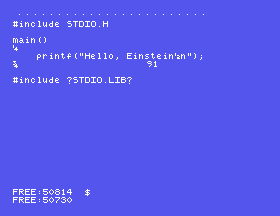
If you mistype, DEL rubs out the character to the left of the cursor. To move along a line without rubbing anything out, hold GRPH and press S to go left, or D to go right. (GRPH is the key to the right of the space bar. In MAME: GRPH is F8.) S5 has the rest of the editor's keys and says why GRPH; for now, DEL and those two will get you through a typing mistake.
Hold GRPH and press K, let go, and press X. A question appears at the top:
          Filename: HELLO.C
          See manual for details
Press ENTER to accept the name. The file is written, and you are back at 0:. Type DISP HELLO.C and there is your program, exactly as you typed it.
Type:
HC HELLO.C
and press ENTER - the .C is needed this time. Then wait. For ten seconds or so nothing happens at all - the compiler is being read from the disc - and then:
0:HC HELLO.C
HiSoft-C Compiler V1.35 Copyright (C) 1985
Line File
MEMORY MAP    Start  End
Runtimes      0100  11FF
Code          1200  1320
Initialisers  1321  1324
Fixed Data    EBE3  EC00
Smallest #data 0x134B
0:
About half a minute from ENTER to the prompt coming back.
HC is the compiler. It reads HELLO.C, and the two library files your #include lines named, and writes one new file, HELLO.COM - your program translated into Z80 machine code, ready to run. If there were anything wrong it would have said so instead (S7). The memory map is the compiler telling you where in memory the program will live; S6 reads it. For now, 0: coming back after the map means it worked.
Type its name:
HELLO
0:HELLO
Hello, Einstein
0:
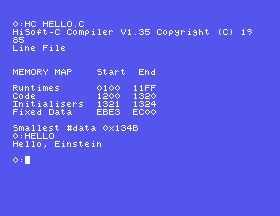
A few seconds of disc, and there it is. That is a program you made, running on the Einstein, and it will run again every time you type HELLO at the prompt, with no compiler in sight.
0:DIR HELLO.*
0: HELLO   .C   : HELLO   .COM
8k Size, 64k Free, 190k Total
0:
Two files where there was none. HELLO.C is what you typed; HELLO.COM is what the compiler wrote and what you ran. Together they take 8K of the disc - the .COM is three-quarters of it - and S6 says why, and which of them you can throw away.
That is the whole cycle, and you will go round it for the rest of the course: ED NAME.C, type, GRPH-K X, ENTER; HC NAME.C; NAME. A minute or so, most of it waiting for the disc. Use the time to think about what the program is going to do; you will find you get more right first time.
#include STDIO.H

main()
{
    printf("Hello, Einstein\n");
}

#include ?STDIO.LIB?
Starting from
A fresh boot of the course disc, at 0:, CAPS LOCK pressed once.
What you should see
After HC HELLO.C: the compiler's sign-on and the memory map, and 0:. After HELLO:
Hello, Einstein
Make each change in the editor (ED HELLO.C opens the file again with the cursor at the top), GRPH-K X, ENTER, and go round the cycle.
printf line under the first, printing your own name. What order do the two lines come out in, and does the second start on a new line?\n out of the first printf but leave the second in. Now what do you see?HELLO a second time without compiling. Does it need the compiler again?4.1 Write and run a program that prints three lines: your name, the name of your first computer, and the year you got it.
4.2 Change 4.1 so that all three come out on one line, separated by commas.
Worked solutions are in Appendix II.
| Symptom | Cause |
|---|---|
Pressing an arrow key put [, ] or ^ in your program | The arrows type characters on the Einstein. DEL takes it out; move with GRPH-S and GRPH-D. |
Holding CONTROL and pressing a letter put ^E or the like in your program | On this copy of ED80 the command key is GRPH, not CONTROL. DEL it out. |
The compiler says ERROR - 27 - undefined symbol MAIN or PRINTF | CAPS LOCK was on while you typed. C's names are case-sensitive: main, not MAIN. |
HC HELLO says it cannot find the file | The .C must be typed: HC HELLO.C. |
You typed HC HELLO.C and nothing happens | Give it longer. The compiler is being read from the disc, and nothing moves on screen until it is loaded. |
DISP says HELLO.C? | The file was not saved - GRPH-K Q, or the machine was restarted before GRPH-K X. |
Bad Data 0: and Try Again(Y/N)? | You are running from a .dsk, which cannot be written to. Restart with the course disc (S3). |
A C program is a text file ending .C, typed in ED80 and saved with GRPH-K X and ENTER. HC NAME.C compiles it into NAME.COM; NAME runs it. The compiler takes about half a minute and the two files take 8K of the disc. The screen draws {, } and \ as ¼, ¾ and ½.
S5, The Editor - the rest of ED80: moving about a longer program, deleting lines, auto-indent, and leaving without saving.
