module
9
Numbers are half of what a program handles. The other half is text: names, messages, and - in the game this course builds - everything the player types and everything the ship says back. BBC BASIC calls a piece of text a string, and keeps it in a variable whose name ends in $.
NAME$="EINSTEIN"
makes a string variable called NAME$ and puts the eight letters of EINSTEIN in it. The $ is part of the name - say it "name-string" - and it is what tells BBC BASIC to expect text. NAME$ and NAME are different variables.
Try to put a number in a string variable, or text in a number variable, and BBC BASIC refuses with Type mismatch.
+ between two strings joins them:
GREETING$="HELLO, "+NAME$
gives HELLO, EINSTEIN. Notice the space inside the first quotes: nothing is added between the pieces that you do not put there.
Which means + does two different jobs. Between numbers it adds; between strings it joins. 5+5 is 10, but "5"+"5" is 55 - two characters side by side. A digit in quotes is a character, not a number.
In PRINT, a semicolon does a similar job without making a new string: PRINT GREETING$;"!" prints the two one after the other.
LEN counts the characters in a string:
PRINT LEN(GREETING$)
prints 15 - the letters, the comma and the space all count. An empty string, "", has length 0.
A string can hold up to 255 characters. Try to make one longer and you get String too long.
A string begins and ends with ", so how do you put a " in one? Write it twice. PRINT "SAY ""HELLO""" prints SAY "HELLO".
STRING$ makes a string by repeating another:
PRINT STRING$(20,"*")
prints twenty stars. Keep the number below 256: STRING$ quietly starts again from nothing at 256, so STRING$(256,"*") is empty.
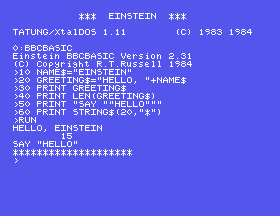
10 NAME$="EINSTEIN"
20 GREETING$="HELLO, "+NAME$
30 PRINT GREETING$
40 PRINT LEN(GREETING$)
50 PRINT "SAY ""HELLO"""
60 PRINT STRING$(20,"*")
Starting from
A fresh boot, or NEW.
What you should see
>RUN
HELLO, EINSTEIN
        15
SAY "HELLO"
********************
>
NAME$=5. What does RUN say, and which line does it blame?PRINT GREETING$;"!". What is different?>, type PRINT "5"+"5";" ";5+5. Why are the two answers different?9.1 Put a first name and a last name in two string variables, and print the whole name with a space between.
9.2 Print how many characters there are in that whole name, space included.
9.3 Print a line of ten *s without typing ten of them.
Worked solutions are in Appendix II.
| Symptom | Cause |
|---|---|
Type mismatch | A number where a string should be, or the other way round - NAME$=5, or "A"+1. |
No such variable for a name you set | You left off the $. NAME and NAME$ are different. |
| Joined words run together | + adds nothing between them. Put the space inside the quotes. |
String too long | Strings stop at 255 characters. |
Missing " | A quote was opened and not closed. To put a " in a string, write two. |
A name ending in $ holds text. + joins strings, LEN measures them, and STRING$ repeats one. "5" is a character, not a number. Two quotes make one inside a string.
S10, Asking A Question - letting the person at the keyboard type something in.
This form is protected by reCAPTCHA, and the Google Privacy Policy and Terms of Service apply.
