module
8
A sum is worked out and printed, and then it is gone. A program needs to keep things - a score, a count, a price - and use them again. BBC BASIC keeps a number under a name you choose, called a variable.
APPLES=5
makes a variable called APPLES and puts 5 in it. From then on, APPLES in a sum means 5: PRINT APPLES*2 prints 10.
The = here means "becomes", not "equals". That is why this works:
APPLES=APPLES+1
"APPLES becomes what APPLES was, plus one." Read that way, it makes sense, and it is how a program counts.
You can write LET APPLES=5 if you like; LET means the same as nothing at all, and nobody bothers.
A name starts with a letter and goes on with letters, digits and the underline _: APPLES, ROOM2, MY_SCORE. It can be as long as you like, and every letter counts - SCORE1 and SCORE2 are two different variables. So choose names that say what they hold.
Capitals and small letters count too: A and a are different variables. With CAPS LOCK on, as this course keeps it, you will only ever make capitals.
A name must not begin with one of BBC BASIC's own words. TOTAL begins with TO, which BBC BASIC uses in FOR loops, and a line that uses it is a Syntax error. PRINTER=3 is worse: BBC BASIC reads it as PRINT ER=3, and complains that there is no variable called ER.
The worst of it is that a program line with the mistake in is accepted when you type it. The complaint only comes when you RUN it, as Syntax error at line 30. If a line that looks right fails like that, look at the start of its names.
PRINT FRUITS
when there is no FRUITS gets No such variable. A slip in one letter - FRUITS for FRUIT - gives the same message, which is its most common cause.
Put % on the end of a name and the variable only holds whole numbers.
HALF%=7/2
stores 3: the half is thrown away, not rounded. That is useful whenever a thing can only be counted - rooms, lives, items - and it is what % will mean in this course from now on.
HALF% and HALF are two different variables.
When a program is RUN, all its variables are wiped first, so it starts clean - except for the 26 single letters with %, A% to Z%, which keep their values.
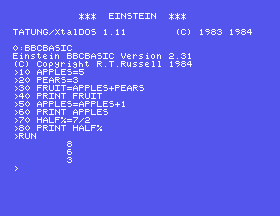
10 APPLES=5
20 PEARS=3
30 FRUIT=APPLES+PEARS
40 PRINT FRUIT
50 APPLES=APPLES+1
60 PRINT APPLES
70 HALF%=7/2
80 PRINT HALF%
Starting from
A fresh boot, or NEW.
What you should see
>RUN
         8
         6
         3
>
FRUIT to TOTAL in lines 30 and 40, and RUN. What happens, and on which line?FRUIT back in line 30 but make line 40 PRINT FRUITS. What does BBC BASIC say?HALF=7/2, without the %, and line 80 to match. What is printed now?8.1 A room is 6 metres by 4. Put the two sizes in variables and print the area.
8.2 Put 1 in A and 2 in B. Swap them, so A holds 2 and B holds 1, and print both. (You will need a third variable.)
8.3 A price is 250 pence. Keep it in a whole-number variable, and print it as pounds and pence.
Worked solutions are in Appendix II.
| Symptom | Cause |
|---|---|
Syntax error at line 30 on a line that looks fine | A name there begins with a BBC BASIC word - TOTAL begins with TO. Choose another. |
No such variable | The name was never given a value - often a spelling slip. |
A % variable lost its fraction | That is what % is for. Leave it off to keep fractions. |
A variable you set at the > has gone after RUN | RUN clears variables first. Set it in the program. |
NAME=value keeps a number; the name then stands for it in any sum, and NAME=NAME+1 counts. Names can be long and every letter counts, but must not begin with a BBC BASIC word. % makes a whole-number variable.
S9, Words - variables that hold text.
This form is protected by reCAPTCHA, and the Google Privacy Policy and Terms of Service apply.
