module
7
A computer is, underneath, a machine for sums, and BBC BASIC will do yours at the > or in a program. Most of it is what you would expect. A little of it is not, and those are the parts worth knowing before a program depends on them.
| Sign | Does | 7 and 2 give |
|---|---|---|
+ | adds | 9 |
- | subtracts | 5 |
* | multiplies | 14 |
/ | divides | 3.5 |
DIV | divides, keeping only the whole number | 3 |
MOD | the remainder after that | 1 |
^ | raises to a power: 2^10 is 2 times itself ten times | 1024 |
Multiply is *, not x. DIV and MOD are words, with a space either side: 7 DIV 2.
DIV and MOD belong together. Share 100 sweets among 7 people and 100 DIV 7 is how many each person gets, 100 MOD 7 how many are left over.
2+3*4 is 14, not 20. Multiplying and dividing - *, /, DIV, MOD - are done before adding and subtracting, and brackets come before either: (2+3)*4 is 20. When in doubt, bracket it: brackets never hurt.
Things of the same rank are done from left to right, so 10-4-3 is 3.
Two cases catch people out, so try them once:
2^3^2 is 64. The powers are done left to right too: 2 cubed is 8, and 8 squared is 64.-2^2 is 4, not -4. The minus sign belongs to the 2 before the power is worked out. If you mean "minus two squared", write -(2^2).A number printed on its own is lined up on the right of a ten-column space, which is why PRINT 7+3 puts 10 well over from the left. When you print a column of answers, the units line up under each other - that is the point of it.
Fractions get nine significant figures: 1/3 prints as 0.333333333.
Very big and very small numbers are printed in E notation. 1.23456789E9 means 1.23456789 times ten to the power 9 - move the point nine places right to get 1234567890. Whole numbers switch to this at ten digits, and small ones sooner: 0.001 prints as 1E-3.
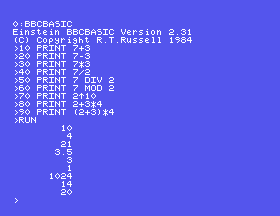
10 PRINT 7+3
20 PRINT 7-3
30 PRINT 7*3
40 PRINT 7/2
50 PRINT 7 DIV 2
60 PRINT 7 MOD 2
70 PRINT 2^10
80 PRINT 2+3*4
90 PRINT (2+3)*4
Starting from
A fresh boot, or NEW.
What you should see
>RUN
        10
         4
        21
       3.5
         3
         1
      1024
        14
        20
>
PRINT 1/3. How many 3s do you get?PRINT 2^40. What does the answer mean?>, try PRINT 2^3^2 and then PRINT -2^2. Are they what you expected? Why not?7.1 How many seconds are there in a day? Make BBC BASIC work it out.
7.2 100 sweets are shared among 7 children. Print how many each gets and how many are left over, on one line.
7.3 Print the average of 4, 8 and 9.
Worked solutions are in Appendix II.
| Symptom | Cause |
|---|---|
Division by zero | Something was divided by 0. |
A minus sum prints only the first number, then No such variable | The key marked - types _. Minus is SHIFT and =. |
-2^2 prints 4 | The minus belongs to the 2. Write -(2^2). |
A big number prints as something like 1.23456789E9 | That is E notation - move the point 9 places right. |
7 DIV 2*2 is 6, not 1 | DIV ranks with *, so it is done first, left to right. Bracket what you mean: 7 DIV (2*2). |
+ - * / as usual; DIV and MOD for whole-number division and remainders; ^ for powers. Multiplying and dividing come before adding and subtracting, brackets first, and otherwise left to right. Numbers print right-aligned in ten columns, to nine figures, in E notation when they are very big or small.
S8, Names For Numbers - keeping an answer under a name, so a program can use it again.
This form is protected by reCAPTCHA, and the Google Privacy Policy and Terms of Service apply.
