module
35

S1 said this course would build one program, a small game in which a mouse jumps between platforms to reach its hole while cats patrol. You have written it, and a best time on the disc, and a tune for getting home, which S1 did not promise.
This section has one short listing in it, at the end, and it is a door rather than a room. Mostly it is here because thirty-four sections is a long way to come, and stopping without looking back at the ground would be a poor way to finish.
Not a list of section titles: a list of things you can sit down and do.
You can write a program, keep it, and change it: numbered lines, the screen editor, SAVE and LOAD, and a disc that holds your work between one evening and the next.
You can make the machine decide and repeat: IF, FOR, loops that go round until something happens, and a way out of every one of them.
You can handle data: numbers, strings cut up and joined, lists in arrays, tables in DATA, and a file on the disc that outlives the program.
You can draw, and make things move: lines, shapes, fills, characters of your own design, and sprites that glide over a picture without disturbing it.
You can make it sound like something: an envelope that dies away while the game carries on, and a tune when it is over.
You can build a program bigger than one idea: a main loop, subroutines with names, a pass that can be timed and made faster, and a structure you can still find your way round.
You can read somebody else's program, which is how you will learn everything this course did not tell you.
Mouse In A Hole runs, keeps score, has three lives and a best time, and squeaks, hisses and plays a tune. It is also plainly a first game, and the exercises from S27 onwards are a list of what it wants next: a third cat, cats that turn towards the mouse, extra lives, the best three times.
Take them or leave them. The more useful move is usually to start something of your own, because the second program is where you find out which parts you understood and which parts you copied. The loop, the subroutines, gravity as a speed that changes, a count of what is left to collect; they are the same in anything you write next.
Deliberately, and worth knowing so you can go and find it. The manual has an entry for each.
ADC(0) and ADC(1) read joystick 1's position, and BTN(0) its fire button, which reads 0 while it is pressed, not 1. The mouse would steer well with one.MUSIC takes three strings and plays them together, and VOICE shapes how each note starts and fades.POLY draws regular polygons, and CLS 32 gives a screen of 32 wider columns instead of 40.APPEND, to add to the end of one.CHAIN and HOLD, as S34 found DEMO using them: one program handing over to the next and keeping its variables.DEF FN, for a one-line function of your own, and SWAP, which exchanges two variables.S34 read one. There are eight more, all from Tatung in 1984 and all on the menu that DEMO shows: CLOCK, EINSTEIN, HANGMAN, INTRO, KEYBOARD, OTHELLO, PICPEN and SNAKES. Load one, run it, then LIST its main program at line 1000 and work out what each subroutine is for. Every one of them is made of things you now know, and a few things you can look up.
Everything in this course has been BASIC asking the machine to do things. Underneath, the machine is a Z80 processor reading numbers from memory, and BASIC will let you put numbers there yourself, and ask the processor to run them.
PEEK reads one byte of memory and POKE writes one. CALL tells the processor to start running whatever is at an address. Together they are enough for a first step:
CLEAR &DFFF
POKE &E000,&3E,42,&CF,158,&C9
PRINT "(";:CALL &E000:PRINT ")"
CLEAR &DFFF tells BASIC to keep out of the memory above address DFFF (hexadecimal, as the & says), so nothing of BASIC's will land on top of what goes there. POKE puts five bytes at E000. CALL runs them. What they say, in the language the processor speaks:
| Bytes | Meaning |
|---|---|
&3E,42 | Put 42 into the processor's A register: 42 is the code for * |
&CF,158 | Ask the machine's own built-in routines to print the character in A |
&C9 | Go back to BASIC |
(*)
The star came from five bytes you wrote, run by the processor directly, with no BASIC in between. Change the second byte and a different character appears:
POKE &E001,77
PRINT "(";:CALL &E000:PRINT ")"
(M)
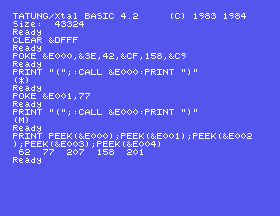
That is machine code, and you have been running some since S24. The key reader is 28 bytes of exactly this kind, POKEd and CALLed the same way; now you know what those numbers are.
Machine code is what games of the time were written in when they had to be fast. S31 found the limit of BASIC: to make Mouse In A Hole move smoothly, it would be written in machine code from end to end. The Z80 assembly course on this site starts from here: it writes those bytes as LD A,42, RST 8, DEFB 158 and RET, which is easier to read than numbers, and builds a complete game out of them. You have met most of its ideas already: a loop that runs once a pass, a sprite at a position, a sound that dies away, a collision, from the comfortable side.
42 in the POKE to 35, and CALL again. Which character do you get? Use ASC from S9 to find the code of any other.PRINT PEEK(&E000);PEEK(&E001);PEEK(&E002);PEEK(&E003);PEEK(&E004). What are the five numbers, and where have you seen them before?35.1 Put CALL &E000 inside a FOR loop that runs five times. What is printed?
35.2 Pick one item from "What This Course Left Alone", read its entry in the manual, and find out by experiment whether the manual is right.
35.3 Write a second game, a small one, of your own.
Worked solutions are in Appendix II.
The sections are a path, and you walk them once. The appendices are for coming back to:
S1 asked for three things and they all still stand, more now than at the start.
If something here is wrong, say so: a wrong sentence nobody reports stays wrong for everyone who reads it next. If something was unclear, that is a fault in the writing; the person who already knows the answer is the worst judge of whether an explanation works. And if you think you could improve it: a clearer explanation, a missing section, a note on what the real machine does differently, please do.
The contact form is at tatungbytes.co.uk/contact.
Every listing in this course was run on the machine before it was printed, and every result you were told to expect was read off a screen rather than off a manual. That mattered more than it should have. Tatung's own manual is the best guide there is to this BASIC, and it is still wrong in places; it prints DRAW with brackets that the machine rejects, and a TEMPO table the machine does not follow.
That is not a complaint about the book. It is the reason the course is shaped the way it is, and it is worth carrying with you: the machine is the authority. When something you read disagrees with what the Einstein does in front of you, the Einstein is right.
Go and find out what it does.
This form is protected by reCAPTCHA, and the Google Privacy Policy and Terms of Service apply.
