module
34

The disc that came with the Einstein carried nine BASIC programs written at Tatung in 1984, and they are on the course disc too. This section reads one of them: MASTERMIND, by Nigel Deakin, 99 lines long.
Reading other people's programs is how most programmers of the time learnt the tricks nobody wrote down. You now know enough to follow nearly every line of this one, and the lines you do not know are a chance to use the manual the way it was meant to be used.
LOAD "MASTMIND"
RUN
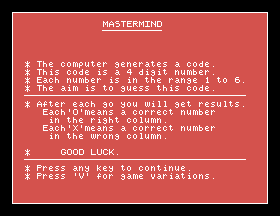
The computer thinks of a four-digit code, each digit from 1 to 6. You have ten guesses. After each one it prints an O for every digit that is right and in the right place, and an X for every digit that is right but in the wrong place.
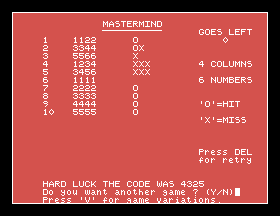
Play a couple of games before reading on. It is much easier to read a program when you know what it does.
LIST it a piece at a time. The part that runs first is at the top:
LIST 1100,,1210
1100 RST:TEMPO4:FOR K=0 TO 15:KEYK," ":NEXT K:REM START LINE 1
1110 IF Z THEN CLEAR:RESTORE 1000:Z=-1:ELSE CLEAR:RESTORE 1000:ON ERR GOTO 1210:REM START LINE 2
1120 BCOL1:TCOL15,6:GCOL15,6
1130 C=4:C$="4":N=6:N$="6":REM GAME START VALUES
1140 GOSUB 1660:REM ** INSTRUCTIONS
1150 IF VAR THEN GOSUB 1830:REM ** VARIATIONS
1160 GOSUB 1220:REM ** PLAY GAME
1170 GOSUB 1580:REM ** GAME RESULT
1180 REM ** GAME END
1190 IF OPT=86 THEN GOSUB 1830:GOTO 1160:REM VARIATIONS THEN PLAY
1200 IF OPT=89 THEN GOTO 1160:REM PLAY GAME AGAIN
1210 IF Z THEN 320:ELSE RST:BCOL4:END:REM EXIT LINE
This is a table of contents. Each line calls one part of the game: the instructions, the variations, the play, the result, and a REM on the end says which. The parts themselves are subroutines further down, each starting with a REM heading. It is the same shape as your own game, and for the same reason: you can see the whole program on one screen, and find any part of it by name.
Several things here are new:
RST puts the screen back to how BASIC starts: cleared, 40 columns, white on transparent, the cursor on. It leaves the backdrop colour alone, which is why line 1210 sets BCOL4 itself on the way out.KEY sets what a function key types. Line 1100 sets all sixteen: F0 to F7, and the same with SHIFT, to type a single space.CLEAR and the mysterious Z are explained at the end of this section. Look up CLEAR in the manual.ON ERR GOTO 1210 sends an error to the exit line, so an error ends the game tidily instead of stopping it with a message.TCOL15,6: white text on dark red, which is why the game is red.Lines 1400 to 1480 work out the Os and the Xs. It is harder than it looks, because no digit may be counted twice.
LIST 1390,,1480
1390 REM*HITS CHECK
1400 H=0:FOR A=1 TO C
1410 IF MID$(H$,A,1)=MID$(G$,A,1)THEN G$=LEFT$(G$,A-1)+"A"+RIGHT$(G$,C-A):H=H+1:H$=LEFT$(H$,A-1)+"B"+RIGHT$(H$,C-A)
1420 NEXTA
1430 REM*MISS CHECK
1440 M=0:FOR A=1 TO C
1450 FOR B=1 TO C
1460 IF MID$(H$,A,1)=MID$(G$,B,1)THEN G$=LEFT$(G$,B-1)+"C"+RIGHT$(G$,C-B):M=M+1:GOTO1480
1470 NEXT B
1480 NEXTA
H$ is a copy of the hidden code and G$ is the guess, both as strings of digits. C is the number of columns, 4.
The hits come first. Line 1410 looks at each column in turn; where the two digits are the same, it is a hit, and the program crosses both digits out: it puts an A in the guess and a B in the code, using LEFT$ for the part before the column and RIGHT$ for the part after. A crossed-out digit can never match anything again, and A can never equal B.
Then the misses. Lines 1440 to 1480 take each digit left in the code and look for it anywhere in the guess. When one is found, it is crossed out with a C and counted, and the GOTO 1480 stops looking for that code digit.
Follow it by hand with the code 4325 and the guess 3344:
Code H$ | Guess G$ | ||
|---|---|---|---|
| Start | 4325 | 3344 | |
| Column 2 matches | 4B25 | 3A44 | H=1 |
Code's 4 found at guess column 3 | 4B25 | 3AC4 | M=1 |
Code's 2 and 5: not in the guess |
One O and one X: OX, which is what the game printed. Without the crossing out, the guess's 3 in column 1 would also have matched the code's 3, and been counted a second time.
When the game asks whether you want another go, it takes Y, N or V, in capitals or not:
1650 OPT=INCH:OPT=OPT AND &DF:IF OPT<>86 AND OPT <>89 AND OPT <>78 THEN 1650:ELSE RETURN
&DF is a number written in hexadecimal, as the & says: it is 223, which is every bit from S21's rows except the one worth 32. And a small letter's code is exactly its capital's code plus 32: y is 121 and Y is 89. So AND &DF, as in S28, takes away that one bit, and turns a small letter into its capital. A capital, which does not have the bit, is left alone.
Every Tatung program on the disc starts at line 1000, all but one, and line 1210 has a GOTO 320 in it, to a line MASTERMIND does not have.
The answer is the one exception: DEMO, the menu that runs the other programs, whose lines run from 100 to 890. LOAD "DEMO" and LIST 850,,880: before it runs a program, DEMO uses HOLD 999, which sets its own lines, all numbered below 1000, to one side, and then CHAINs the program. CHAIN loads and runs a program and keeps the variables, and held lines survive it. So while MASTERMIND runs, the menu's own lines are still there, underneath, and Z is -1 because the menu set it.
When MASTERMIND ends it checks Z. If it was run from the menu, GOTO 320 goes back into the menu's lines. If you ran it yourself, Z is 0, and it simply ends. Two programs sharing one memory, by agreement on their line numbers.
There is no code to type this time. Load MASTMIND from the disc, and LIST it in pieces as you read.
Starting from
A fresh start of BASIC.
What you should see
MASTERMIND's instructions in white on red; then the board, and the Os and Xs after each guess.
Save this. If you change it, save it under a new name: SAVE "MYMIND". The disc's own copy is locked.
1130 C=5:C$="5":N=6:N$="6". How many columns do you get? What do the instructions still say, and why?1305 PRINT@2,23;I$; and play. What is at the bottom of the screen? What is the ; on the end for? (Try it without.)OPT=OPT AND &DF: out of line 1650 and, at the question, press CAPS LOCK and answer with a small n. What happens?34.1 Make the instructions right when the number of columns or the range of numbers is changed: lines 1690 and 1700 always say 4 and 1 to 6.
34.2 Keep the fewest goes anyone has needed in a file, as S32 kept the best time.
34.3 Load HANGMAN or SNAKES from the disc. List the main program, and write down in one line each what every subroutine it calls is for.
Worked solutions are in Appendix II.
| Symptom | Cause |
|---|---|
File Locked Error when saving | The disc's own programs are locked. Save your changed version under a new name. |
| The board jumps up a line | Something was printed on the bottom row without a ; on the end. |
| Y and N do nothing at the end | AND &DF has been taken out of line 1650 and CAPS LOCK is off. |
A real program has the same shape as yours: a short main program at the top that reads like a list of contents, and subroutines with REM headings. Follow the clever part by hand with real values. Look up what you do not know in the manual, then try it. And sometimes a program only makes sense next to another one: MASTERMIND starts at line 1000 so that the menu's lines can share memory with it.
S35, Where You Go From Here: what you can do now, what the course left out, and the way down to the machine itself.
This form is protected by reCAPTCHA, and the Google Privacy Policy and Terms of Service apply.
