module
25

In S24 the mouse could walk left and right along the floor, and that was all. The platforms were out of reach, and the cheese was going to be up there.
This section gives the mouse weight. It falls when there is nothing under it, lands when there is, and jumps when you press the space bar.
From now on the mouse is always in one of two states: on the ground, or in the air. What the keys do depends on which. On the ground, Z and X walk and space jumps. In the air, the keys do nothing at all: the mouse goes where its jump is taking it.
G says which state it is in: -1, true, on the ground; 0, false, in the air (S11). The loop asks once, and hands over to one of two subroutines:
140 IF G THEN GOSUB 300
145 IF NOT G THEN GOSUB 340
Both lines are needed, and in this order: the subroutine at 300 can make the mouse leave the ground, and when it does, line 145 moves it through the air on the same pass.
300 VX=0:IF K=64 THEN VX=-6
310 IF K=32 THEN VX=6
320 IF J THEN VY=15:VX=SGN(VX)*4:G=0:RETURN
330 IF VX=0 THEN RETURN
332 MX=MX+VX:IF MX<0 THEN MX=0
334 IF MX>239 THEN MX=239
336 IF POINT(MX+3,MY-17)<>1 AND POINT(MX+10,MY-17)<>1 THEN G=0:VX=0
338 RETURN
VX is how far the mouse moves sideways this pass. Lines 300 and 310 set it from the keys, exactly as S24's lines did, and lines 332 and 334 move it and keep it on the screen. J is the space bar, read on line 130 alongside the others: bit 64 of row 0:
130 CALL &E000:K=PEEK(&E047) AND 96:J=PEEK(&E040) AND 64
Line 336 asks S20's question: is there anything under my feet? A sprite at MY has its bottom row at MY-16, so the pixel just under its feet is MY-17. The mouse's two feet are near the left and the right of its picture, three and ten pixels in. If neither has anything lit under it, the mouse has walked off an edge: it is in the air now, and it drops straight down.
POINT only sees what is drawn. The cats are sprites, and the mouse will never stand on a cat.
Line 320 is the jump. If space is down, the mouse leaves the ground going up at 15, and it keeps its direction: SGN(VX) is -1 if it was walking left, 1 if right and 0 if it was standing still, so VX becomes -4, 4 or 0.
From then on nothing changes it. The keys are not read in the air, so a jump cannot be steered, slowed or stopped once it has begun. That is how the platform games of the day behaved: the skill is in choosing where to jump from. It is also why the jump goes sideways at 4 rather than the walking 6: at 6 it carried the mouse further than a platform is wide, and there was nowhere it could safely jump to.
In the air, VY is how fast the mouse is moving up or down. Positive is up, negative is down.
340 MX=MX+VX:IF MX<0 THEN MX=0:VX=0
342 IF MX>239 THEN MX=239:VX=0
344 VY=VY-2:IF VY<-6 THEN VY=-6
346 MY=MY+VY:IF VY>=0 THEN RETURN
Each pass, VY goes down by two and then MY changes by VY. That is gravity. Nothing more is needed to make it look right: the mouse rises 13 pixels, then 11, then 9, slowing as gravity takes its share, stops at the top, 49 pixels up, and comes back down faster and faster.
A falling mouse moves several pixels at a time, so it usually arrives inside a platform rather than exactly on it. Line 350 puts that right, and lands it:
350 IF POINT(MX+3,MY-16)=1 OR POINT(MX+10,MY-16)=1 THEN MY=MY+1:G=-1:VY=0:GOTO 350
352 RETURN
While the mouse's bottom row is inside something, move it up one, and it is on the ground. It stops the moment the bottom row is clear, which is exactly on top.
This only happens on the way down (line 346 leaves the subroutine early while the mouse is still rising), which has a consequence worth knowing: the mouse can jump up through a platform from underneath and land on top of it. It makes climbing much easier.
The second half of line 344 stops the mouse falling faster than 6 pixels a pass. The floor is six pixels thick. A mouse falling eight at a time can be seven pixels up on one pass and one pixel below the floor on the next; it has passed straight through, without ever being inside it for line 350 to catch. Capped at six, a fall that reaches the floor or a platform always lands in it.
It is the general rule of every game that moves things in steps: nothing may move further in one step than the thinnest thing it is meant to hit.
Take S24's listing. Delete lines 150 to 170, DEL 150,170, because walking has moved into the subroutine. Then type these, which replace lines 130, 140 and 800 and add the rest.
130 CALL &E000:K=PEEK(&E047) AND 96:J=PEEK(&E040) AND 64
140 IF G THEN GOSUB 300
145 IF NOT G THEN GOSUB 340
290 REM -- ON THE GROUND: WALK OR JUMP --
300 VX=0:IF K=64 THEN VX=-6
310 IF K=32 THEN VX=6
320 IF J THEN VY=15:VX=SGN(VX)*4:G=0:RETURN
330 IF VX=0 THEN RETURN
332 MX=MX+VX:IF MX<0 THEN MX=0
334 IF MX>239 THEN MX=239
336 IF POINT(MX+3,MY-17)<>1 AND POINT(MX+10,MY-17)<>1 THEN G=0:VX=0
338 RETURN
339 REM -- IN THE AIR: NO STEERING --
340 MX=MX+VX:IF MX<0 THEN MX=0:VX=0
342 IF MX>239 THEN MX=239:VX=0
344 VY=VY-2:IF VY<-6 THEN VY=-6
346 MY=MY+VY:IF VY>=0 THEN RETURN
350 IF POINT(MX+3,MY-16)=1 OR POINT(MX+10,MY-16)=1 THEN MY=MY+1:G=-1:VY=0:GOTO 350
352 RETURN
800 MX=20:MY=22:G=-1:VX=0:VY=0
Line 800 starts the mouse on the floor, on the ground and still.
Starting from
LOAD "MOUSE7" from S24.
What you should see
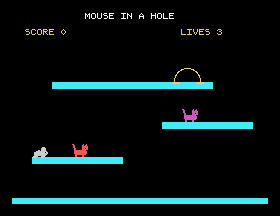
Tap the space bar and the mouse leaps from the floor, rises through the first platform and lands on top of it:
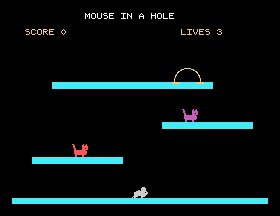
Walk it off the end of a platform and it drops to whatever is below:
Hold X and press space, and it jumps to the right in an arc, as far as it was going to go. With a little practice you can climb all three platforms to the hole.
Save this. SAVE "MOUSE8".
15 in line 320 to 11. Can the mouse still reach the first platform? What about 19?-6 in line 344 to -8, both of them, and jump straight up from the floor. Where does the mouse go?25.1 Let the player steer in the air: while the mouse is in the air, let Z and X change VX. Play it both ways. Which is easier, and which is more of a game?
25.2 Print VY on the score line while the game runs, and watch it go up and down through a jump.
25.3 Stop the mouse from being able to jump up through a platform: if it is rising and its head reaches something lit, stop it rising so that it falls back.
Worked solutions are in Appendix II.
| Symptom | Cause |
|---|---|
| The mouse falls straight through the floor or a platform | It is falling more pixels in one step than the thing is thick. Keep the cap in line 344 at 6. |
| The mouse sinks into a platform and stays there | Line 350 is missing, so nothing lifts it back out after a landing. |
| The mouse floats a little above a platform | Its picture has empty rows under its feet. Redraw it with the feet on the bottom row (S22). |
| The mouse freezes in mid-air after a jump | Line 145 is missing, so nothing moves it through the air. |
| The mouse walks on thin air | Line 336 is missing, so nothing notices the edge. |
| The mouse jumps again in mid-air | The jump is not inside the ground subroutine; check that line 320 is at 320 and that line 140 tests G. |
The mouse is on the ground or in the air, and G says which. On the ground the keys walk it and space jumps; in the air nothing steers it, so a jump is decided at take-off. Gravity is VY, taken down each pass and added to the position. "Standing" is POINT under the feet; after a fall, lift the mouse out of whatever it landed in. Never move further in one step than the thinnest thing you must not pass through.
S26, Cheese: something to climb for, and a score that means something.
This form is protected by reCAPTCHA, and the Google Privacy Policy and Terms of Service apply.
