module
24

Everything so far has run from top to bottom and stopped. A game does not: it goes round and round, many times a second, and each time round it looks at the keyboard, moves things and draws them.
That circle is called the game loop, and once you have written one you have written the shape of every game there is.
This section also meets the first job BASIC cannot do well enough on its own, and does something programmers of the time did all the time: it adds a few bytes of machine code to BASIC to do that one job properly.
130 CALL &E000:K=PEEK(&E047) AND 96
140 IF K=64 THEN MX=MX-6
150 IF K=32 THEN MX=MX+6
160 IF MX<0 THEN MX=0
170 IF MX>239 THEN MX=239
180 SPRITE 0,MX,MY
190 IF PEEK(&E045)=64 THEN 200 ELSE 130
Seven lines, and they are in a deliberate order that every game loop follows:
K is 0 and the loop carries straight on.MX, the mouse's x position. Notice they change a number, not the screen.SPRITE statement puts the mouse where MX now says.Work out first, draw once. That order matters. If you scatter SPRITE statements through the arithmetic you get flicker and wasted time; one draw at the end of the pass is both faster and steadier.
S10's KBD looks like the obvious way to read the keys, and for a game it is not good enough, for two reasons.
It does not see a key being held. Hold a key down and the Einstein repeats it, as it does when you hold a key while typing, and KBD sees each repeat once. On the passes in between it gives 0. A mouse moved by KBD stutters along in the rhythm of the key repeating, not the rhythm of the game.
It cannot see two keys at once. While two keys are held, KBD reports neither of them. In S25 the mouse jumps with the space bar, and a mouse that cannot jump while you hold the key to run is no good at all.
The keyboard itself has neither problem. Inside the Einstein the keys are wired as a grid of eight rows of eight keys, and the machine can look at a whole row at once and see every key in it that is down, on every pass, and as many as you like.
BASIC has no word for reading the grid, and it cannot do it with the words it has. So we add one. These are the Z80's own instructions, as numbers: 28 of them: that read all eight rows and leave the answers in memory where BASIC can PEEK them:
15 CLEAR &DFFF:GOSUB 1710
1700 REM -- ADD A KEY READER TO BASIC --
1710 RESTORE 1740:FOR I=0 TO 27:READ B:POKE &E000+I,B:NEXT I
1720 RETURN
1740 DATA 243,33,64,224,6,254,62,14,211,2,120,211,3,62,15,211,2,219,2,47,119,35,203,0,56,236,251,201
CLEAR &DFFF tells BASIC to keep its program and variables below address &E000, so nothing of BASIC's will ever land on top of the machine code. It clears the variables too, so it has to come first.&E000 onwards, one POKE each.CALL &E000, at the start of every pass, runs them, and when they finish BASIC carries on with the next statement.This is extending BASIC, and for a good reason. BASIC is quick to write and easy to change, but some jobs it cannot do, or cannot do fast enough. Programmers of the time handled those jobs with a little machine code, and left everything else in BASIC. That is what this is: the rest of the game stays BASIC from start to finish. S35 shows how machine code is made; the Z80 assembly course on this site explains the keyboard grid in full, in the section called Every Key At Once.
Type the DATA line carefully. A wrong number here does not give a Syntax Error: the machine simply runs a wrong instruction, and that can stop it dead, so that it has to be restarted. Save before you run it.
After CALL &E000, the eight rows are waiting at &E040 to &E047, one byte each. Each byte is eight bits, exactly like a row of a character in S21: worth 128, 64, 32, 16, 8, 4, 2 and 1, and each key in the row owns one bit: the bit is on while the key is down.
| Key | Row | Byte | Bit |
|---|---|---|---|
| Z | 7 | &E047 | 64 |
| X | 7 | &E047 | 32 |
| Q | 5 | &E045 | 64 |
| SPACE | 0 | &E040 | 64 |
Row 7 has other keys in it too, C, V, B, N and M, so line 130 keeps only the two bits it wants with AND, which keeps a bit only where both numbers have it. 96 is 64 plus 32, so PEEK(&E047) AND 96 is:
| Held | K |
|---|---|
| nothing (or only other keys) | 0 |
| Z | 64 |
| X | 32 |
| Z and X together | 96 |
and lines 140 and 150 move the mouse when exactly one of them is down.
Z and X for left and right may look odd on a modern keyboard. They were the usual choice in 1984 because they are next to each other at the bottom left, where your left hand rests, and the course keeps them.
In MAME: Z, X, Q and the space bar are the same keys they are on your own keyboard.
Line 190 is the escape hatch from S13, and this is the program it was written for. Without it there would be no way to stop: nothing outside a running program can interrupt it, so Q has to be the program's own idea.
One more thing happens when the loop stops. While you hold a key, the Einstein goes on treating it as typing and quietly queues up its repeats, even though the program never asks for them. Stop the program with those still queued and they are typed after Ready: a row of Xs on the command line. Line 200 empties the queue first:
200 GOSUB 1810:PRINT @2,4;"STOPPED"
1800 REM -- EMPTY THE KEYBOARD QUEUE --
1810 W=0
1820 W=W+1:IF KBD THEN W=0
1830 IF W<30 THEN 1820
1840 RETURN
KBD takes the queued keys back one at a time, with gaps between them, so a single 0 does not mean the queue is empty. The subroutine keeps reading until KBD has said 0 thirty times running; by then it is.
Take the listing from S23. Add line 15 and the two subroutines, and replace line 120 with the loop. Everything else stays exactly as it was.
15 CLEAR &DFFF:GOSUB 1710
120 REM -- THE GAME LOOP --
130 CALL &E000:K=PEEK(&E047) AND 96
140 IF K=64 THEN MX=MX-6
150 IF K=32 THEN MX=MX+6
160 IF MX<0 THEN MX=0
170 IF MX>239 THEN MX=239
180 SPRITE 0,MX,MY
190 IF PEEK(&E045)=64 THEN 200 ELSE 130
200 GOSUB 1810:PRINT @2,4;"STOPPED"
210 END
1700 REM -- ADD A KEY READER TO BASIC --
1710 RESTORE 1740:FOR I=0 TO 27:READ B:POKE &E000+I,B:NEXT I
1720 RETURN
1740 DATA 243,33,64,224,6,254,62,14,211,2,120,211,3,62,15,211,2,219,2,47,119,35,203,0,56,236,251,201
1800 REM -- EMPTY THE KEYBOARD QUEUE --
1810 W=0
1820 W=W+1:IF KBD THEN W=0
1830 IF W<30 THEN 1820
1840 RETURN
Starting from
LOAD "MOUSE6" from S23. Type the new lines, then SAVE "MOUSE7" before you run it.
What you should see
The same screen, but now hold X and the mouse walks steadily along the floor to the right, and Z walks it back. It stops at each edge instead of disappearing. Q ends the game with STOPPED, and nothing is typed after Ready.
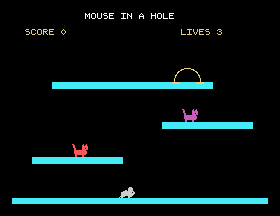
It cannot get up to the platforms yet, and the cats do not move. Both come soon.
6 in lines 140 and 150 to 2, then to 12. Which feels right? What is the cost of a big number: watch the mouse closely as it moves.Z and X together. What does the mouse do, and which line decides that?GOSUB 1810: out of line 200. Hold X for a few seconds, then press Q. What appears after Ready?24.1 Add two more keys so the mouse can move up and down as well: I for up and K for down. I is the bit worth 1 in row 1 (&E041), and K is the bit worth 1 in row 2 (&E042). Keep the mouse on the screen.
24.2 Make the mouse run twice as fast while the space bar is held as well as Z or X. Try the same thing with KBD in place of the key reader, and see why this section did not use it.
24.3 Print the mouse's x position on the score line as it moves, without disturbing the rest of the line.
Worked solutions are in Appendix II.
| Symptom | Cause |
|---|---|
| The machine stops dead, or the screen fills with something strange, as soon as it runs | A wrong number in line 1740. Load your saved copy and check the DATA line number by number. |
| The mouse does not move | Line 15 is missing, so the key reader was never put in memory, or line 130 does not start with CALL &E000. |
| The mouse moves only when you hold C, V, B, N or M as well | AND 96 is missing or mistyped in line 130. |
| The mouse vanishes | A missing bounds check. The sprite is parked off the screen, with no error. |
| The program will not stop | Line 190 is missing or looks at the wrong byte. Q is 64 in &E045. |
A row of Xs appears after Ready | Line 200 does not GOSUB 1810 first. |
| The mouse flickers | Something is drawing more than once a pass. One SPRITE per pass. |
A game loop reads the keyboard, works out where everything should be, keeps it in bounds, draws once, and goes round again, with a way out built in. KBD cannot see a held key on every pass, or two keys at once, so the game adds 28 bytes of machine code to BASIC that read the keyboard's grid: CALL &E000, then each key is one bit of a byte from &E040 to &E047. Empty the key queue before you stop.
S25, Falling And Jumping: gravity, and the reason the mouse cannot reach the cheese yet.
This form is protected by reCAPTCHA, and the Google Privacy Policy and Terms of Service apply.
