module
23

Six sections of pieces; now they go together.
This is the whole of the game's scenery: the screen the player will look at for the rest of the course, and it is also the shape the program will keep as it grows. Every section from here adds to this listing rather than replacing it, so it is worth getting the arrangement right now.
Three ideas, and they are all from S13.
The main program is short and says what happens, not how. Lines 10 to 120 set the screen up, call two subroutines, place three sprites, and stop. You can read it in ten seconds.
Each job is a subroutine with a number you can remember. 600 draws the score line, 700 draws the field, 900 turns a picture into a shape. When the game grows, each new job gets its own hundred.
Anything you might want to change is data, not program. The platforms are three numbers each in a DATA line: left edge, right edge, height. To move a platform you change a number; you do not touch a single line of program.
Two rules decide every number in this listing.
Nothing is drawn above y=160. The score line is text rows 0 to 2, and text row 2 ends at pixel row 23 from the top, which is y=168 counting up from the bottom. A character wipes the graphics in its cell (S18), so anything drawn up there would be punched through the moment the score changed.
A sprite stands on a surface when its y is the surface's height plus 17. A MAG 2 sprite is sixteen rows tall and hangs below the y you give (S22), so its lowest row is y-16. The platform tops here are at 46, 81 and 121, and the floor's at 5, so the cats sit at 63 and 98, and the mouse starts on the floor at 22.
The program has two sets of DATA: the platform numbers and the sprite pictures. READ works through every DATA line in the program in line number order, as though they were one long list, so without help, the shape subroutine would read the platform numbers by mistake.
RESTORE fixes it, and this is exactly what it is for:
40 RESTORE 1100:N=132:GOSUB 900
says "start reading at line 1100" before reading the pictures, and line 700 does the same with RESTORE 840 before reading the platforms.
Leave those out and the symptoms are baffling: the sprites come out as fragments of the wrong thing, no platform appears, and the fills escape across the whole screen. Nothing reports an error.
10 REM *** MOUSE IN A HOLE ***
20 BCOL 1:TCOL 15,1:CLS
30 DIM P$(16)
40 RESTORE 1100:N=132:GOSUB 900
50 N=136:GOSUB 900
60 MAG 2:SPRITE OFF
70 GOSUB 600
80 GOSUB 700
90 SPRITE 0,MX,MY,14,132
100 SPRITE 1,CX1,CY1,8,136
110 SPRITE 2,CX2,CY2,13,136
120 END
590 REM -- THE SCORE LINE --
600 TCOL 15,1:PRINT @12,0;"MOUSE IN A HOLE"
610 TCOL 11,1:PRINT @2,2;"SCORE 0"
620 PRINT @28,2;"LIVES 3"
630 RETURN
690 REM -- THE FIELD --
700 GCOL 7,1:RESTORE 840
710 FOR Y=0 TO 5:DRAW 0,Y TO 255,Y:NEXT Y
720 FOR P=1 TO 3
730 READ X1,X2,PY
740 DRAW X1,PY TO X2,PY TO X2,PY+6 TO X1,PY+6 TO X1,PY
750 FILL X1+3,PY+3
760 NEXT P
770 GCOL 11,1
780 ELLIPSE 175,122,13,1,0,0,3.15
790 DRAW 162,122 TO 162,120:DRAW 188,122 TO 188,120
800 MX=20:MY=22
810 CX1=60:CY1=63
820 CX2=170:CY2=98
830 RETURN
840 DATA 20,110,40,150,240,75,40,200,115
890 REM -- READ A 16x16 PICTURE AND MAKE SHAPE N --
900 S$=""
910 FOR R=1 TO 16:READ P$(R):NEXT R
920 FOR C1=1 TO 9 STEP 8
930 FOR R1=1 TO 9 STEP 8
940 FOR R=R1 TO R1+7
950 V=0:G=128
960 FOR B=0 TO 7
970 IF MID$(P$(R),C1+B,1)<>"." THEN V=V+G
980 G=G/2
990 NEXT B
1000 S$=S$+RIGHT$(HEX$(V),2)
1010 NEXT R
1020 NEXT R1
1030 NEXT C1
1040 SHAPE N,S$:RETURN
1100 DATA "................","................","................","................"
1110 DATA "................","..........###...",".........#####..",".........#####.."
1120 DATA "......##.#####..","....###########.","..###########.##","..##############"
1130 DATA "..#############.","..############..",".#####...####...","#.##.....##....."
1200 DATA "................","................","................","##.........#..#."
1210 DATA ".##.......##.##.",".##.......######",".##.......######","..##......###.##"
1220 DATA "..##......######","..############..","..#############.","..#############."
1230 DATA "..#############.","...###########..","...##.....##....","...##.....##...."
Starting from
A fresh boot, or NEW. It is long, about sixty lines, so SAVE as you go.
What you should see
The finished scenery: the title and score across the top, a floor, three platforms climbing to the right, the mouse hole standing on the top one, the mouse waiting on the floor at the left, and two cats on their platforms.
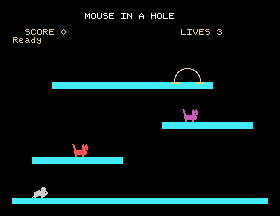
Nothing moves yet. That is S24.
Save this. SAVE "MOUSE6". From here on, each section starts by loading the last one.
150,240,75, to 150,240,90. What moves, and what did you not have to change?RESTORE 1100 out of line 40 and run it. Look closely at what the sprites become, and at what happens to the platforms.CX1=60:CY1=80. Where is the red cat now, and what does that tell you about the "height plus 17" rule?23.1 Add a fourth platform by putting three more numbers in line 840, and changing one other number. Which one?
23.2 Move the mouse hole to the left-hand platform. Two numbers in line 780 change, and all eight in line 790.
23.3 Give the cats different colours, then find a pair that are hard to tell apart on a black background and say why.
Worked solutions are in Appendix II.
| Symptom | Cause |
|---|---|
| The sprites are fragments of something else | A missing RESTORE: the shape subroutine read the platform numbers. |
| A fill covered the whole screen | The platform outline never closed, because its numbers were wrong; again, usually the RESTORE. |
| A cat is sunk into its platform, or floating | Its y is not the platform's top plus 17. |
| The top of the screen flickers or the title is eaten | Something is drawn above y=160, where the score line lives. |
Data Error | The DATA ran out: count the platform numbers in threes, and the picture rows in sixteens. |
| The program is too long to retype | It is. SAVE it. |
The game's scenery is one program: a short main part, a subroutine for each job, and everything adjustable kept in DATA. RESTORE chooses which DATA a READ starts from, which a program with two kinds of data cannot do without. Nothing is drawn above y=160, and a sprite stands on a surface when its y is the height plus 17.
S24, The Mouse: taking control of it, and the loop that will run the whole game.
This form is protected by reCAPTCHA, and the Google Privacy Policy and Terms of Service apply.
