module
22

Everything drawn so far has been part of one picture. Print over it and it is gone; scroll and it moves; cross two colours and they fight.
A sprite is none of those things. It is a shape the hardware draws in front of the picture, thirty-two times over if you like, and moving one costs a single statement and disturbs nothing at all. It is how every game of the period moved anything.
SPRITE 0,100,120,14,132
Five numbers, and the order matters more than you would think:
0 | which sprite: 0 to 31 |
100 | x |
120 | y |
14 | the colour |
132 | the shape number |
Colour comes before the shape. Put them the other way round and you get Ready and an empty screen: a colour of 132 is silently reduced to 4, and shape 14 is probably blank. No error, nothing drawn, nothing to tell you why. If a sprite does not appear, check this first.
x and y work like PLOT's: across, and up from the bottom, with one oddity worth knowing: a sprite's top row is one line below the y you give, so SPRITE 0,100,0 is entirely off the bottom of the screen. Think of y as the line the sprite hangs from.
A position off the screen is not an error. The sprite is simply parked out of sight, which is a tidy way to get something out of the way.
SPRITE 0,MX,MY
Three numbers moves a sprite and leaves its colour and shape alone. That is the whole of animation on this machine.
Nothing is erased and nothing is redrawn. The platform the mouse walks along is untouched: no hole where it has been, no colour bleeding into it, no flicker. Compare that with S18, where printing a single character wiped out the graphics in its cell.
Each move, with the loop around it, takes a few thousandths of a second, so a sprite crossing the whole screen a pixel at a time takes a couple of seconds. Move it three or four pixels at a time and it travels at a decent pace, which is exactly what the 1984 games did.
50 SPRITE OFF
SPRITE OFF hides all thirty-two; SPRITE OFF 3 hides one. Both forget the sprite's colour and shape as well as its position.
Put it at the top of any program that uses sprites. On a freshly started BASIC all thirty-two sprites sit at position (0,0): invisible, but the hardware still counts them, and that runs you into the next rule.
The hardware draws at most four sprites on any one scan line. A fifth simply does not appear: no error, no warning.
That is why SPRITE OFF matters, and it is a real constraint on a game: a mouse and three cats side by side on the same row is already four. The game in this course keeps the cats on different platforms, which keeps them on different lines.
When two sprites do overlap, the lower number is drawn in front. The mouse is sprite 0 so that it is never hidden behind a cat.
Eight by eight is small for a creature. MAG 2 gives you a sprite built from four shapes, sixteen pixels square: four times the detail.
The four shapes have to be in the order the hardware reads them, which is left-hand column top and bottom, then right-hand column top and bottom. You do not have to think about that. Draw sixteen rows of sixteen characters and let the subroutine cut it up:
900 S$=""
910 FOR R=1 TO 16:READ P$(R):NEXT R
920 FOR C1=1 TO 9 STEP 8
930 FOR R1=1 TO 9 STEP 8
940 FOR R=R1 TO R1+7
950 V=0:G=128
960 FOR B=0 TO 7
970 IF MID$(P$(R),C1+B,1)<>"." THEN V=V+G
980 G=G/2
990 NEXT B
1000 S$=S$+RIGHT$(HEX$(V),2)
1010 NEXT R
1020 NEXT R1
1030 NEXT C1
1040 SHAPE N,S$
1050 RETURN
It is S21's subroutine with two loops wrapped round it. C1 picks the left or the right half of each row, R1 the top or the bottom half of the picture, and taking the columns on the outside puts the four blocks in exactly the order wanted. Note DIM P$(16) at the top of the program: the rows have to be kept while all four blocks are worked out.
A 16x16 shape number must be a multiple of 4, because it uses four patterns in a row. 132 is the one this course uses; 136 is the next.
Draw your creature with its feet on the bottom row. Leave blank rows at the top by all means, but not underneath: the game in part three stands sprites on platforms by arithmetic, and a creature with space under its feet floats above whatever it is standing on.
10 BCOL 1:TCOL 15,1:CLS
20 DIM P$(16)
30 N=132:GOSUB 900
40 MAG 2
50 SPRITE OFF
60 GCOL 7,1
70 FOR Y=0 TO 5:DRAW 0,Y TO 255,Y:NEXT Y
80 DRAW 40,60 TO 200,60 TO 200,66 TO 40,66 TO 40,60
90 FILL 45,63
100 TCOL 11,1:PRINT @1,1;"Z LEFT  X RIGHT  ANY OTHER KEY STOPS"
110 MX=60:MY=83
120 SPRITE 0,MX,MY,14,132
130 K=KBD
140 IF K=0 THEN 130
150 IF K=90 THEN MX=MX-4:GOTO 180
160 IF K=88 THEN MX=MX+4:GOTO 180
170 GOTO 210
180 IF MX<0 THEN MX=0
190 IF MX>239 THEN MX=239
200 SPRITE 0,MX,MY:GOTO 130
210 PRINT @1,3;"STOPPED AT X=";MX
220 END
890 REM -- READ A 16x16 PICTURE AND MAKE SHAPE N --
900 S$=""
910 FOR R=1 TO 16:READ P$(R):NEXT R
920 FOR C1=1 TO 9 STEP 8
930 FOR R1=1 TO 9 STEP 8
940 FOR R=R1 TO R1+7
950 V=0:G=128
960 FOR B=0 TO 7
970 IF MID$(P$(R),C1+B,1)<>"." THEN V=V+G
980 G=G/2
990 NEXT B
1000 S$=S$+RIGHT$(HEX$(V),2)
1010 NEXT R
1020 NEXT R1
1030 NEXT C1
1040 SHAPE N,S$
1050 RETURN
1100 DATA "................","................","................","................"
1110 DATA "................","..........###...",".........#####..",".........#####.."
1120 DATA "......##.#####..","....###########.","..###########.##","..##############"
1130 DATA "..#############.","..############..",".#####...####...","#.##.....##....."
Starting from
A fresh boot, or NEW.
What you should see
A cyan platform, and a grey mouse standing on it that moves left and right on Z and X and stops at the edges of the screen. Any other key ends the program and reports where it got to.
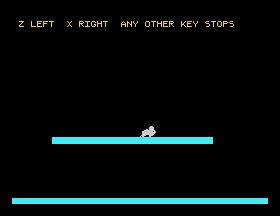
Look at the platform under the mouse. Walk back and forth over it as long as you like: not a pixel of it is disturbed. There is nothing to redraw, because the mouse was never part of the picture.
Save this. SAVE "MOUSE5".
14 and the 132 in line 120. Run it. What appears, and what does BASIC say about it?MY=0. Where does the mouse go?SPRITE 1,80,83,8,132 and so on up to sprite 4. How many can you see?22.1 Design a cat on a sixteen by sixteen grid, with pointed ears to tell it from the mouse, and put it on the platform beside the mouse.
22.2 Make the mouse move up and down as well, on two more keys, and stop it leaving the screen at the top and bottom.
22.3 Make a sprite cross the screen on its own, without the keyboard, using a loop, and remember from S13 to give yourself a way to stop it.
Worked solutions are in Appendix II.
| Symptom | Cause |
|---|---|
| Nothing appears, and no error | The colour and the shape are the wrong way round. It is SPRITE n,x,y,colour,shape. |
| Nothing appears, and the colour looks right | A colour of 16 or more is reduced to its bottom four bits, and 16 becomes 0: transparent. |
| The sprite is off the bottom of the screen | A sprite hangs below the y you give. y=0 is entirely off. |
| Only four sprites show | That is the limit for one scan line. Put them on different rows, and SPRITE OFF at the start. |
| A sprite is half the size you expect, or a quarter | MAG is wrong for the shape: MAG 1 doubles an 8x8, MAG 2 is a true 16x16 from four shapes. |
| A 16x16 sprite shows the wrong picture | Its shape number must be a multiple of 4. |
Qty Error | A sprite number outside 0 to 31, or a shape number outside 0 to 255. |
A sprite survived NEW | Sprites, shapes and MAG all survive NEW, RUN and CLS. RST clears them. |
SPRITE n,x,y,colour,shape puts a shape on the screen: colour before shape, and the wrong order is silent. SPRITE n,x,y moves it and keeps the rest. A sprite hangs below its y, is drawn in front of everything, disturbs nothing underneath, and obeys two limits: four to a scan line, and lower numbers in front. SPRITE OFF at the start of every program. MAG 2 with a shape number that is a multiple of 4 gives a sixteen by sixteen sprite from a sixteen-row drawing.
S23, The Playing Field: the game proper begins, with everything from S17 to S22 in one program.
This form is protected by reCAPTCHA, and the Google Privacy Policy and Terms of Service apply.
