module
21

The Einstein's character set has letters, digits and a set of picture characters, and none of them is a piece of cheese. This section makes one.
A shape is eight rows of eight pixels, and the machine holds 256 of them: the same 256 that its letters and digits come from. Change one and you have changed the character set.
Everything starts on squared paper, eight by eight. Here is a wedge of cheese, with a dot for an empty pixel and a hash for a lit one:
........
........
....#...
...###..
..#####.
.#######
########
........
A wedge, coming to a point. Each row is one pixel wider than the one above, which is what gives it a clean slope; steps of two would read as a staircase. It is not much at this size, and it does not need to be; at double size on a screen it reads perfectly well, and every character in every game of the period was drawn on a grid this size.
Draw yours before you type anything. That is how it was done, and it is much easier than trying to think in numbers.
BASIC wants each row as a number. A row of eight pixels is eight bits: the leftmost is worth 128, then 64, 32, 16, 8, 4, 2, 1. Add up the ones that are lit and you have the row's value.
You could do that by hand for all eight rows. Do not: let BASIC do it:
900 S$=""
910 FOR R=1 TO 8
920 READ P$
930 V=0:G=128
940 FOR B=1 TO 8
950 IF MID$(P$,B,1)<>"." THEN V=V+G
960 G=G/2
970 NEXT B
980 S$=S$+RIGHT$(HEX$(V),2)
990 NEXT R
1000 SHAPE N,S$
1010 RETURN
Line 920 reads one row of the picture. Lines 940 to 970 walk along it: G starts at 128 and halves each time, and any character that is not a dot adds G to the row's value. Line 980 turns that into two digits and adds them to the string.
That is the whole of it, and it is worth reading twice, because it is the only arithmetic in the course you could not have worked out from S7.
HEX$ gives a number in hexadecimal: base sixteen, which is how SHAPE wants its bytes. It always gives four digits, so RIGHT$(...,2) keeps the two we want.
Keep this subroutine. Every shape in the rest of the course goes through it, and it means you never write a hexadecimal number yourself.
20 N=130:GOSUB 900
sets N to the pattern number and calls the subroutine, which reads the next eight DATA rows and does the SHAPE.
Which number? There are 256, and most of them are letters and digits you do not want to lose. 130, 131 and 133 are blank when the machine starts and are the safe ones to use. This course uses 130 upwards.
Shapes survive NEW, RUN and CLS. Only RST puts the character set back, which is the way to undo a mess.
Print it, like any other character:
PRINT CHR$(130)
But it comes out narrow. In the 40-column screen a character is only six pixels wide, so a printed shape shows only its leftmost six columns. That is not a fault in your drawing: the two rightmost columns are simply off the end of the cell.
Or make it a sprite, which always shows all eight columns:
50 MAG 1
70 SPRITE 0,100,120,11,130
MAG 1 says "draw sprites from an eight by eight shape, at double size", so the cheese appears sixteen pixels across. S22 is all about sprites; this is just to see the shape properly.
10 BCOL 1:TCOL 15,1:CLS
20 N=130:GOSUB 900
30 PRINT @2,4;"AS A CHARACTER: ";CHR$(130)
40 PRINT @2,6;"A WHOLE ROW: ";CHR$(130);CHR$(130);CHR$(130);CHR$(130)
50 MAG 1
60 SPRITE OFF
70 SPRITE 0,100,120,11,130
80 PRINT @2,20;"AND AS A SPRITE, DOUBLE SIZE"
90 END
890 REM -- READ EIGHT ROWS AND MAKE SHAPE N --
900 S$=""
910 FOR R=1 TO 8
920 READ P$
930 V=0:G=128
940 FOR B=1 TO 8
950 IF MID$(P$,B,1)<>"." THEN V=V+G
960 G=G/2
970 NEXT B
980 S$=S$+RIGHT$(HEX$(V),2)
990 NEXT R
1000 SHAPE N,S$
1010 RETURN
1100 DATA "........"
1110 DATA "........"
1120 DATA "....#..."
1130 DATA "...###.."
1140 DATA "..#####."
1150 DATA ".#######"
1160 DATA "########"
1170 DATA "........"
Starting from
A fresh boot, or NEW.
What you should see
The cheese three times over: once printed, once four in a row, and once as a sprite in the middle of the screen at double size.
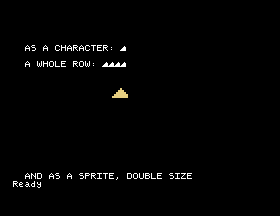
Look at the printed ones against the sprite. The sprite is the full eight columns wide; the printed characters are six, so they are slightly narrower and sit closer together than you drew them.
Save this. SAVE "MOUSE4"; the subroutine is used by every section from here on, and the cheese goes into the game in S26.
DATA, make the wedge taller, or cut a hole in it, and run it again. How long does it take to try an idea?N=65:GOSUB 900, then PRINT "ABC". What has happened to the letter A, and how do you get it back?RIGHT$( and ,2) out of line 980, leaving S$=S$+HEX$(V). What does the shape look like now, and can you say why from what HEX$ gives?21.1 Design a key, a coin or a gem, something else worth collecting, and show it as a sprite beside the cheese.
21.2 Design an arrow pointing right, then a second shape with it pointing left, and print them side by side.
21.3 Design two shapes, 130 and 131, that are the same creature with its legs in different positions. Print them one after the other with a delay between, and you have an animation.
Worked solutions are in Appendix II.
| Symptom | Cause |
|---|---|
Shape Defn Error | The string has an odd number of digits, or something that is not a hex digit. Check the subroutine reached exactly eight rows. |
Data Error | Fewer than eight DATA rows for the shape, or the DATA has been read already. RESTORE before reading a second shape. |
| The shape is mirrored or shifted | A row of DATA is not exactly eight characters long. |
| A letter or digit has turned into your shape | You used a pattern number that was already a character. 130, 131 and 133 are free. RST puts them all back. |
| The printed shape is missing its right-hand edge | A printed character is six pixels wide. Use a sprite to see all eight. |
| Nothing appears as a sprite | Check the argument order: it is SPRITE number,x,y,colour,shape, with the colour before the shape. S22. |
A shape is eight rows of eight pixels, and shapes are the same 256 patterns the machine's characters come from. Draw it on squared paper with dots and hashes, put the rows in DATA, and let the subroutine turn them into the string SHAPE wants. Use pattern 130 upwards. Printed, a shape shows only six columns; as a sprite it shows all eight, and MAG 1 doubles it.
S22, Sprites: putting a shape anywhere on the screen, over the top of everything else, moving it without disturbing what is underneath, and stepping up to a sixteen by sixteen grid for the mouse and the cats.
This form is protected by reCAPTCHA, and the Google Privacy Policy and Terms of Service apply.
